LangSmith 通过 OpenTelemetry 集成支持跟踪 Google Agent Development Kit(ADK)应用程序。本指南向您展示如何自动捕获 Google ADK 智能体的跟踪并将它们发送到 LangSmith 进行监控和分析。
使用您首选的包管理器安装所需的包:
pip install langsmith google-adk
需要 LangSmith Python SDK 版本 langsmith>=0.4.26 以获得最佳的 OpenTelemetry 支持。
1. 配置环境变量
设置您的 LangSmith API 密钥和项目名称:
export LANGSMITH_API_KEY=<your_langsmith_api_key>
export LANGSMITH_PROJECT=<your_project_name>
2. 配置 OpenTelemetry 集成
在您的 Google ADK 应用程序中,导入并配置 LangSmith OpenTelemetry 集成。这将自动为 OpenTelemetry 检测 Google ADK 跨度。
from langsmith.integrations.otel import configure

# Configure LangSmith tracing
configure(project_name="adk-example")  # Optional: can also use LANGSMITH_PROJECT and LANGSMITH_API_KEY environment variables
from langsmith.integrations.otel import configure
from openinference.instrumentation.google_adk import GoogleADKInstrumentor

# Configure LangSmith tracing
configure(project_name="adk-example")

# Instrument Google ADK directly
GoogleADKInstrumentor().instrument()
您不需要设置任何 OpenTelemetry 环境变量或手动配置导出器 —configure() 自动处理所有内容。
3. 创建并运行您的 ADK 智能体
配置完成后,您的 Google ADK 应用程序将自动将跟踪发送到 LangSmith:
此示例包括一个设置智能体、会话和运行器的最小应用,然后发送消息并流式传输事件。
import asyncio
from langsmith.integrations.otel import configure
from google.adk import Runner
from google.adk.agents import LlmAgent
from google.adk.sessions import InMemorySessionService
from google.genai import types

# Configure LangSmith tracing
configure(project_name="travel-assistant")

# Define your tools
def get_flight_info(destination: str, departure_date: str) -> dict:
    """Get flight information for a destination."""
    return {
        "destination": destination,
        "departure_date": departure_date,
        "price": "$450",
        "duration": "5h 30m",
        "airline": "Example Airways"
    }

def get_hotel_recommendations(city: str, check_in: str) -> dict:
    """Get hotel recommendations for a city."""
    return {
        "city": city,
        "check_in": check_in,
        "hotels": [
            {"name": "Grand Plaza Hotel", "rating": 4.5, "price": "$120/night"},
            {"name": "City Center Inn", "rating": 4.2, "price": "$95/night"}
        ]
    }

async def main():
    # Create your ADK agent
    agent = LlmAgent(
        name="travel_assistant",
        tools=[get_flight_info, get_hotel_recommendations],
        model="gemini-2.5-flash-lite",
        instruction="You are a helpful travel assistant that can help with flights and hotels.",
    )

    # Set up session service and runner
    session_service = InMemorySessionService()
    runner = Runner(
        app_name="travel_app",
        agent=agent,
        session_service=session_service
    )

    # Create a session
    user_id = "traveler_456"
    session_id = "session_789"
    await session_service.create_session(
        app_name="travel_app",
        user_id=user_id,
        session_id=session_id
    )

    # Send a message to the agent
    new_message = types.Content(
        parts=[types.Part(text="I need to book a flight to Paris for March 15th and find a good hotel.")],
        role="user",
    )

    # Run the agent and process events
    events = runner.run(
        user_id=user_id,
        session_id=session_id,
        new_message=new_message,
    )

    for event in events:
        print(event)

if __name__ == "__main__":
    asyncio.run(main())
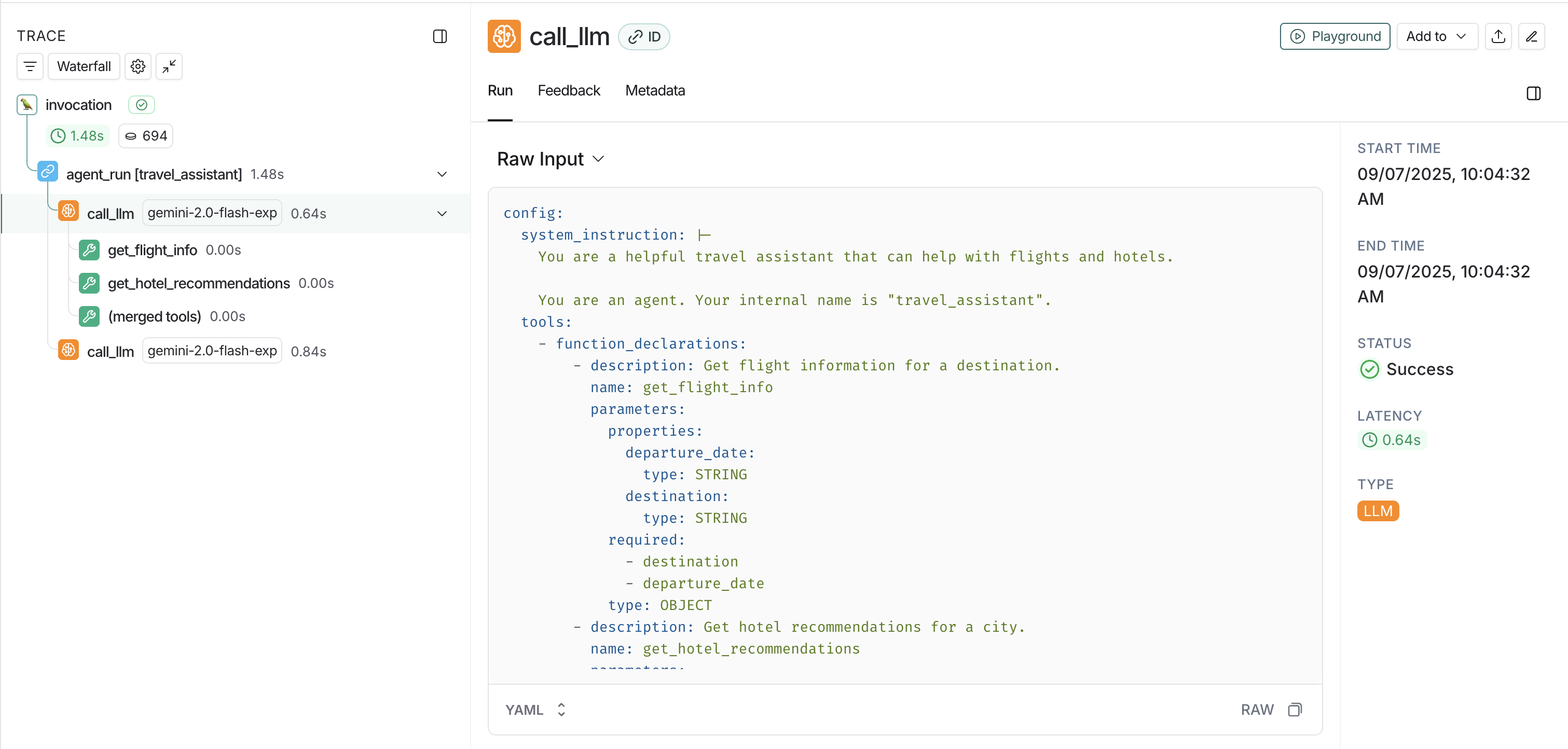
View traces in LangSmith
- Agent conversations: Complete conversation flows between users and your ADK agents.
- Tool calls: Individual function calls made by your agents.
- Model interactions: LLM requests and responses using Gemini models.
- Session information: User and session context for organizing related traces.
- Model interactions: LLM requests and responses using Gemini models
Advanced usage
You can add custom metadata to your traces by setting span attributes in your ADK application:
from opentelemetry import trace

# Get the current tracer
tracer = trace.get_tracer(__name__)

async def main():
    with tracer.start_as_current_span("travel_booking_session") as span:
        # Add custom metadata
        span.set_attribute("langsmith.metadata.user_type", "premium")
        span.set_attribute("langsmith.metadata.booking_source", "mobile_app")
        span.set_attribute("langsmith.span.tags", "travel,booking,premium")

        agent = LlmAgent(
            name="travel_assistant",
            tools=[get_flight_info, get_hotel_recommendations],
            model="gemini-2.5-flash-lite",
            instruction="You are a helpful travel assistant that can help with flights and hotels.",
        )

        session_service = InMemorySessionService()
        runner = Runner(
            app_name="travel_app",
            agent=agent,
            session_service=session_service
        )

        # Continue with your ADK workflow
        # ...

