可观测性是使用大型语言模型(LLM)构建的应用程序的关键要求。LLM 是非确定性的,这意味着相同的提示可以产生不同的响应。这种行为使调试和监控比传统软件更具挑战性。 LangSmith 通过提供应用程序处理请求方式的端到端可见性来解决这个问题。每个请求都会生成一个跟踪,它捕获发生的完整记录。跟踪中包含单独的运行,即应用程序执行的特定操作,例如 LLM 调用或检索步骤。跟踪运行使您能够检查、调试和验证应用程序的行为。 在本快速入门中,您将设置一个最小的检索增强生成(RAG)应用程序,并使用 LangSmith 添加跟踪。您将:
  1. 配置您的环境。
  2. 创建一个检索上下文并调用 LLM 的应用程序。
  3. 启用跟踪以捕获检索步骤和 LLM 调用。
  4. 在 LangSmith UI 中查看生成的跟踪。
如果您更喜欢观看有关跟踪入门的视频,请参阅快速入门视频指南

先决条件

在开始之前,请确保您具备: 本快速入门中的示例应用将使用 OpenAI 作为 LLM 提供商。您可以为您的应用的 LLM 提供商调整示例。
如果您使用 LangChainLangGraph 构建应用程序,您可以使用单个环境变量启用 LangSmith 跟踪。通过阅读使用 LangChain 跟踪或使用 LangGraph 跟踪的指南开始。

1. 创建目录并安装依赖项

在终端中,为您的项目创建目录并在环境中安装依赖项:
mkdir ls-observability-quickstart && cd ls-observability-quickstart
python -m venv .venv && source .venv/bin/activate
python -m pip install --upgrade pip
pip install -U langsmith openai

2. 设置环境变量

设置以下环境变量:
  • LANGSMITH_TRACING
  • LANGSMITH_API_KEY
  • OPENAI_API_KEY(或您的 LLM 提供商的 API 密钥)
  • (可选)LANGSMITH_WORKSPACE_ID:如果您的 LangSmith API 密钥链接到多个工作区,请设置此变量以指定要使用的工作区。
export LANGSMITH_TRACING=true
export LANGSMITH_API_KEY="<your-langsmith-api-key>"
export OPENAI_API_KEY="<your-openai-api-key>"
export LANGSMITH_WORKSPACE_ID="<your-workspace-id>"
如果您使用 Anthropic,请使用 Anthropic 包装器来跟踪您的调用。对于其他提供商,请使用可跟踪包装器

3. 定义您的应用程序

您可以使用此步骤中概述的示例应用代码来检测 RAG 应用程序。或者,您可以使用包含 LLM 调用的自己的应用程序代码。 这是一个最小的 RAG 应用,直接使用 OpenAI SDK,尚未添加任何 LangSmith 跟踪。它有三个主要部分:
  • 检索器函数:模拟文档检索,始终返回相同的字符串。
  • OpenAI 客户端:实例化一个普通的 OpenAI 客户端以发送聊天完成请求。
  • RAG 函数:将检索到的文档与用户的问题结合起来形成系统提示,使用 gpt-4o-mini 调用 chat.completions.create() 端点,并返回助手的响应。
将以下代码添加到您的应用文件(例如,app.pyapp.ts):
from openai import OpenAI

def retriever(query: str):
    # Minimal example retriever
    return ["Harrison worked at Kensho"]

# OpenAI client call (no wrapping yet)
client = OpenAI()

def rag(question: str) -> str:
    docs = retriever(question)
    system_message = (
        "Answer the user's question using only the provided information below:\n"
        + "\n".join(docs)
    )

    # This call is not traced yet
    resp = client.chat.completions.create(
        model="gpt-4o-mini",
        messages=[
            {"role": "system", "content": system_message},
            {"role": "user", "content": question},
        ],
    )
    return resp.choices[0].message.content

if __name__ == "__main__":
    print(rag("Where did Harrison work?"))

4. Trace LLM calls

To start, you’ll trace all your OpenAI calls. LangSmith provides wrappers: This snippet wraps the OpenAI client so that every subsequent model call is logged automatically as a traced child run in LangSmith.
  1. Include the highlighted lines in your app file:
    from openai import OpenAI
    from langsmith.wrappers import wrap_openai  # traces openai calls
    
    def retriever(query: str):
        return ["Harrison worked at Kensho"]
    
    client = wrap_openai(OpenAI())  # log traces by wrapping the model calls
    
    def rag(question: str) -> str:
        docs = retriever(question)
        system_message = (
            "Answer the user's question using only the provided information below:\n"
            + "\n".join(docs)
        )
        resp = client.chat.completions.create(
            model="gpt-4o-mini",
            messages=[
                {"role": "system", "content": system_message},
                {"role": "user", "content": question},
            ],
        )
        return resp.choices[0].message.content
    
    if __name__ == "__main__":
        print(rag("Where did Harrison work?"))
    
  2. Call your application:
    python app.py
    
    You’ll receive the following output:
    Harrison worked at Kensho.
    
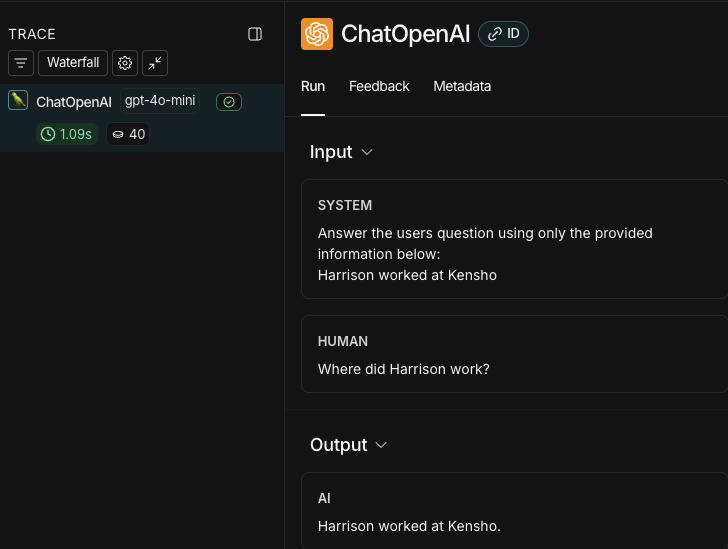
  3. In the LangSmith UI, navigate to the default Tracing Project for your workspace (or the workspace you specified in Step 2). You’ll see the OpenAI call you just instrumented.
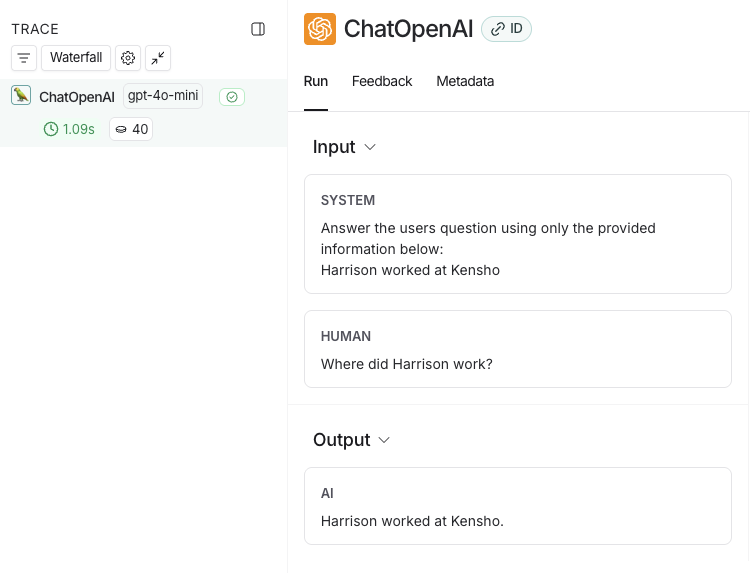
LangSmith UI showing an LLM call trace called ChatOpenAI with a system and human input followed by an AI Output.

5. Trace an entire application

You can also use the traceable decorator for Python or TypeScript to trace your entire application instead of just the LLM calls.
  1. Include the highlighted code in your app file:
    from openai import OpenAI
    from langsmith.wrappers import wrap_openai
    from langsmith import traceable
    
    def retriever(query: str):
        return ["Harrison worked at Kensho"]
    
    client = wrap_openai(OpenAI())  # keep this to capture the prompt and response from the LLM
    
    @traceable
    def rag(question: str) -> str:
        docs = retriever(question)
        system_message = (
            "Answer the user's question using only the provided information below:\n"
            + "\n".join(docs)
        )
        resp = client.chat.completions.create(
            model="gpt-4o-mini",
            messages=[
                {"role": "system", "content": system_message},
                {"role": "user", "content": question},
            ],
        )
        return resp.choices[0].message.content
    
    if __name__ == "__main__":
        print(rag("Where did Harrison work?"))
    
  2. Call the application again to create a run:
    python app.py
    
  3. Return to the LangSmith UI, navigate to the default Tracing Project for your workspace (or the workspace you specified in Step 2). You’ll find a trace of the entire app pipeline with the rag step and the ChatOpenAI LLM call.
LangSmith UI showing a trace of the entire application called rag with an input followed by an output.

Next steps

Here are some topics you might want to explore next:

Video guide


Connect these docs programmatically to Claude, VSCode, and more via MCP for real-time answers.