- 进行重点调查:快速缩小到特定运行以进行临时分析
- 调试和分析:识别和检查错误、失败的运行和性能瓶颈
创建和应用过滤器
按运行属性过滤
有两种方法可以在跟踪项目中过滤运行:- 过滤器:位于跟踪项目页面的左上角。这是您构建和管理详细过滤条件的地方。

- 过滤器快捷方式:位于跟踪项目页面的右侧边栏。过滤器快捷方式栏提供基于项目中运行的最常出现属性的快速访问过滤器。
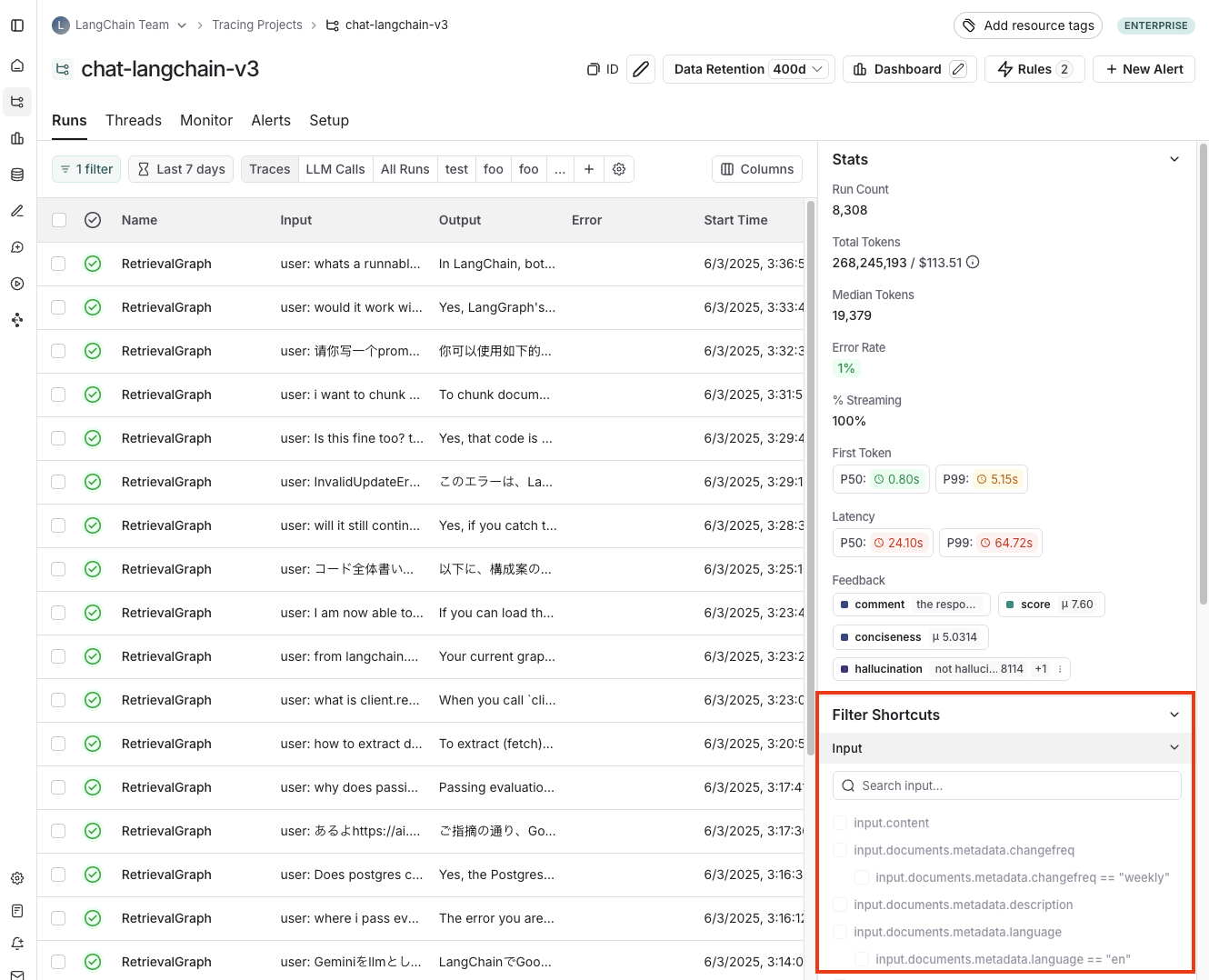
默认过滤器默认情况下,应用
IsTrace 为 true 过滤器。这仅显示顶级跟踪。移除此过滤器将显示项目中的所有运行,包括中间跨度。按时间范围过滤
除了按运行属性过滤外,您还可以在特定时间范围内过滤运行。此选项在跟踪项目页面的左上角可用。
过滤器运算符
可用的过滤器运算符取决于您正在过滤的属性数据类型。以下是常见运算符的概述:- is:与过滤器值完全匹配
- is not:与过滤器值不匹配
- contains:与过滤器值部分匹配
- does not contain:与过滤器值不部分匹配
- is one of:与列表中的任何值匹配
>/<:可用于数字字段
特定过滤技术
过滤中间运行(跨度)
为了过滤中间运行(跨度),您首先需要移除默认的IsTrace 为 true 过滤器。例如,如果您想按子运行的 run name 过滤或按 run type 过滤,您会这样做。
运行元数据和标签也是强大的过滤依据。这些依赖于在管道的所有部分进行良好的标记。要了解更多信息,您可以查看本指南。
基于输入和输出过滤
您可以根据运行的输入和输出中的内容过滤运行。 要过滤输入或输出,您可以使用Full-Text Search 过滤器,该过滤器将匹配任一字段中的关键字。对于更有针对性的搜索,您可以使用 Input 或 Output 过滤器,它们将仅基于相应字段匹配内容。
为了性能,我们为全文搜索索引最多 250 个字符的数据。如果您的搜索查询超过此限制,我们建议使用输入/输出键值搜索代替。
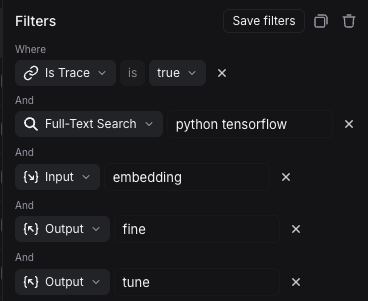 根据上面的过滤器,系统将在输入或输出中搜索
 python 和 tensorflow,在输入中搜索 embedding,在输出中搜索 fine 和 tune。
Filter based on input / output key-value pairs
In addition to full-text search, you can filter runs based on specific key-value pairs in the inputs and outputs. This allows for more precise filtering, especially when dealing with structured data.We index up to 100 unique keys to keep your data organized and searchable. Each key also has a character limit of 250 characters per value. If your data exceeds either of these limits, the text won’t be indexed. This helps us ensure fast, reliable performance.
Input Key or Output Key filter from the filters dropdown.
For example, to match the following input:
Filters, Add Filter to bring up the filtering options. Then select Input Key, enter input as the key and enter What is the capital of France? as the value.
 You can also match nested keys by using dot notation to select the nested key name. For example, to match nested keys in the output:
Output Key, enter documents.page_content as the key and enter The capital of France is Paris as the value. This will match the nested key documents.page_content with the specified value.
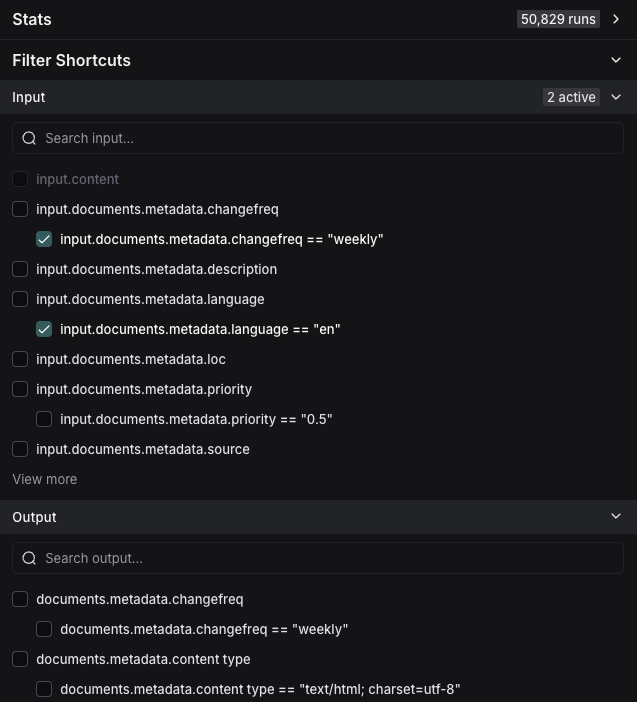
 You can add multiple key-value filters to create more complex queries. You can also use the
 Filter Shortcuts on the right side to quickly filter based on common key-value pairs as shown below:
Example: Filtering for tool calls
It’s common to want to search for traces that contain specific tool calls. Tool calls are typically indicated in the output of an LLM run. To filter for tool calls, you would use theOutput Key filter.
While this example will show you how to filter for tool calls, the same logic can be applied to filter for any key-value pair in the output.
In this case, let’s assume this is the output you want to filter for:
| Key | Value |
|---|---|
generations.type | ChatGeneration |
generations.message.type | constructor |
generations.message.kwargs.type | ai |
generations.message.kwargs.id | run-ca7f7531-f4de-4790-9c3e-960be7f8b109 |
generations.message.kwargs.tool_calls.name | Plan |
generations.message.kwargs.tool_calls.args.steps | Research LangGraph's node configuration capabilities |
generations.message.kwargs.tool_calls.args.steps | Investigate how to add a Python code execution node |
generations.message.kwargs.tool_calls.args.steps | Find an example or create a sample implementation of a code execution node |
generations.message.kwargs.tool_calls.id | toolu_01XexPzAVknT3gRmUB5PK5BP |
generations.message.kwargs.tool_calls.type | tool_call |
type | LLMResult |
generations.message.kwargs.tool_calls.name = Plan
This will match root and non-root runs where the tool_calls name is Plan.

Negative filtering on key-value pairs
Different types of negative filtering can be applied toMetadata, Input Key, and Output Key fields to exclude specific runs from your results.
For example, to find all runs where the metadata key phone is not equal to 1234567890, set the Metadata Key operator to is and Key field to phone, then set the Value operator to is not and the Value field to 1234567890. This will match all runs that have a metadata key phone with any value except 1234567890.
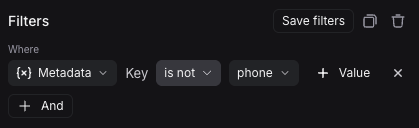
 要查找缺少特定元数据键的运行,将
 Key 运算符设置为 is not。例如,将键设置为 phone 并选择 is not,即可匹配所有元数据中不包含 phone 字段的运行。
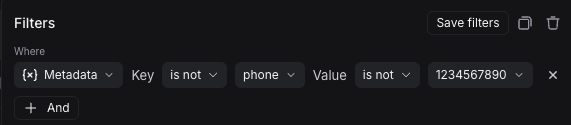
 您也可以筛选同时缺少特定键和值的运行。例如,如果希望找到元数据中既没有键
 phone,也没有值 1234567890 的运行,可以将 Key 运算符设置为 is not、键为 phone,并将 Value 运算符设置为 is not、值为 1234567890。
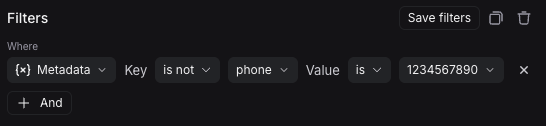
 最后,您还可以筛选没有特定键但存在特定值的运行。例如,如果想查找元数据中没有
 phone 键,但在其他键下存在值 1234567890 的运行,可以将 Key 运算符设置为 is not(键为 phone),同时将 Value 运算符设置为 is(值为 1234567890)。
 请注意,可以使用
 does not contain 运算符替代 is not 进行子串匹配。
Save a filter
保存筛选器可以存储并复用常用的筛选配置。保存的筛选器与特定跟踪项目相关。Save a filter
在筛选器栏中构建好条件后,点击 Save filter 按钮,会弹出对话框以指定筛选器的名称和描述。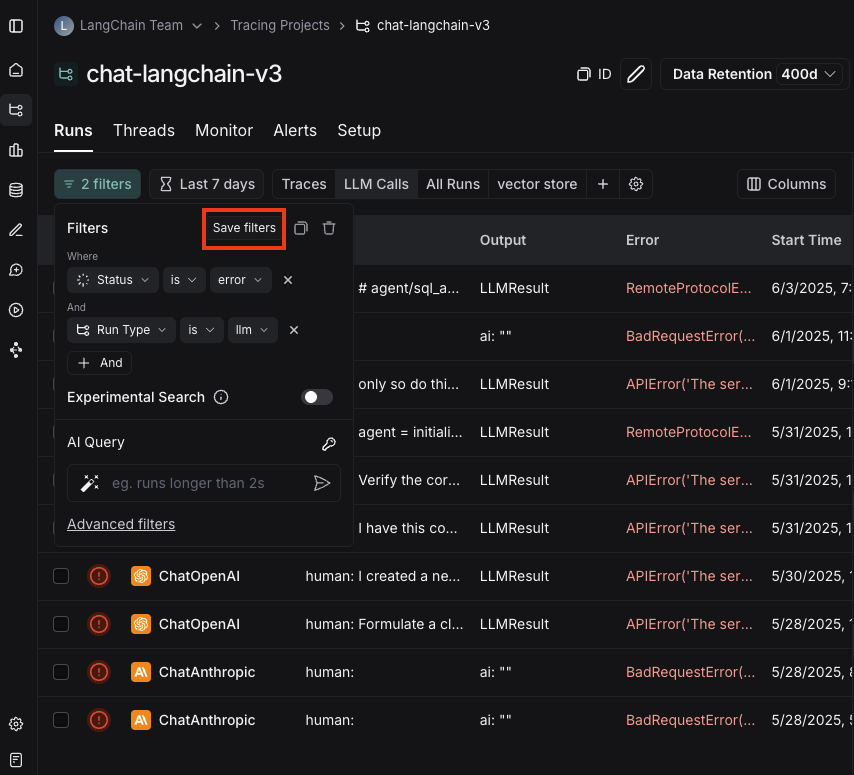
Use a saved filter
保存后,该筛选器会显示在筛选栏中,方便快速使用。如果保存的筛选器超过三个,界面上只会直接显示两个,其余可通过“更多”菜单查看。可以通过筛选栏中的设置图标隐藏默认保存的筛选器。
Update a saved filter
选中某个筛选器后,可调整相关参数,然后点击 Update filter > Update 进行更新。 在相同菜单中,您也可以点击 Update filter > Create new 创建新的保存筛选器。Delete a saved filter
点击保存筛选器栏中的设置图标,再使用垃圾桶图标删除筛选器。Copy a filter
可以复制已构建的筛选器,以便与同事分享、后续复用,或在 API 或 SDK 中程序化查询运行。 若要复制筛选器,可先在 UI 中构建好条件,然后点击右上角的复制按钮。如果构建了树形或跟踪筛选器,也可以一并复制。 系统会生成一段 LangSmith 查询语言表示的筛选字符串,例如:and(eq(is_root, true), and(eq(feedback_key, "user_score"), eq(feedback_score, 1)))。有关查询语言语法的更多信息,请参阅此参考文档。

Filtering runs within the trace view
您也可以在跟踪视图中直接应用筛选器,这对于筛选包含大量运行的跟踪非常有用。主运行表视图中提供的所有筛选条件在此同样适用。 默认情况下,仅显示符合条件的运行。若希望在更完整的跟踪树上下文中查看这些运行,可将视图选项从“Filtered Only”切换为“Show All”或“Most relevant”。
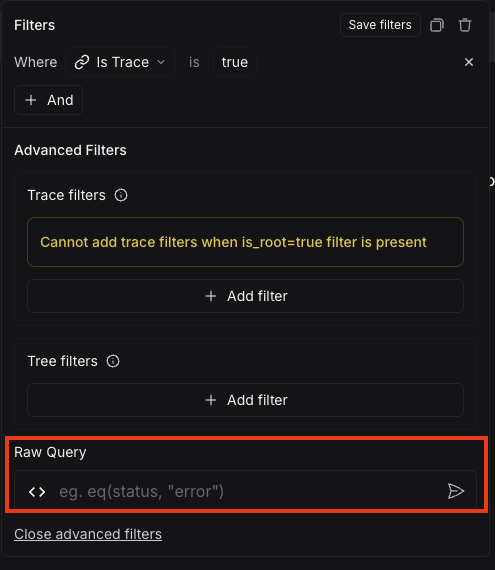
Manually specify a raw query in LangSmith query language
如果您已复制先前构建的筛选器,可能希望在之后的会话中手动应用该原始查询。 为此,可点击筛选弹窗底部的 Advanced filters,然后将原始查询粘贴到文本框中。 请注意,这会将查询追加到现有条件中,而不会覆盖它们。