在深入了解此内容之前,阅读以下指南会有所帮助:
以下功能在以下 SDK 版本中可用:
  • Python SDK: >=0.1.141
  • JS/TS SDK: >=0.2.5
LangSmith 支持随跟踪上传二进制文件(如图像、音频、视频、PDF 和 CSV)。这在使用多模态输入或输出的 LLM 管道时特别有用。 在 Python 和 TypeScript SDK 中,都可以通过指定每个文件的 MIME 类型和二进制内容来将附件添加到跟踪。本指南解释如何在 Python 中使用 Attachment 类型定义和跟踪附件,在 TypeScript 中使用 Uint8Array / ArrayBuffer

Python

在 Python SDK 中,您可以使用 Attachment 类型将文件附加到跟踪中。每个 Attachment 需要:
  • mime_type (str):文件的 MIME 类型(例如 "image/png")。
  • data (bytes | Path):文件的二进制内容,或文件路径。
为方便起见,您也可以使用形如 (mime_type, data) 的元组定义附件。 只需用 @traceable 装饰函数,并将 Attachment 实例作为参数传入即可。请注意,如果要使用文件路径而不是原始字节,需要在装饰器中将 dangerously_allow_filesystem 设为 True
Python
from langsmith import traceable
from langsmith.schemas import Attachment
from pathlib import Path
import os

# 如果希望使用文件路径,必须将 dangerously_allow_filesystem 设为 True
@traceable(dangerously_allow_filesystem=True)
def trace_with_attachments(
    val: int,
    text: str,
    image: Attachment,
    audio: Attachment,
    video: Attachment,
    pdf: Attachment,
    csv: Attachment,
):
    return f"Processed: {val}, {text}, {len(image.data)}, {len(audio.data)}, {len(video.data)}, {len(pdf.data), {len(csv.data)}}"

# 将文件读取为字节的辅助函数
def load_file(file_path: str) -> bytes:
    with open(file_path, "rb") as f:
        return f.read()

# 加载文件并创建附件
image_data = load_file("my_image.png")
audio_data = load_file("my_mp3.mp3")
video_data = load_file("my_video.mp4")
pdf_data = load_file("my_document.pdf")

image_attachment = Attachment(mime_type="image/png", data=image_data)
audio_attachment = Attachment(mime_type="audio/mpeg", data=audio_data)
video_attachment = Attachment(mime_type="video/mp4", data=video_data)
pdf_attachment = ("application/pdf", pdf_data) # Can just define as tuple of (mime_type, data)
csv_attachment = Attachment(mime_type="text/csv", data=Path(os.getcwd()) / "my_csv.csv")

# Define other parameters
val = 42
text = "Hello, world!"

# Call the function with traced attachments
result = trace_with_attachments(
    val=val,
    text=text,
    image=image_attachment,
    audio=audio_attachment,
    video=video_attachment,
    pdf=pdf_attachment,
    csv=csv_attachment,
)

TypeScript

在 TypeScript SDK 中,可以使用 Uint8ArrayArrayBuffer 作为数据类型将附件添加到跟踪中。每个附件的 MIME 类型在 extractAttachments 中指定:
  • Uint8Array:便于直接处理二进制数据。
  • ArrayBuffer:表示固定长度的二进制数据,可按需转换为 Uint8Array
使用 traceable 包装您的函数,并通过 extractAttachments 选项提供附件。 在 TypeScript SDK 中,extractAttachments 函数是 traceable 配置项中的可选参数。当调用通过 traceable 包装的函数时,它会从输入中提取二进制数据(如图像、音频文件),并与其他跟踪数据一起记录,同时指定它们的 MIME 类型。 请注意,TypeScript SDK 中不能直接传入文件路径,因为并非所有运行时环境都支持访问本地文件。
TypeScript
type AttachmentData = Uint8Array | ArrayBuffer;
type Attachments = Record<string, [string, AttachmentData]>;

extractAttachments?: (
    ...args: Parameters<Func>
) => [Attachments | undefined, KVMap];
TypeScript
import { traceable } from "langsmith/traceable";

const traceableWithAttachments = traceable(
    (
        val: number,
        text: string,
        attachment: Uint8Array,
        attachment2: ArrayBuffer,
        attachment3: Uint8Array,
        attachment4: ArrayBuffer,
        attachment5: Uint8Array,
    ) =>
        `Processed: ${val}, ${text}, ${attachment.length}, ${attachment2.byteLength}, ${attachment3.length}, ${attachment4.byteLength}, ${attachment5.byteLength}`,
    {
        name: "traceWithAttachments",
        extractAttachments: (
            val: number,
            text: string,
            attachment: Uint8Array,
            attachment2: ArrayBuffer,
            attachment3: Uint8Array,
            attachment4: ArrayBuffer,
            attachment5: Uint8Array,
        ) => [
            {
                "image inputs": ["image/png", attachment],
                "mp3 inputs": ["audio/mpeg", new Uint8Array(attachment2)],
                "video inputs": ["video/mp4", attachment3],
                "pdf inputs": ["application/pdf", new Uint8Array(attachment4)],
                "csv inputs": ["text/csv", new Uint8Array(attachment5)],
            },
            { val, text },
        ],
    }
);

const fs = Deno // or Node.js fs module
const image = await fs.readFile("my_image.png"); // Uint8Array
const mp3Buffer = await fs.readFile("my_mp3.mp3");
const mp3ArrayBuffer = mp3Buffer.buffer; // Convert to ArrayBuffer
const video = await fs.readFile("my_video.mp4"); // Uint8Array
const pdfBuffer = await fs.readFile("my_document.pdf");
const pdfArrayBuffer = pdfBuffer.buffer; // Convert to ArrayBuffer
const csv = await fs.readFile("test-vals.csv"); // Uint8Array

// Define example parameters
const val = 42;
const text = "Hello, world!";

// Call traceableWithAttachments with the files
const result = await traceableWithAttachments(
    val, text, image, mp3ArrayBuffer, video, pdfArrayBuffer, csv
);
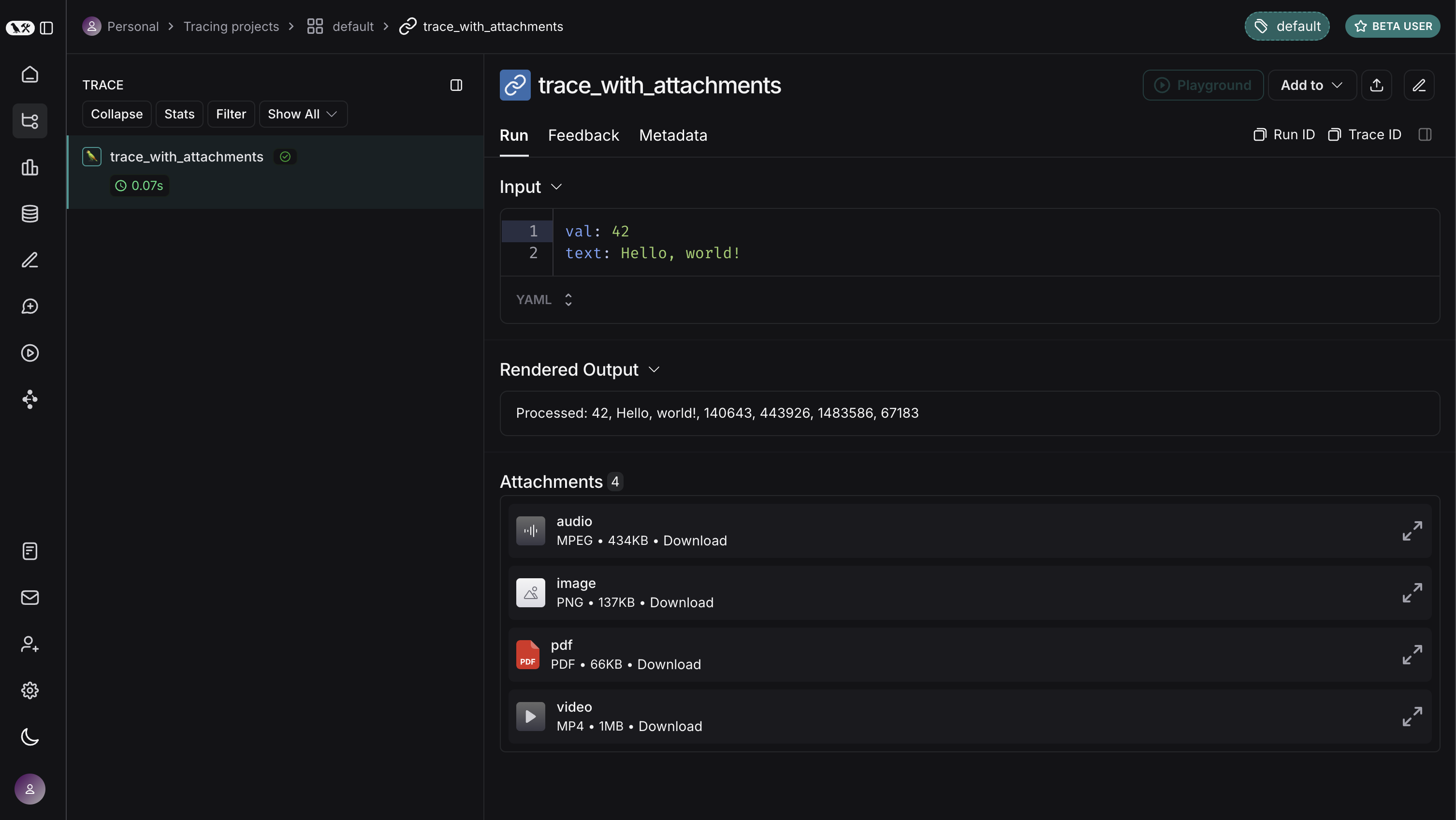
Here is how the above would look in the LangSmith UI. You can expand each attachment to view its contents.
Connect these docs programmatically to Claude, VSCode, and more via MCP for real-time answers.