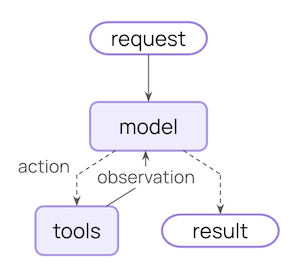
中间件提供了一种更紧密控制智能体内部发生的事情的方法。 核心智能体循环涉及调用模型,让它选择要执行的工具,然后在不再调用工具时完成:
Core agent loop diagram
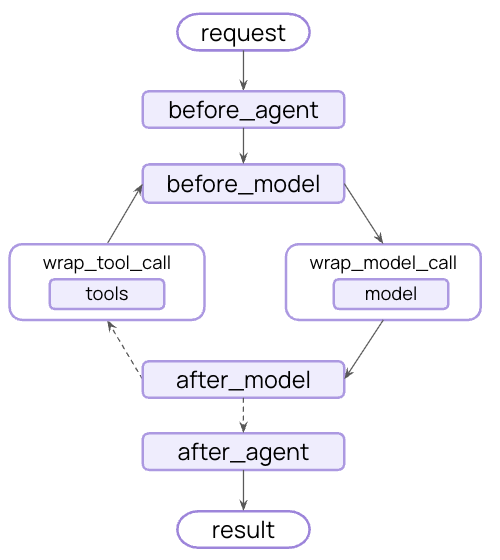
中间件在这些步骤的前后公开钩子:
中间件流程图

中间件可以做什么?

监控

通过日志记录、分析和调试跟踪智能体行为

修改

转换提示、工具选择和输出格式

控制

添加重试、回退和提前终止逻辑

强制执行

应用速率限制、护栏和 PII 检测
通过将中间件传递给 create_agent 来添加中间件:
from langchain.agents import create_agent
from langchain.agents.middleware import SummarizationMiddleware, HumanInTheLoopMiddleware


agent = create_agent(
    model="gpt-4o",
    tools=[...],
    middleware=[SummarizationMiddleware(), HumanInTheLoopMiddleware()],
)

内置中间件

LangChain 为常见用例提供预构建的中间件:

摘要

在接近令牌限制时自动总结对话历史。
完美适用于:
  • 超出上下文窗口的长时间运行的对话
  • 具有广泛历史记录的多轮对话
  • 保留完整对话上下文很重要的应用程序
from langchain.agents import create_agent
from langchain.agents.middleware import SummarizationMiddleware


agent = create_agent(
    model="gpt-4o",
    tools=[weather_tool, calculator_tool],
    middleware=[
        SummarizationMiddleware(
            model="gpt-4o-mini",
            max_tokens_before_summary=4000,  # Trigger summarization at 4000 tokens
            messages_to_keep=20,  # Keep last 20 messages after summary
            summary_prompt="Custom prompt for summarization...",  # Optional
        ),
    ],
)
model
string
required
Model for generating summaries
max_tokens_before_summary
number
Token threshold for triggering summarization
messages_to_keep
number
default:"20"
Recent messages to preserve
token_counter
function
Custom token counting function. Defaults to character-based counting.
summary_prompt
string
Custom prompt template. Uses built-in template if not specified.
summary_prefix
string
default:"## Previous conversation summary:"
Prefix for summary messages

人在回路

在执行之前暂停智能体执行,以便人工批准、编辑或拒绝工具调用。
完美适用于:
  • 需要人工批准的高风险操作(数据库写入、金融交易)
  • 必须有人工监督的合规工作流程
  • 使用人工反馈来指导智能体的长时间运行对话
from langchain.agents import create_agent
from langchain.agents.middleware import HumanInTheLoopMiddleware
from langgraph.checkpoint.memory import InMemorySaver


agent = create_agent(
    model="gpt-4o",
    tools=[read_email_tool, send_email_tool],
    checkpointer=InMemorySaver(),
    middleware=[
        HumanInTheLoopMiddleware(
            interrupt_on={
                # Require approval, editing, or rejection for sending emails
                "send_email_tool": {
                    "allowed_decisions": ["approve", "edit", "reject"],
                },
                # Auto-approve reading emails
                "read_email_tool": False,
            }
        ),
    ],
)
interrupt_on
dict
required
Mapping of tool names to approval configs. Values can be True (interrupt with default config), False (auto-approve), or an InterruptOnConfig object.
description_prefix
string
default:"Tool execution requires approval"
Prefix for action request descriptions
InterruptOnConfig options:
allowed_decisions
list[string]
List of allowed decisions: "approve", "edit", or "reject"
description
string | callable
Static string or callable function for custom description
重要: 人在回路中间件需要检查点器来在中断之间维护状态。有关完整示例和集成模式,请参阅人在回路文档

Anthropic 提示缓存

通过缓存 Anthropic 模型的重复提示前缀来降低成本。
完美适用于:
  • 具有长且重复的系统提示的应用程序
  • 在调用之间重用相同上下文的智能体
  • 减少高流量部署的 API 成本
了解有关 Anthropic 提示缓存策略和限制的更多信息。
from langchain_anthropic import ChatAnthropic
from langchain_anthropic.middleware import AnthropicPromptCachingMiddleware
from langchain.agents import create_agent


LONG_PROMPT = """
Please be a helpful assistant.

<Lots more context ...>
"""

agent = create_agent(
    model=ChatAnthropic(model="claude-sonnet-4-5-20250929"),
    system_prompt=LONG_PROMPT,
    middleware=[AnthropicPromptCachingMiddleware(ttl="5m")],
)

# cache store
agent.invoke({"messages": [HumanMessage("Hi, my name is Bob")]})

# cache hit, system prompt is cached
agent.invoke({"messages": [HumanMessage("What's my name?")]})
type
string
default:"ephemeral"
Cache type. Only "ephemeral" is currently supported.
ttl
string
default:"5m"
Time to live for cached content. Valid values: "5m" or "1h"
min_messages_to_cache
number
default:"0"
Minimum number of messages before caching starts
unsupported_model_behavior
string
default:"warn"
Behavior when using non-Anthropic models. Options: "ignore", "warn", or "raise"

模型调用限制

限制模型调用次数以防止无限循环或过度成本。
完美适用于:
  • 防止失控的智能体进行过多的 API 调用
  • 在生产部署上强制执行成本控制
  • 在特定调用预算内测试智能体行为
from langchain.agents import create_agent
from langchain.agents.middleware import ModelCallLimitMiddleware


agent = create_agent(
    model="gpt-4o",
    tools=[...],
    middleware=[
        ModelCallLimitMiddleware(
            thread_limit=10,  # Max 10 calls per thread (across runs)
            run_limit=5,  # Max 5 calls per run (single invocation)
            exit_behavior="end",  # Or "error" to raise exception
        ),
    ],
)
thread_limit
number
Maximum model calls across all runs in a thread. Defaults to no limit.
run_limit
number
Maximum model calls per single invocation. Defaults to no limit.
exit_behavior
string
default:"end"
Behavior when limit is reached. Options: "end" (graceful termination) or "error" (raise exception)

工具调用限制

通过限制工具调用次数来控制智能体执行,可以全局限制所有工具或针对特定工具。
完美适用于:
  • 防止对昂贵的外部 API 进行过多调用
  • 限制网络搜索或数据库查询
  • 对特定工具使用强制执行速率限制
  • 防止失控的智能体循环
要全局限制所有工具或针对特定工具限制工具调用,请设置 tool_name。对于每个限制,指定以下一项或两项:
  • 线程限制 (thread_limit) - 对话中所有运行的最大调用次数。在调用之间持续存在。需要检查点器。
  • 运行限制 (run_limit) - 每次调用的最大调用次数。每轮重置。
Exit behaviors:
BehaviorEffectBest For
"continue" (default)Blocks exceeded calls with error messages, agent continuesMost use cases - agent handles limits gracefully
"error"Raises exception immediatelyComplex workflows where you want to handle the limit error manually
"end"Stops with ToolMessage + AI messageSingle-tool scenarios (errors if other tools pending)
from langchain.agents import create_agent
from langchain.agents.middleware import ToolCallLimitMiddleware

# Global limit: max 20 calls per thread, 10 per run
global_limiter = ToolCallLimitMiddleware(
    thread_limit=20,
    run_limit=10,
)

# Tool-specific limit with default "continue" behavior
search_limiter = ToolCallLimitMiddleware(
    tool_name="search",
    thread_limit=5,
    run_limit=3,
)

# Thread limit only (no per-run limit)
database_limiter = ToolCallLimitMiddleware(
    tool_name="query_database",
    thread_limit=10,
)

# Strict enforcement with "error" behavior
web_scraper_limiter = ToolCallLimitMiddleware(
    tool_name="scrape_webpage",
    run_limit=2,
    exit_behavior="error",
)

# Immediate termination with "end" behavior
critical_tool_limiter = ToolCallLimitMiddleware(
    tool_name="delete_records",
    run_limit=1,
    exit_behavior="end",
)

# Use multiple limiters together
agent = create_agent(
    model="gpt-4o",
    tools=[search_tool, database_tool, scraper_tool],
    middleware=[
        global_limiter,
        search_limiter,
        database_limiter,
        web_scraper_limiter
    ],
)
tool_name
string
Name of specific tool to limit. If not provided, limits apply to all tools globally.
thread_limit
number
Maximum tool calls across all runs in a thread (conversation). Persists across multiple invocations with the same thread ID. Requires a checkpointer to maintain state. None means no thread limit.
run_limit
number
Maximum tool calls per single invocation (one user message → response cycle). Resets with each new user message. None means no run limit.Note: At least one of thread_limit or run_limit must be specified.
exit_behavior
string
default:"continue"
Behavior when limit is reached:
  • "continue" (default) - Block exceeded tool calls with error messages, let other tools and the model continue. The model decides when to end based on the error messages.
  • "error" - Raise a ToolCallLimitExceededError exception, stopping execution immediately
  • "end" - Stop execution immediately with a ToolMessage and AI message for the exceeded tool call. Only works when limiting a single tool; raises NotImplementedError if other tools have pending calls.

模型回退

当主模型失败时自动回退到替代模型。
完美适用于:
  • 构建能够处理模型中断的弹性智能体
  • 通过回退到更便宜的模型来优化成本
  • 跨 OpenAI、Anthropic 等的提供商冗余
from langchain.agents import create_agent
from langchain.agents.middleware import ModelFallbackMiddleware


agent = create_agent(
    model="gpt-4o",  # Primary model
    tools=[...],
    middleware=[
        ModelFallbackMiddleware(
            "gpt-4o-mini",  # Try first on error
            "claude-3-5-sonnet-20241022",  # Then this
        ),
    ],
)
first_model
string | BaseChatModel
required
First fallback model to try when the primary model fails. Can be a model string (e.g., "openai:gpt-4o-mini") or a BaseChatModel instance.
*additional_models
string | BaseChatModel
Additional fallback models to try in order if previous models fail

PII 检测

检测和处理对话中的个人身份信息。
完美适用于:
  • 具有合规要求的医疗保健和金融应用程序
  • 需要清理日志的客户服务智能体
  • 处理敏感用户数据的任何应用程序
from langchain.agents import create_agent
from langchain.agents.middleware import PIIMiddleware


agent = create_agent(
    model="gpt-4o",
    tools=[...],
    middleware=[
        # Redact emails in user input
        PIIMiddleware("email", strategy="redact", apply_to_input=True),
        # Mask credit cards (show last 4 digits)
        PIIMiddleware("credit_card", strategy="mask", apply_to_input=True),
        # Custom PII type with regex
        PIIMiddleware(
            "api_key",
            detector=r"sk-[a-zA-Z0-9]{32}",
            strategy="block",  # Raise error if detected
        ),
    ],
)
pii_type
string
required
Type of PII to detect. Can be a built-in type (email, credit_card, ip, mac_address, url) or a custom type name.
strategy
string
default:"redact"
How to handle detected PII. Options:
  • "block" - Raise exception when detected
  • "redact" - Replace with [REDACTED_TYPE]
  • "mask" - Partially mask (e.g., ****-****-****-1234)
  • "hash" - Replace with deterministic hash
detector
function | regex
Custom detector function or regex pattern. If not provided, uses built-in detector for the PII type.
apply_to_input
boolean
default:"True"
Check user messages before model call
apply_to_output
boolean
default:"False"
Check AI messages after model call
apply_to_tool_results
boolean
default:"False"
Check tool result messages after execution

规划

为复杂的多步骤任务添加待办事项列表管理功能。
此中间件自动为智能体提供 write_todos 工具和系统提示,以指导有效的任务规划。
from langchain.agents import create_agent
from langchain.agents.middleware import TodoListMiddleware
from langchain.messages import HumanMessage


agent = create_agent(
    model="gpt-4o",
    tools=[...],
    middleware=[TodoListMiddleware()],
)

result = agent.invoke({"messages": [HumanMessage("Help me refactor my codebase")]})
print(result["todos"])  # Array of todo items with status tracking
system_prompt
string
Custom system prompt for guiding todo usage. Uses built-in prompt if not specified.
tool_description
string
Custom description for the write_todos tool. Uses built-in description if not specified.

LLM 工具选择器

在调用主模型之前使用 LLM 智能选择相关工具。
完美适用于:
  • 具有许多工具(10+)的智能体,其中大多数工具与每个查询无关
  • 通过过滤不相关的工具来减少 token 使用
  • 提高模型的专注度和准确性
from langchain.agents import create_agent
from langchain.agents.middleware import LLMToolSelectorMiddleware


agent = create_agent(
    model="gpt-4o",
    tools=[tool1, tool2, tool3, tool4, tool5, ...],  # Many tools
    middleware=[
        LLMToolSelectorMiddleware(
            model="gpt-4o-mini",  # Use cheaper model for selection
            max_tools=3,  # Limit to 3 most relevant tools
            always_include=["search"],  # Always include certain tools
        ),
    ],
)
model
string | BaseChatModel
Model for tool selection. Can be a model string or BaseChatModel instance. Defaults to the agent’s main model.
system_prompt
string
Instructions for the selection model. Uses built-in prompt if not specified.
max_tools
number
Maximum number of tools to select. Defaults to no limit.
always_include
list[string]
List of tool names to always include in the selection

工具重试

使用可配置的指数退避自动重试失败的工具调用。
完美适用于:
  • 处理外部 API 调用中的瞬态故障
  • 提高依赖网络的工具的可靠性
  • 构建能够优雅处理临时错误的弹性智能体
from langchain.agents import create_agent
from langchain.agents.middleware import ToolRetryMiddleware


agent = create_agent(
    model="gpt-4o",
    tools=[search_tool, database_tool],
    middleware=[
        ToolRetryMiddleware(
            max_retries=3,  # Retry up to 3 times
            backoff_factor=2.0,  # Exponential backoff multiplier
            initial_delay=1.0,  # Start with 1 second delay
            max_delay=60.0,  # Cap delays at 60 seconds
            jitter=True,  # Add random jitter to avoid thundering herd
        ),
    ],
)
max_retries
number
default:"2"
Maximum number of retry attempts after the initial call (3 total attempts with default)
tools
list[BaseTool | str]
Optional list of tools or tool names to apply retry logic to. If None, applies to all tools.
retry_on
tuple[type[Exception], ...] | callable
default:"(Exception,)"
Either a tuple of exception types to retry on, or a callable that takes an exception and returns True if it should be retried.
on_failure
string | callable
default:"return_message"
Behavior when all retries are exhausted. Options:
  • "return_message" - Return a ToolMessage with error details (allows LLM to handle failure)
  • "raise" - Re-raise the exception (stops agent execution)
  • Custom callable - Function that takes the exception and returns a string for the ToolMessage content
backoff_factor
number
default:"2.0"
Multiplier for exponential backoff. Each retry waits initial_delay * (backoff_factor ** retry_number) seconds. Set to 0.0 for constant delay.
initial_delay
number
default:"1.0"
Initial delay in seconds before first retry
max_delay
number
default:"60.0"
Maximum delay in seconds between retries (caps exponential backoff growth)
jitter
boolean
default:"true"
Whether to add random jitter (±25%) to delay to avoid thundering herd

LLM 工具模拟器

使用 LLM 模拟工具执行以用于测试目的,用 AI 生成的响应替换实际工具调用。
完美适用于:
  • 在不执行真实工具的情况下测试智能体行为
  • 在外部工具不可用或昂贵时开发智能体
  • 在实现实际工具之前原型化智能体工作流程
from langchain.agents import create_agent
from langchain.agents.middleware import LLMToolEmulator


agent = create_agent(
    model="gpt-4o",
    tools=[get_weather, search_database, send_email],
    middleware=[
        # Emulate all tools by default
        LLMToolEmulator(),

        # Or emulate specific tools
        # LLMToolEmulator(tools=["get_weather", "search_database"]),

        # Or use a custom model for emulation
        # LLMToolEmulator(model="claude-sonnet-4-5-20250929"),
    ],
)
tools
list[str | BaseTool]
List of tool names (str) or BaseTool instances to emulate. If None (default), ALL tools will be emulated. If empty list, no tools will be emulated.
model
string | BaseChatModel
default:"anthropic:claude-3-5-sonnet-latest"
Model to use for generating emulated tool responses. Can be a model identifier string or BaseChatModel instance.

上下文编辑

通过修剪、总结或清除工具使用来管理对话上下文。
完美适用于:
  • 需要定期清理上下文的长对话
  • 从上下文中删除失败的工具尝试
  • 自定义上下文管理策略
from langchain.agents import create_agent
from langchain.agents.middleware import ContextEditingMiddleware, ClearToolUsesEdit


agent = create_agent(
    model="gpt-4o",
    tools=[...],
    middleware=[
        ContextEditingMiddleware(
            edits=[
                ClearToolUsesEdit(trigger=1000),  # Clear old tool uses
            ],
        ),
    ],
)
edits
list[ContextEdit]
default:"[ClearToolUsesEdit()]"
List of ContextEdit strategies to apply
token_count_method
string
default:"approximate"
Token counting method. Options: "approximate" or "model"
ClearToolUsesEdit options:
trigger
number
default:"100000"
Token count that triggers the edit
clear_at_least
number
default:"0"
Minimum tokens to reclaim
keep
number
default:"3"
Number of recent tool results to preserve
clear_tool_inputs
boolean
default:"False"
Whether to clear tool call parameters
exclude_tools
list[string]
default:"()"
List of tool names to exclude from clearing
placeholder
string
default:"[cleared]"
Placeholder text for cleared outputs

Custom middleware

Build custom middleware by implementing hooks that run at specific points in the agent execution flow. You can create middleware in two ways:
  1. Decorator-based - Quick and simple for single-hook middleware
  2. Class-based - More powerful for complex middleware with multiple hooks

Decorator-based middleware

For simple middleware that only needs a single hook, decorators provide the quickest way to add functionality:
from langchain.agents.middleware import before_model, after_model, wrap_model_call
from langchain.agents.middleware import AgentState, ModelRequest, ModelResponse, dynamic_prompt
from langchain.messages import AIMessage
from langchain.agents import create_agent
from langgraph.runtime import Runtime
from typing import Any, Callable


# Node-style: logging before model calls
@before_model
def log_before_model(state: AgentState, runtime: Runtime) -> dict[str, Any] | None:
    print(f"About to call model with {len(state['messages'])} messages")
    return None

# Node-style: validation after model calls
@after_model(can_jump_to=["end"])
def validate_output(state: AgentState, runtime: Runtime) -> dict[str, Any] | None:
    last_message = state["messages"][-1]
    if "BLOCKED" in last_message.content:
        return {
            "messages": [AIMessage("I cannot respond to that request.")],
            "jump_to": "end"
        }
    return None

# Wrap-style: retry logic
@wrap_model_call
def retry_model(
    request: ModelRequest,
    handler: Callable[[ModelRequest], ModelResponse],
) -> ModelResponse:
    for attempt in range(3):
        try:
            return handler(request)
        except Exception as e:
            if attempt == 2:
                raise
            print(f"Retry {attempt + 1}/3 after error: {e}")

# Wrap-style: dynamic prompts
@dynamic_prompt
def personalized_prompt(request: ModelRequest) -> str:
    user_id = request.runtime.context.get("user_id", "guest")
    return f"You are a helpful assistant for user {user_id}. Be concise and friendly."

# Use decorators in agent
agent = create_agent(
    model="gpt-4o",
    middleware=[log_before_model, validate_output, retry_model, personalized_prompt],
    tools=[...],
)

Available decorators

Node-style (run at specific execution points):
  • @before_agent - Before agent starts (once per invocation)
  • @before_model - Before each model call
  • @after_model - After each model response
  • @after_agent - After agent completes (once per invocation)
Wrap-style (intercept and control execution): Convenience decorators:

When to use decorators

Use decorators when

• You need a single hook
• No complex configuration

Use classes when

• Multiple hooks needed
• Complex configuration
• Reuse across projects (config on init)

Class-based middleware

Two hook styles

Node-style hooks

Run sequentially at specific execution points. Use for logging, validation, and state updates.

Wrap-style hooks

Intercept execution with full control over handler calls. Use for retries, caching, and transformation.

Node-style hooks

Run at specific points in the execution flow:
  • before_agent - Before agent starts (once per invocation)
  • before_model - Before each model call
  • after_model - After each model response
  • after_agent - After agent completes (up to once per invocation)
Example: Logging middleware
from langchain.agents.middleware import AgentMiddleware, AgentState
from langgraph.runtime import Runtime
from typing import Any

class LoggingMiddleware(AgentMiddleware):
    def before_model(self, state: AgentState, runtime: Runtime) -> dict[str, Any] | None:
        print(f"About to call model with {len(state['messages'])} messages")
        return None

    def after_model(self, state: AgentState, runtime: Runtime) -> dict[str, Any] | None:
        print(f"Model returned: {state['messages'][-1].content}")
        return None
Example: Conversation length limit
from langchain.agents.middleware import AgentMiddleware, AgentState
from langchain.messages import AIMessage
from langgraph.runtime import Runtime
from typing import Any

class MessageLimitMiddleware(AgentMiddleware):
    def __init__(self, max_messages: int = 50):
        super().__init__()
        self.max_messages = max_messages

    def before_model(self, state: AgentState, runtime: Runtime) -> dict[str, Any] | None:
        if len(state["messages"]) == self.max_messages:
            return {
                "messages": [AIMessage("Conversation limit reached.")],
                "jump_to": "end"
            }
        return None

Wrap-style hooks

Intercept execution and control when the handler is called:
  • wrap_model_call - Around each model call
  • wrap_tool_call - Around each tool call
You decide if the handler is called zero times (short-circuit), once (normal flow), or multiple times (retry logic). Example: Model retry middleware
from langchain.agents.middleware import AgentMiddleware, ModelRequest, ModelResponse
from typing import Callable

class RetryMiddleware(AgentMiddleware):
    def __init__(self, max_retries: int = 3):
        super().__init__()
        self.max_retries = max_retries

    def wrap_model_call(
        self,
        request: ModelRequest,
        handler: Callable[[ModelRequest], ModelResponse],
    ) -> ModelResponse:
        for attempt in range(self.max_retries):
            try:
                return handler(request)
            except Exception as e:
                if attempt == self.max_retries - 1:
                    raise
                print(f"Retry {attempt + 1}/{self.max_retries} after error: {e}")
Example: Dynamic model selection
from langchain.agents.middleware import AgentMiddleware, ModelRequest, ModelResponse
from langchain.chat_models import init_chat_model
from typing import Callable

class DynamicModelMiddleware(AgentMiddleware):
    def wrap_model_call(
        self,
        request: ModelRequest,
        handler: Callable[[ModelRequest], ModelResponse],
    ) -> ModelResponse:
        # Use different model based on conversation length
        if len(request.messages) > 10:
            request.model = init_chat_model("gpt-4o")
        else:
            request.model = init_chat_model("gpt-4o-mini")

        return handler(request)
Example: Tool call monitoring
from langchain.tools.tool_node import ToolCallRequest
from langchain.agents.middleware import AgentMiddleware
from langchain_core.messages import ToolMessage
from langgraph.types import Command
from typing import Callable

class ToolMonitoringMiddleware(AgentMiddleware):
    def wrap_tool_call(
        self,
        request: ToolCallRequest,
        handler: Callable[[ToolCallRequest], ToolMessage | Command],
    ) -> ToolMessage | Command:
        print(f"Executing tool: {request.tool_call['name']}")
        print(f"Arguments: {request.tool_call['args']}")

        try:
            result = handler(request)
            print(f"Tool completed successfully")
            return result
        except Exception as e:
            print(f"Tool failed: {e}")
            raise

Custom state schema

Middleware can extend the agent’s state with custom properties. Define a custom state type and set it as the state_schema:
from langchain.agents.middleware import AgentState, AgentMiddleware
from typing_extensions import NotRequired
from typing import Any

class CustomState(AgentState):
    model_call_count: NotRequired[int]
    user_id: NotRequired[str]

class CallCounterMiddleware(AgentMiddleware[CustomState]):
    state_schema = CustomState

    def before_model(self, state: CustomState, runtime) -> dict[str, Any] | None:
        # Access custom state properties
        count = state.get("model_call_count", 0)

        if count > 10:
            return {"jump_to": "end"}

        return None

    def after_model(self, state: CustomState, runtime) -> dict[str, Any] | None:
        # Update custom state
        return {"model_call_count": state.get("model_call_count", 0) + 1}
agent = create_agent(
    model="gpt-4o",
    middleware=[CallCounterMiddleware()],
    tools=[...],
)

# Invoke with custom state
result = agent.invoke({
    "messages": [HumanMessage("Hello")],
    "model_call_count": 0,
    "user_id": "user-123",
})

Execution order

When using multiple middleware, understanding execution order is important:
agent = create_agent(
    model="gpt-4o",
    middleware=[middleware1, middleware2, middleware3],
    tools=[...],
)
Before hooks run in order:
  1. middleware1.before_agent()
  2. middleware2.before_agent()
  3. middleware3.before_agent()
Agent loop starts
  1. middleware1.before_model()
  2. middleware2.before_model()
  3. middleware3.before_model()
Wrap hooks nest like function calls:
  1. middleware1.wrap_model_call()middleware2.wrap_model_call()middleware3.wrap_model_call() → model
After hooks run in reverse order:
  1. middleware3.after_model()
  2. middleware2.after_model()
  3. middleware1.after_model()
Agent loop ends
  1. middleware3.after_agent()
  2. middleware2.after_agent()
  3. middleware1.after_agent()
Key rules:
  • before_* hooks: First to last
  • after_* hooks: Last to first (reverse)
  • wrap_* hooks: Nested (first middleware wraps all others)

Agent jumps

To exit early from middleware, return a dictionary with jump_to:
class EarlyExitMiddleware(AgentMiddleware):
    def before_model(self, state: AgentState, runtime) -> dict[str, Any] | None:
        # Check some condition
        if should_exit(state):
            return {
                "messages": [AIMessage("Exiting early due to condition.")],
                "jump_to": "end"
            }
        return None
Available jump targets:
  • "end": Jump to the end of the agent execution
  • "tools": Jump to the tools node
  • "model": Jump to the model node (or the first before_model hook)
Important: When jumping from before_model or after_model, jumping to "model" will cause all before_model middleware to run again. To enable jumping, decorate your hook with @hook_config(can_jump_to=[...]):
from langchain.agents.middleware import AgentMiddleware, hook_config
from typing import Any

class ConditionalMiddleware(AgentMiddleware):
    @hook_config(can_jump_to=["end", "tools"])
    def after_model(self, state: AgentState, runtime) -> dict[str, Any] | None:
        if some_condition(state):
            return {"jump_to": "end"}
        return None

Best practices

  1. Keep middleware focused - each should do one thing well
  2. Handle errors gracefully - don’t let middleware errors crash the agent
  3. Use appropriate hook types:
    • Node-style for sequential logic (logging, validation)
    • Wrap-style for control flow (retry, fallback, caching)
  4. Clearly document any custom state properties
  5. Unit test middleware independently before integrating
  6. Consider execution order - place critical middleware first in the list
  7. Use built-in middleware when possible, don’t reinvent the wheel :)

Examples

Dynamically selecting tools

Select relevant tools at runtime to improve performance and accuracy.
Benefits:
  • Shorter prompts - Reduce complexity by exposing only relevant tools
  • Better accuracy - Models choose correctly from fewer options
  • Permission control - Dynamically filter tools based on user access
from langchain.agents import create_agent
from langchain.agents.middleware import AgentMiddleware, ModelRequest
from typing import Callable


class ToolSelectorMiddleware(AgentMiddleware):
    def wrap_model_call(
        self,
        request: ModelRequest,
        handler: Callable[[ModelRequest], ModelResponse],
    ) -> ModelResponse:
        """Middleware to select relevant tools based on state/context."""
        # Select a small, relevant subset of tools based on state/context
        relevant_tools = select_relevant_tools(request.state, request.runtime)
        request.tools = relevant_tools
        return handler(request)

agent = create_agent(
    model="gpt-4o",
    tools=all_tools,  # All available tools need to be registered upfront
    # Middleware can be used to select a smaller subset that's relevant for the given run.
    middleware=[ToolSelectorMiddleware()],
)

Additional resources


Connect these docs programmatically to Claude, VSCode, and more via MCP for real-time answers.