
在本指南中,我们将为聊天机器人设置评估。这些评估允许您在一组数据上衡量应用程序的表现。能够快速可靠地获得这些见解将使您能够自信地迭代。 在高层次上,在本教程中我们将:
  • 创建初始黄金数据集以衡量性能
  • 定义用于衡量性能的指标
  • 在几个不同的提示或模型上运行评估
  • 手动比较结果
  • 跟踪随时间的结果
  • 设置在 CI/CD 中运行的自动化测试
有关 LangSmith 支持的评估工作流程的更多信息,请查看操作指南,或查看 evaluate 及其异步 aevaluate 对应项的参考文档。 有很多内容要涵盖,让我们开始吧!

设置

首先安装本教程所需的依赖项。我们碰巧使用 OpenAI,但 LangSmith 可以与任何模型一起使用:
pip install -U langsmith openai
并设置环境变量以启用 LangSmith 跟踪:
export LANGSMITH_TRACING="true"
export LANGSMITH_API_KEY="<Your LangSmith API key>"
export OPENAI_API_KEY="<Your OpenAI API key>"

创建数据集

准备测试和评估应用程序的第一步是定义要评估的数据点。这里有几个方面需要考虑:
  • 每个数据点的模式应该是什么?
  • 我应该收集多少个数据点?
  • 我应该如何收集这些数据点?
**模式:**每个数据点至少应包括应用程序的输入。如果可以,定义预期输出也非常有帮助 - 这些代表您期望正常运行的应用程序输出的内容。通常您无法定义完美的输出 - 没关系!评估是一个迭代过程。有时您可能还想为每个示例定义更多信息 - 例如在 RAG 中要获取的预期文档,或作为智能体要采取的预期步骤。LangSmith 数据集非常灵活,允许您定义任意模式。 **多少个:**没有硬性规定应该收集多少个。主要是确保您对可能想要防范的边缘情况有适当的覆盖。即使 10-50 个示例也可以提供很多价值!不要担心一开始获取大量数据 - 您可以(也应该)随时添加! **如何获取:**这可能是最棘手的部分。一旦您知道要收集数据集…您实际上如何去做?对于大多数开始新项目的团队,我们通常看到他们首先手动收集前 10-20 个数据点。从这些数据点开始后,这些数据集通常是活的构造,随时间增长。它们通常在看到真实用户将如何使用您的应用程序、看到存在的痛点,然后将其中一些数据点移动到此集合后增长。还有一些方法,如合成生成数据,可用于增强您的数据集。开始时,我们建议不要担心这些,只需手动标记约 10-20 个示例。 一旦您有了数据集,有几种不同的方法可以将它们上传到 LangSmith。对于本教程,我们将使用客户端,但您也可以通过 UI 上传(甚至在 UI 中创建它们)。 对于本教程,我们将创建 5 个数据点进行评估。我们将评估一个问答应用程序。输入将是一个问题,输出将是一个答案。由于这是一个问答应用程序,我们可以定义预期答案。让我们展示如何创建并将此数据集上传到 LangSmith!
from langsmith import Client

client = Client()

# Define dataset: these are your test cases
dataset_name = "QA Example Dataset"
dataset = client.create_dataset(dataset_name)

client.create_examples(
    dataset_id=dataset.id,
    examples=[
        {
            "inputs": {"question": "What is LangChain?"},
            "outputs": {"answer": "A framework for building LLM applications"},
        },
        {
            "inputs": {"question": "What is LangSmith?"},
            "outputs": {"answer": "A platform for observing and evaluating LLM applications"},
        },
        {
            "inputs": {"question": "What is OpenAI?"},
            "outputs": {"answer": "A company that creates Large Language Models"},
        },
        {
            "inputs": {"question": "What is Google?"},
            "outputs": {"answer": "A technology company known for search"},
        },
        {
            "inputs": {"question": "What is Mistral?"},
            "outputs": {"answer": "A company that creates Large Language Models"},
        }
    ]
)
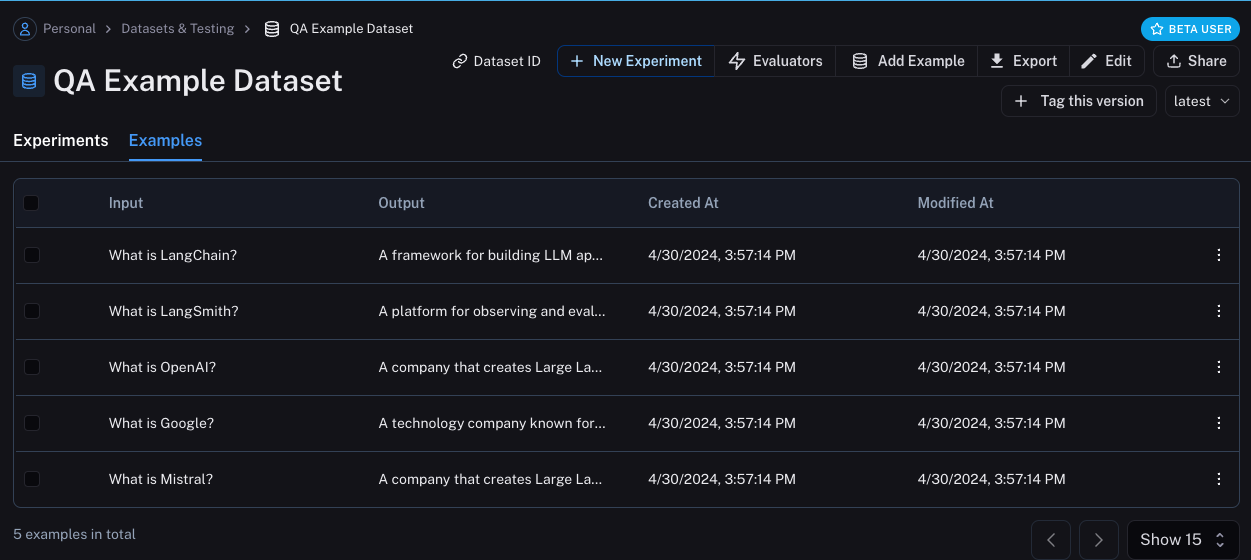
Now, if we go the LangSmith UI and look for QA Example Dataset in the Datasets & Testing page, when we click into it we should see that we have five new examples.
Define metrics

After creating our dataset, we can now define some metrics to evaluate our responses on. Since we have an expected answer, we can compare to that as part of our evaluation. However, we do not expect our application to output those exact answers, but rather something that is similar. This makes our evaluation a little trickier. In addition to evaluating correctness, let’s also make sure our answers are short and concise. This will be a little easier - we can define a simple Python function to measure the length of the response. Let’s go ahead and define these two metrics. For the first, we will use an LLM to judge whether the output is correct (with respect to the expected output). This LLM-as-a-judge is relatively common for cases that are too complex to measure with a simple function. We can define our own prompt and LLM to use for evaluation here:
import openai
from langsmith import wrappers

openai_client = wrappers.wrap_openai(openai.OpenAI())

eval_instructions = "You are an expert professor specialized in grading students' answers to questions."

def correctness(inputs: dict, outputs: dict, reference_outputs: dict) -> bool:
    user_content = f"""You are grading the following question:
{inputs['question']}
Here is the real answer:
{reference_outputs['answer']}
You are grading the following predicted answer:
{outputs['response']}
Respond with CORRECT or INCORRECT:
Grade:"""
    response = openai_client.chat.completions.create(
        model="gpt-4o-mini",
        temperature=0,
        messages=[
            {"role": "system", "content": eval_instructions},
            {"role": "user", "content": user_content},
        ],
    ).choices[0].message.content
    return response == "CORRECT"
For evaluating the length of the response, this is a lot easier! We can just define a simple function that checks whether the actual output is less than 2x the length of the expected result.
def concision(outputs: dict, reference_outputs: dict) -> bool:
    return int(len(outputs["response"]) < 2 * len(reference_outputs["answer"]))

Run Evaluations

Great! So now how do we run evaluations? Now that we have a dataset and evaluators, all that we need is our application! We will build a simple application that just has a system message with instructions on how to respond and then passes it to the LLM. We will build this using the OpenAI SDK directly:
default_instructions = "Respond to the users question in a short, concise manner (one short sentence)."

def my_app(question: str, model: str = "gpt-4o-mini", instructions: str = default_instructions) -> str:
    return openai_client.chat.completions.create(
        model=model,
        temperature=0,
        messages=[
            {"role": "system", "content": instructions},
            {"role": "user", "content": question},
        ],
    ).choices[0].message.content
Before running this through LangSmith evaluations, we need to define a simple wrapper that maps the input keys from our dataset to the function we want to call, and then also maps the output of the function to the output key we expect.
def ls_target(inputs: str) -> dict:
    return {"response": my_app(inputs["question"])}
Great! Now we’re ready to run an evaluation. Let’s do it!
experiment_results = client.evaluate(
    ls_target, # Your AI system
    data=dataset_name, # The data to predict and grade over
    evaluators=[concision, correctness], # The evaluators to score the results
    experiment_prefix="openai-4o-mini", # A prefix for your experiment names to easily identify them
)
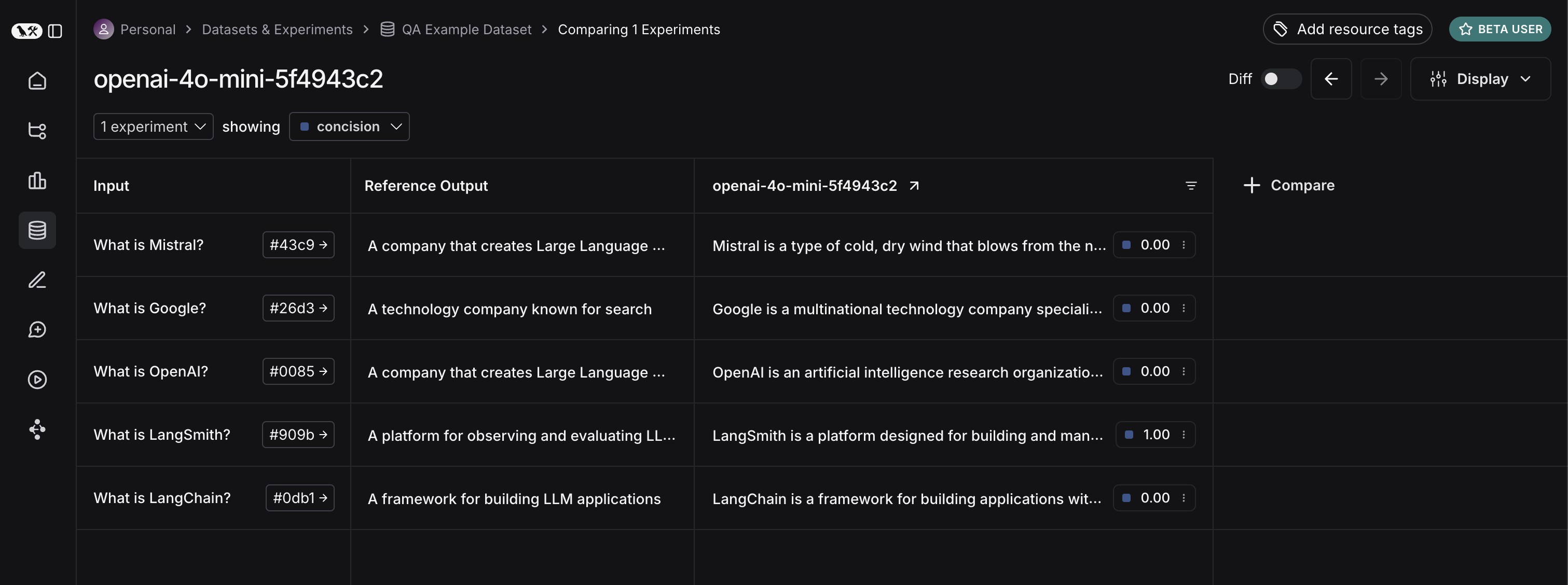
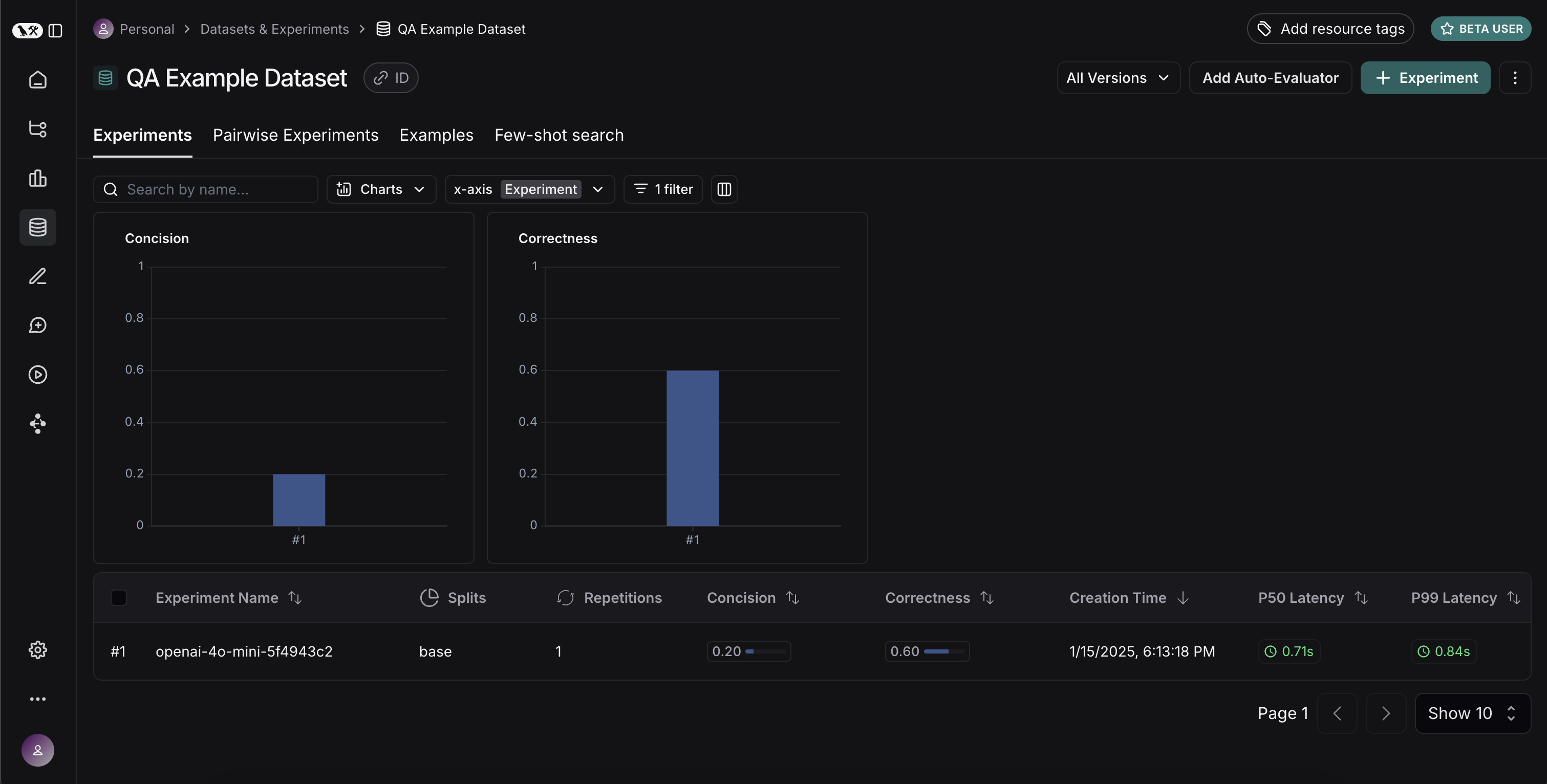
This will output a URL. If we click on it, we should see results of our evaluation! If we go back to the dataset page and select the Experiments tab, we can now see a summary of our one run! Let’s now try it out with a different model! Let’s try gpt-4-turbo
def ls_target_v2(inputs: str) -> dict:
    return {"response": my_app(inputs["question"], model="gpt-4-turbo")}

experiment_results = client.evaluate(
    ls_target_v2,
    data=dataset_name,
    evaluators=[concision, correctness],
    experiment_prefix="openai-4-turbo",
)
And now let’s use GPT-4 but also update the prompt to be a bit more strict in requiring the answer to be short.
instructions_v3 = "Respond to the users question in a short, concise manner (one short sentence). Do NOT use more than ten words."

def ls_target_v3(inputs: str) -> dict:
    response = my_app(
        inputs["question"],
        model="gpt-4-turbo",
        instructions=instructions_v3
    )
    return {"response": response}

experiment_results = client.evaluate(
    ls_target_v3,
    data=dataset_name,
    evaluators=[concision, correctness],
    experiment_prefix="strict-openai-4-turbo",
)
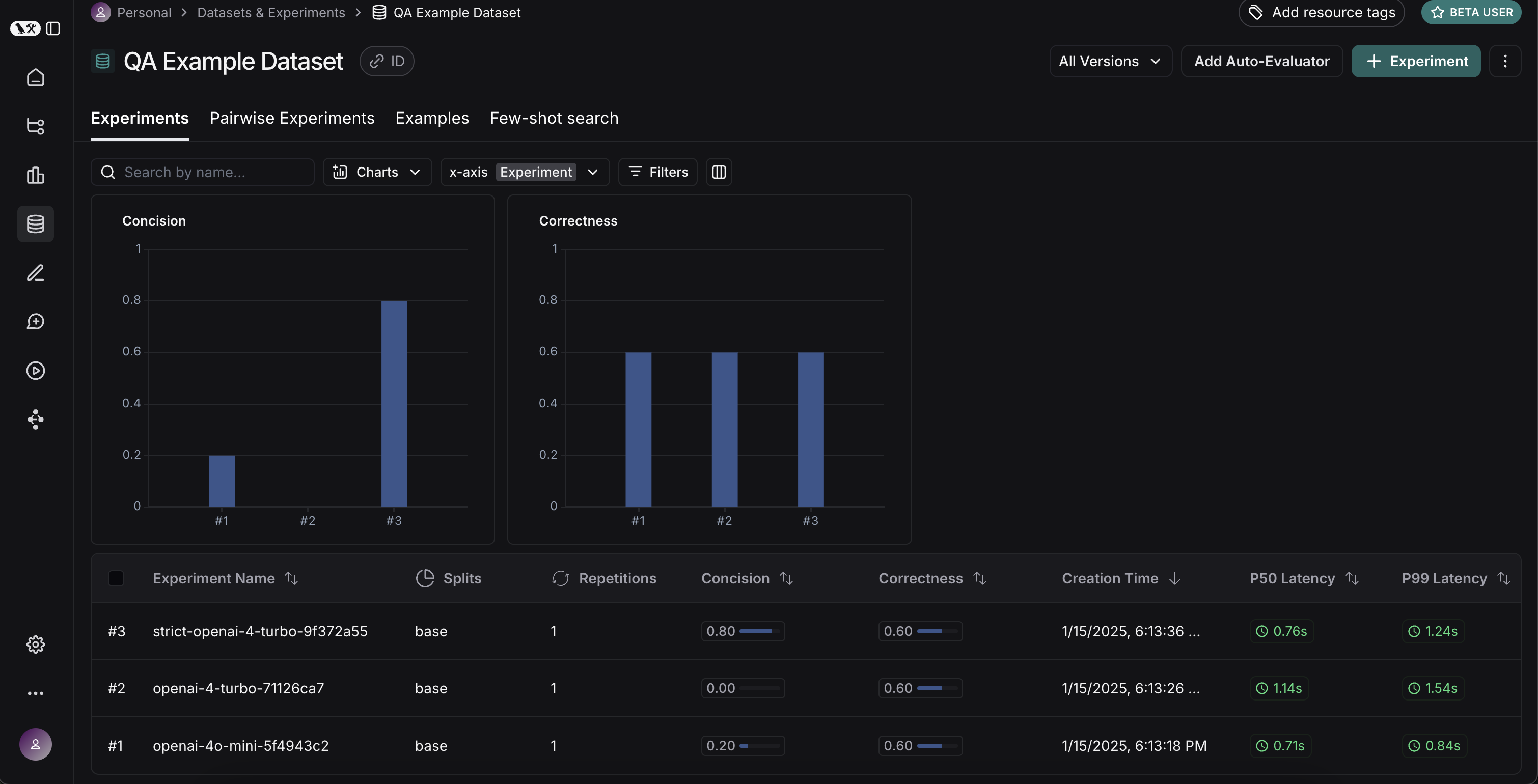
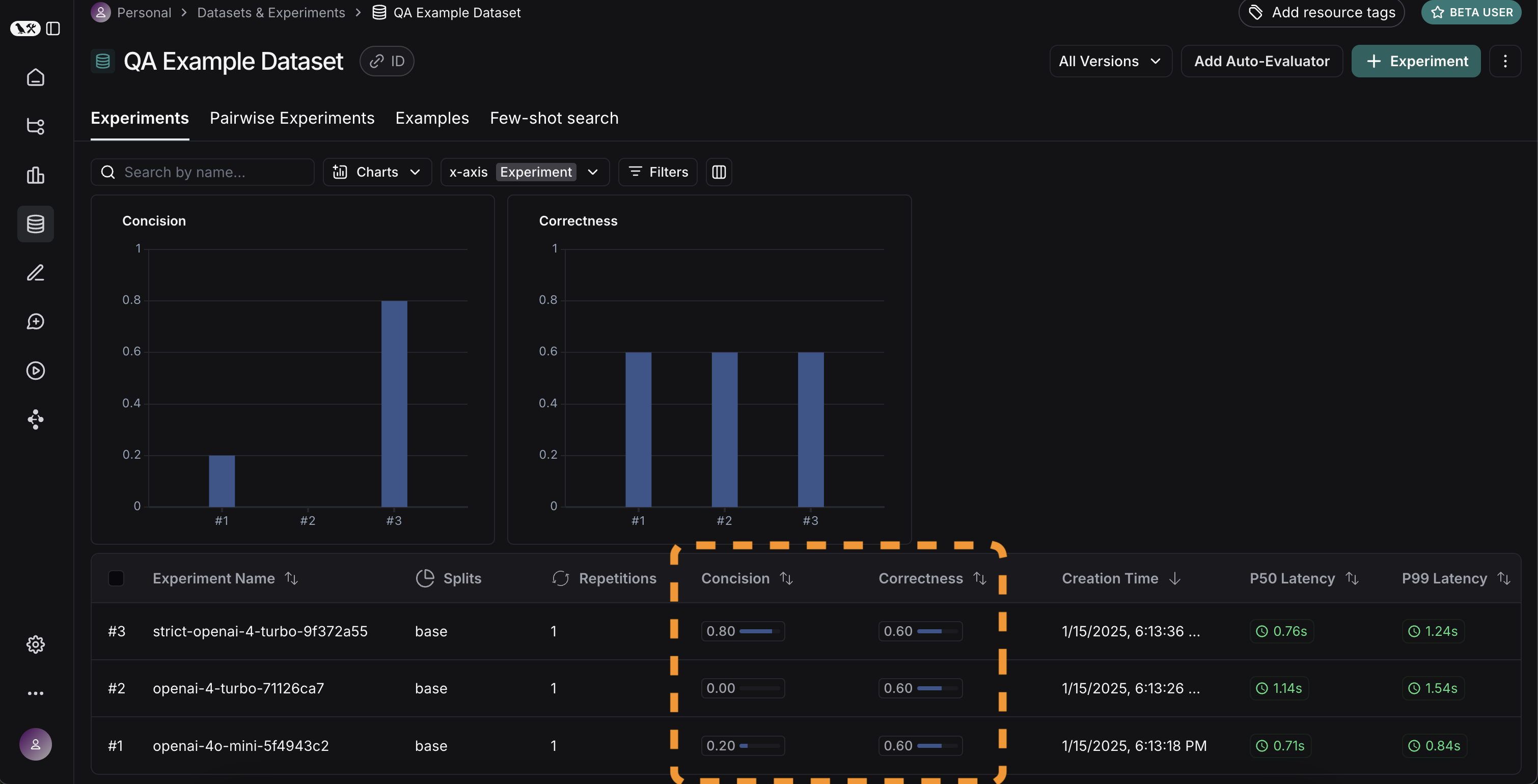
If we go back to the Experiments tab on the datasets page, we should see that all three runs now show up!
Comparing results

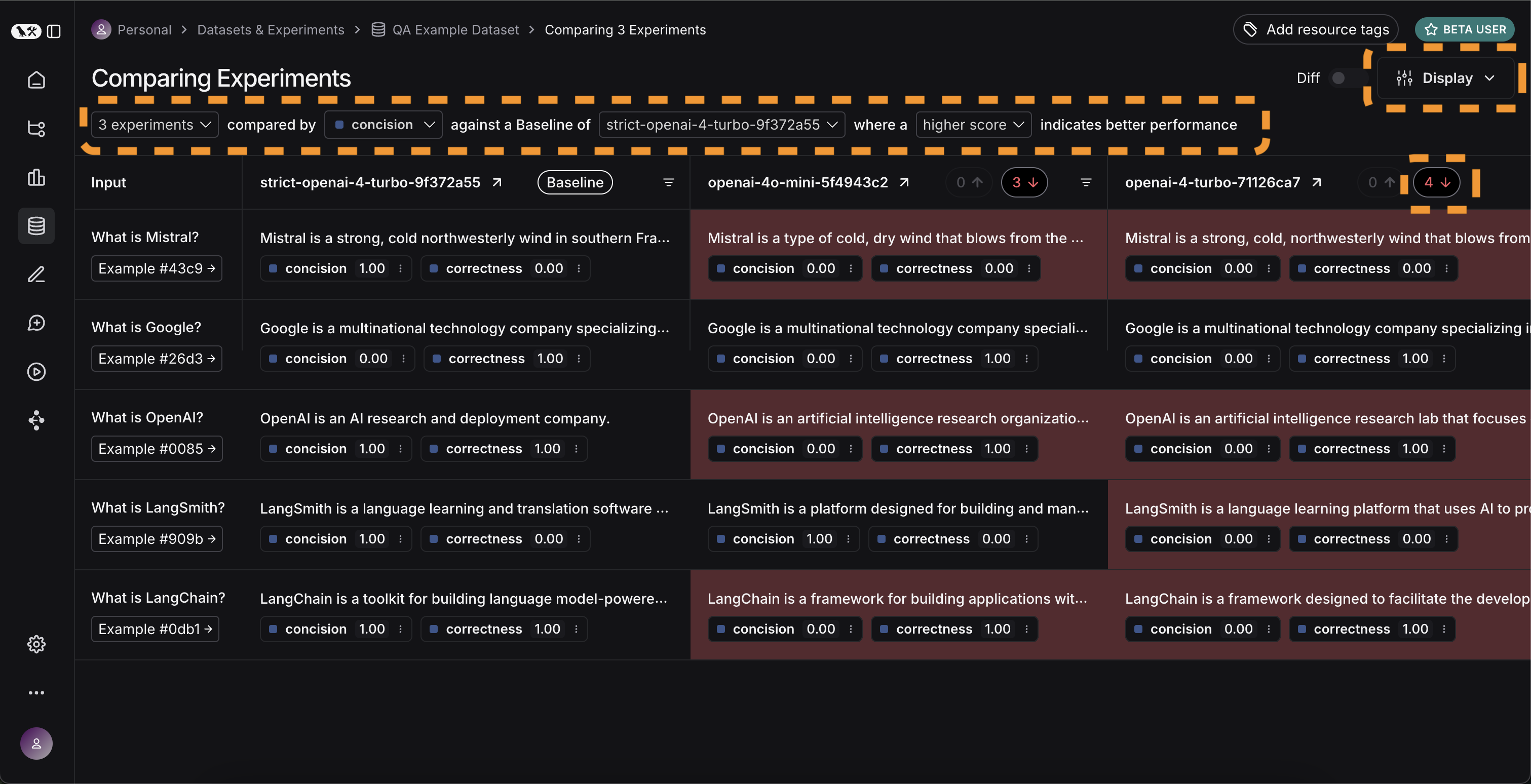
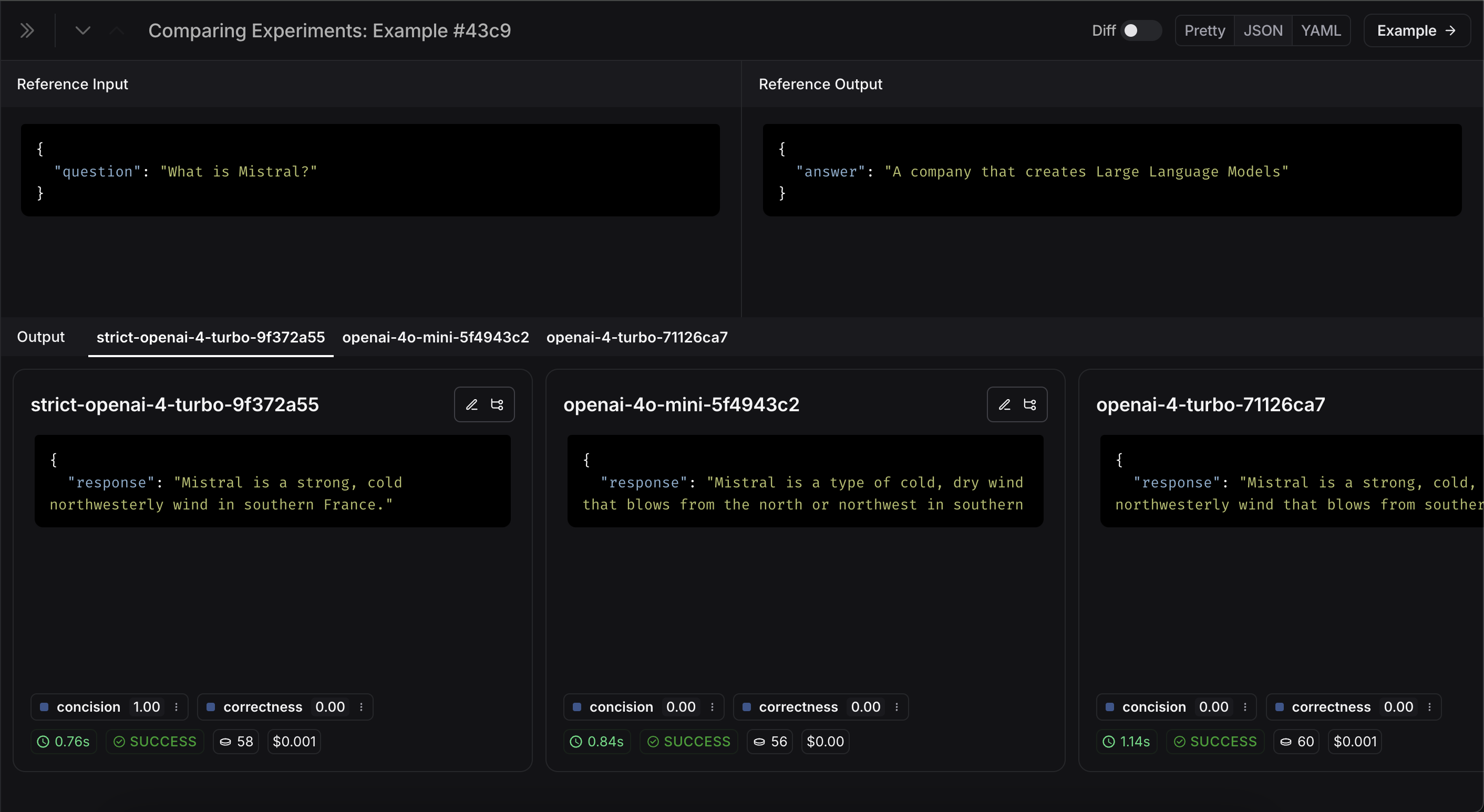
Awesome, we’ve evaluated three different runs. But how can we compare results? The first way we can do this is just by looking at the runs in the Experiments tab. If we do that, we can see a high level view of the metrics for each run: Great! So we can tell that GPT-4 is better than GPT-3.5 at knowing who companies are, and we can see that the strict prompt helped a lot with the length. But what if we want to explore in more detail? In order to do that, we can select all the runs we want to compare (in this case all three) and open them up in a comparison view. We immediately see all three tests side by side. Some of the cells are color coded - this is showing a regression of a certain metric compared to a certain baseline. We automatically choose defaults for the baseline and metric, but you can change those yourself. You can also choose which columns and which metrics you see by using the Display control. You can also automatically filter to only see the runs that have improvements/regressions by clicking on the icons at the top. If we want to see more information, we can also select the Expand button that appears when hovering over a row to open up a side panel with more detailed information:
Set up automated testing to run in CI/CD

Now that we’ve run this in a one-off manner, we can set it to run in an automated fashion. We can do this pretty easily by just including it as a pytest file that we run in CI/CD. As part of this, we can either just log the results OR set up some criteria to determine if it passes or not. For example, if I wanted to ensure that we always got at least 80% of generated responses passing the length check, we could set that up with a test like:
def test_length_score() -> None:
    """Test that the length score is at least 80%."""
    experiment_results = evaluate(
        ls_target, # Your AI system
        data=dataset_name, # The data to predict and grade over
        evaluators=[concision, correctness], # The evaluators to score the results
    )
    # This will be cleaned up in the next release:
    feedback = client.list_feedback(
        run_ids=[r.id for r in client.list_runs(project_name=experiment_results.experiment_name)],
        feedback_key="concision"
    )
    scores = [f.score for f in feedback]
    assert sum(scores) / len(scores) >= 0.8, "Aggregate score should be at least .8"

Track results over time

Now that we’ve got these experiments running in an automated fashion, we want to track these results over time. We can do this from the overall Experiments tab in the datasets page. By default, we show evaluation metrics over time (highlighted in red). We also automatically track git metrics, to easily associate it with the branch of your code (highlighted in yellow).

Conclusion

That’s it for this tutorial! We’ve gone over how to create an initial test set, define some evaluation metrics, run experiments, compare them manually, set up CI/CD, and track results over time. Hopefully this can help you iterate with confidence. This is just the start. As mentioned earlier, evaluation is an ongoing process. For example - the datapoints you will want to evaluate on will likely continue to change over time. There are many types of evaluators you may wish to explore. For information on this, check out the how-to guides. Additionally, there are other ways to evaluate data besides in this “offline” manner (e.g. you can evaluate production data). For more information on online evaluation, check out this guide.

Reference code

import openai
from langsmith import Client, wrappers

# Application code
openai_client = wrappers.wrap_openai(openai.OpenAI())

default_instructions = "Respond to the users question in a short, concise manner (one short sentence)."

def my_app(question: str, model: str = "gpt-4o-mini", instructions: str = default_instructions) -> str:
    return openai_client.chat.completions.create(
        model=model,
        temperature=0,
        messages=[
            {"role": "system", "content": instructions},
            {"role": "user", "content": question},
        ],
    ).choices[0].message.content

client = Client()

# Define dataset: these are your test cases
dataset_name = "QA Example Dataset"
dataset = client.create_dataset(dataset_name)

client.create_examples(
    dataset_id=dataset.id,
    examples=[
        {
            "inputs": {"question": "What is LangChain?"},
            "outputs": {"answer": "A framework for building LLM applications"},
        },
        {
            "inputs": {"question": "What is LangSmith?"},
            "outputs": {"answer": "A platform for observing and evaluating LLM applications"},
        },
        {
            "inputs": {"question": "What is OpenAI?"},
            "outputs": {"answer": "A company that creates Large Language Models"},
        },
        {
            "inputs": {"question": "What is Google?"},
            "outputs": {"answer": "A technology company known for search"},
        },
        {
            "inputs": {"question": "What is Mistral?"},
            "outputs": {"answer": "A company that creates Large Language Models"},
        }
    ]
)

# Define evaluators
eval_instructions = "You are an expert professor specialized in grading students' answers to questions."

def correctness(inputs: dict, outputs: dict, reference_outputs: dict) -> bool:
    user_content = f"""You are grading the following question:
{inputs['question']}
Here is the real answer:
{reference_outputs['answer']}
You are grading the following predicted answer:
{outputs['response']}
Respond with CORRECT or INCORRECT:
Grade:"""
    response = openai_client.chat.completions.create(
        model="gpt-4o-mini",
        temperature=0,
        messages=[
            {"role": "system", "content": eval_instructions},
            {"role": "user", "content": user_content},
        ],
    ).choices[0].message.content
    return response == "CORRECT"

def concision(outputs: dict, reference_outputs: dict) -> bool:
    return int(len(outputs["response"]) < 2 * len(reference_outputs["answer"]))

# Run evaluations
def ls_target(inputs: str) -> dict:
    return {"response": my_app(inputs["question"])}

experiment_results_v1 = client.evaluate(
    ls_target, # Your AI system
    data=dataset_name, # The data to predict and grade over
    evaluators=[concision, correctness], # The evaluators to score the results
    experiment_prefix="openai-4o-mini", # A prefix for your experiment names to easily identify them
)

def ls_target_v2(inputs: str) -> dict:
    return {"response": my_app(inputs["question"], model="gpt-4-turbo")}

experiment_results_v2 = client.evaluate(
    ls_target_v2,
    data=dataset_name,
    evaluators=[concision, correctness],
    experiment_prefix="openai-4-turbo",
)

instructions_v3 = "Respond to the users question in a short, concise manner (one short sentence). Do NOT use more than ten words."

def ls_target_v3(inputs: str) -> dict:
    response = my_app(
        inputs["question"],
        model="gpt-4-turbo",
        instructions=instructions_v3
    )
    return {"response": response}

experiment_results_v3 = client.evaluate(
    ls_target_v3,
    data=dataset_name,
    evaluators=[concision, correctness],
    experiment_prefix="strict-openai-4-turbo",
)

Connect these docs programmatically to Claude, VSCode, and more via MCP for real-time answers.