

数据集
数据集是用于评估应用程序的示例集合。示例是测试输入、参考输出对。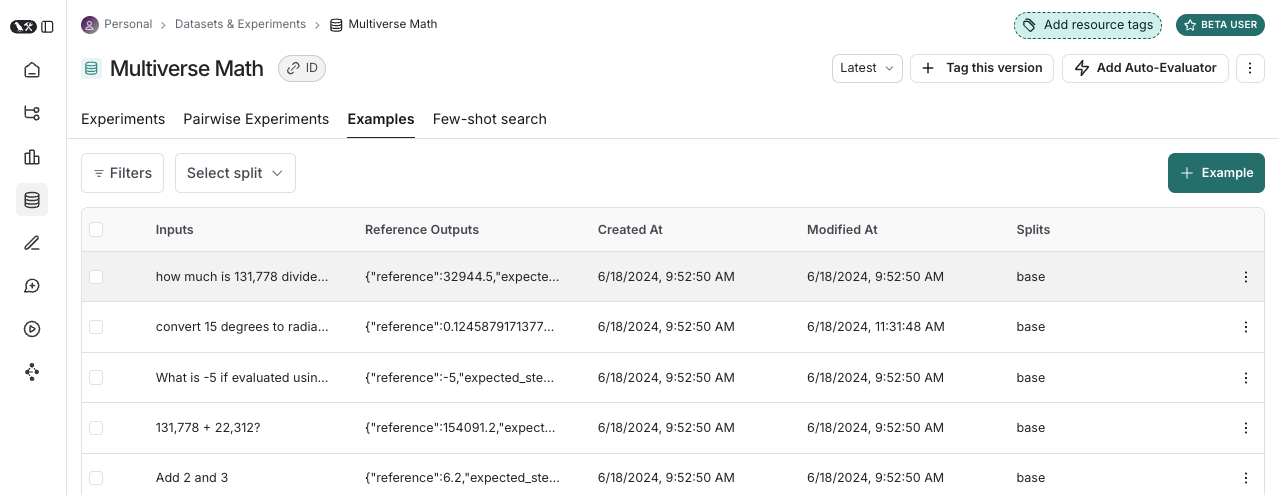
示例
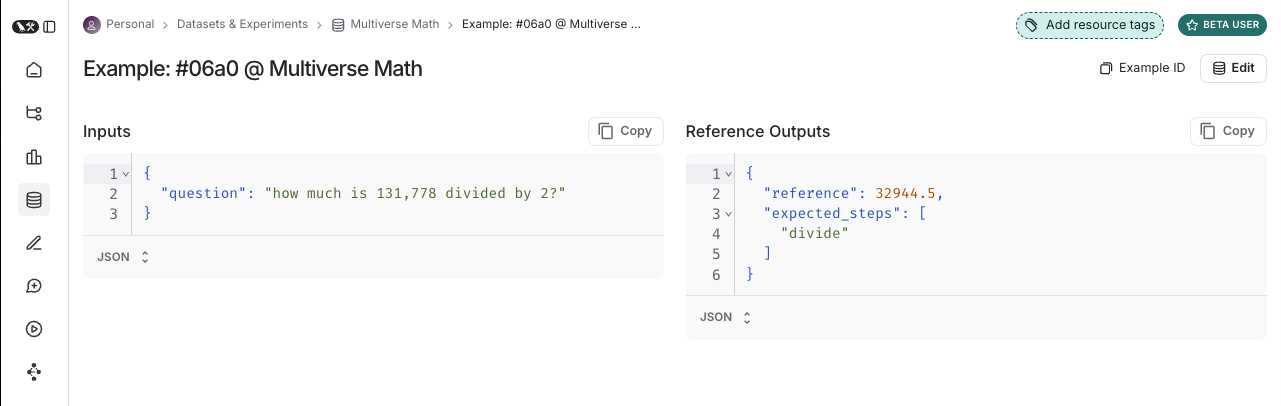
每个示例包括:- 输入:要传递给应用程序的输入变量字典。
- 参考输出(可选):参考输出字典。这些不会传递给您的应用程序,它们仅在评估器中使用。
- 元数据(可选):可用于创建数据集过滤视图的其他信息字典。
数据集策划
有多种方法可以构建用于评估的数据集,包括:手动策划的示例
这是我们通常建议人们开始创建数据集的方式。从构建应用程序开始,您可能对应用程序应该能够处理的输入类型以及什么是”好”的响应有一些想法。您可能想要涵盖一些您可以想象的不同常见边缘情况或情况。即使是 10-20 个高质量、手动策划的示例也可以走得很远。历史跟踪
一旦您的应用程序投入生产,您就开始获得有价值的信息:用户实际上是如何使用它的?这些真实世界的运行成为很好的示例,因为它们是最真实的! 如果您获得大量流量,如何确定哪些运行有价值添加到数据集?您可以使用以下几种技术:- 用户反馈:如果可能 - 尝试收集最终用户反馈。然后您可以查看哪些数据点获得了负面反馈。这非常有价值!这些是您的应用程序表现不佳的地方。您应该将这些添加到数据集中,以便将来进行测试。
- 启发式方法:您还可以使用其他启发式方法来识别”有趣”的数据点。例如,完成时间很长的运行可能很有趣,值得查看并添加到数据集。
- LLM 反馈:您可以使用另一个 LLM 来检测值得注意的运行。例如,您可以使用 LLM 来标记用户必须重新表述问题或以某种方式纠正模型的聊天机器人对话,这表明聊天机器人最初没有正确响应。
合成数据
一旦您有了一些示例,您可以尝试人工生成更多示例。通常建议在此之前有一些好的手工制作的示例,因为这些合成数据通常会以某种方式与它们相似。这可能是快速获取大量数据点的有用方法。拆分
在设置评估时,您可能希望将数据集分区为不同的拆分。例如,您可以使用较小的拆分进行许多快速且便宜的迭代,使用较大的拆分进行最终评估。此外,拆分对于实验的可解释性很重要。例如,如果您有 RAG 应用程序,您可能希望数据集拆分专注于不同类型的问题(例如,事实、观点等),并分别在每个拆分上评估您的应用程序。 了解如何创建和管理数据集拆分。版本
数据集是版本化的,因此每次您在数据集中添加、更新或删除示例时,都会创建数据集的新版本。这使得在您犯错误时检查和恢复数据集更改变得容易。您还可以标记版本数据集,以为它们提供更易读的名称。这对于标记数据集历史中的重要里程碑很有用。 您可以在数据集的特定版本上运行评估。这在 CI 中运行评估时很有用,以确保数据集更新不会意外破坏您的 CI 管道。评估器
评估器是对应用程序在特定示例上的表现进行评分的函数。评估器输入
评估器接收这些输入:评估器输出
评估器返回一个或多个指标。这些应作为以下形式的字典或字典列表返回:key:指标的名称。score|value:指标的值。如果是数字指标,使用score;如果是分类指标,使用value。comment(可选):证明分数的推理或其他字符串信息。
Defining evaluators
There are a number of ways to define and run evaluators:- Custom code: Define custom evaluators as Python or TypeScript functions and run them client-side using the SDKs or server-side via the UI.
- Built-in evaluators: LangSmith has a number of built-in evaluators that you can configure and run via the UI.
Evaluation techniques
There are a few high-level approaches to LLM evaluation:Human
Human evaluation is often a great starting point for evaluation. LangSmith makes it easy to review your LLM application outputs as well as the traces (all intermediate steps). LangSmith’s annotation queues make it easy to get human feedback on your application’s outputs.Heuristic
Heuristic evaluators are deterministic, rule-based functions. These are good for simple checks like making sure that a chatbot’s response isn’t empty, that a snippet of generated code can be compiled, or that a classification is exactly correct.LLM-as-judge
LLM-as-judge evaluators use LLMs to score the application’s output. To use them, you typically encode the grading rules / criteria in the LLM prompt. They can be reference-free (e.g., check if system output contains offensive content or adheres to specific criteria). Or, they can compare task output to a reference output (e.g., check if the output is factually accurate relative to the reference). With LLM-as-judge evaluators, it is important to carefully review the resulting scores and tune the grader prompt if needed. Often it is helpful to write these as few-shot evaluators, where you provide examples of inputs, outputs, and expected grades as part of the grader prompt. Learn about how to define an LLM-as-a-judge evaluator.Pairwise
Pairwise evaluators allow you to compare the outputs of two versions of an application. This can use either a heuristic (“which response is longer”), an LLM (with a specific pairwise prompt), or human (asking them to manually annotate examples). When should you use pairwise evaluation? Pairwise evaluation is helpful when it is difficult to directly score an LLM output, but easier to compare two outputs. This can be the case for tasks like summarization - it may be hard to give a summary an absolute score, but easy to choose which of two summaries is more informative. Learn how run pairwise evaluations.Experiment
Each time we evaluate an application on a dataset, we are conducting an experiment. An experiment contains the results of running a specific version of your application on the dataset. To understand how to use the LangSmith experiment view, see how to analyze experiment results.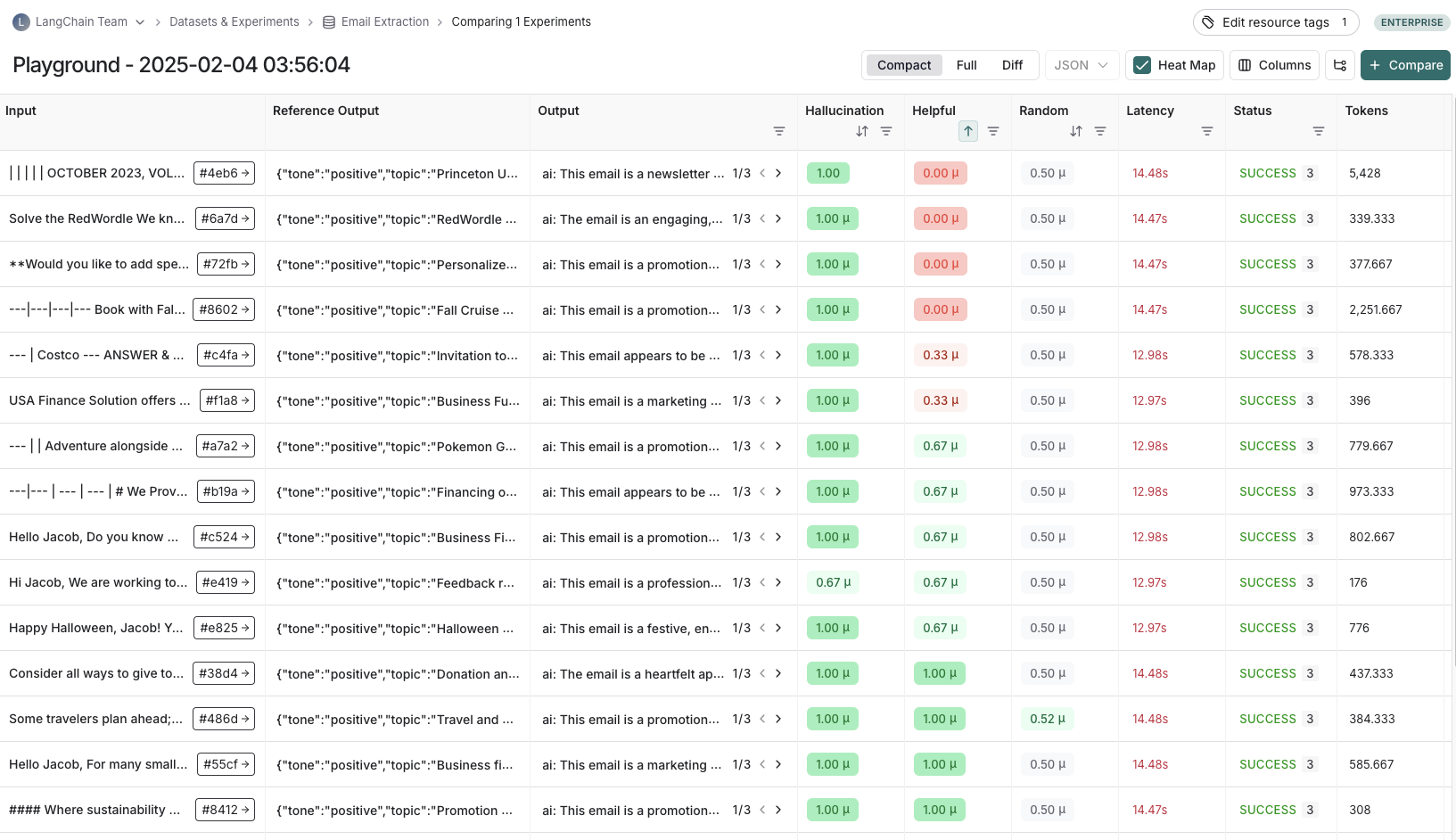 Typically, we will run multiple experiments on a given dataset, testing different configurations of our application (e.g., different prompts or LLMs). In LangSmith, you can easily view all the experiments associated with your dataset. Additionally, you can compare multiple experiments in a comparison view.

Experiment configuration
LangSmith supports a number of experiment configurations which make it easier to run your evals in the manner you want.Repetitions
Running an experiment multiple times can be helpful since LLM outputs are not deterministic and can differ from one repetition to the next. By running multiple repetitions, you can get a more accurate estimate of the performance of your system. Repetitions can be configured by passing thenum_repetitions argument to evaluate / aevaluate (Python, TypeScript). Repeating the experiment involves both re-running the target function to generate outputs and re-running the evaluators.
To learn more about running repetitions on experiments, read the how-to-guide.
Concurrency
By passing themax_concurrency argument to evaluate / aevaluate, you can specify the concurrency of your experiment. The max_concurrency argument has slightly different semantics depending on whether you are using evaluate or aevaluate.
evaluate
The max_concurrency argument to evaluate specifies the maximum number of concurrent threads to use when running the experiment. This is both for when running your target function as well as your evaluators.
aevaluate
The max_concurrency argument to aevaluate is fairly similar to evaluate, but instead uses a semaphore to limit the number of concurrent tasks that can run at once. aevaluate works by creating a task for each example in the dataset. Each task consists of running the target function as well as all of the evaluators on that specific example. The max_concurrency argument specifies the maximum number of concurrent tasks, or put another way - examples, to run at once.
Caching
Lastly, you can also cache the API calls made in your experiment by setting theLANGSMITH_TEST_CACHE to a valid folder on your device with write access. This will cause the API calls made in your experiment to be cached to disk, meaning future experiments that make the same API calls will be greatly sped up.
Annotation queues
Human feedback is often the most valuable feedback you can gather on your application. With annotation queues you can flag runs of your application for annotation. Human annotators then have a streamlined view to review and provide feedback on the runs in a queue. Often (some subset of) these annotated runs are then transferred to a dataset for future evaluations. While you can always annotate runs inline, annotation queues provide another option to group runs together, specify annotation criteria, and configure permissions. Learn more about annotation queues and human feedback.Offline evaluation
在数据集上评估应用,我们称之为“离线”评估。之所以称为离线,是因为评估针对的是预先整理好的数据集。与之相对的是“在线”评估,它在接近实时的真实流量上评估已部署应用的输出。离线评估通常用于在上线前测试应用的某个版本。 您可以使用 LangSmith SDK(Python 或 TypeScript)在客户端运行离线评估;也可以通过 Prompt Playground 在服务端运行,或配置自动化规则让特定评估器在每次新实验时针对某个数据集自动执行。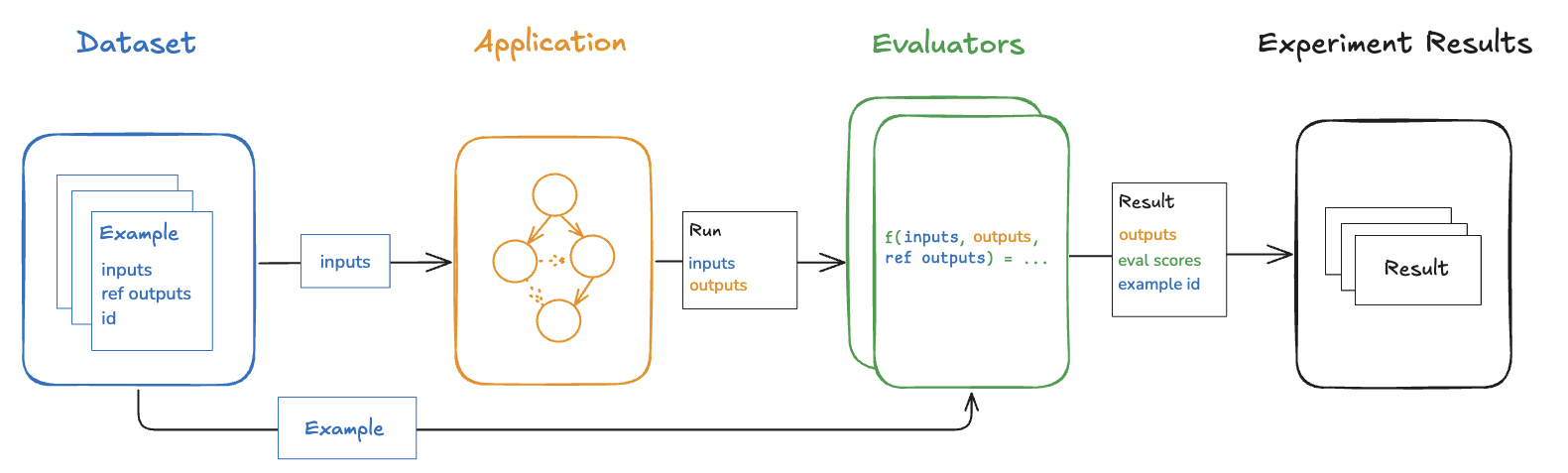
Benchmarking
离线评估中最常见的一类是基准测试:精心挑选具有代表性的输入数据集,定义关键性能指标,并对多个应用版本进行对比以选出最佳方案。基准测试往往工作量较大,因为许多场景都需要准备带有权威参考输出的数据集,并设计合理的指标用于比较实验结果。对于 RAG 问答机器人,这通常意味着准备一个问题+参考答案的数据集,再使用“LLM 评审”评估器判断实际答案是否与参考答案语义等价。对于 ReACT 智能体,则可能需要准备用户请求的数据集和模型应调用的工具参考列表,并使用启发式评估器检查所有参考工具调用是否被执行。Unit tests
单元测试在软件开发中用于验证系统各个组件的正确性。在 LLM 场景下,单元测试通常以规则断言的形式出现,对 LLM 的输入或输出进行检查(例如确保模型生成的代码可以编译、JSON 可以解析等),以验证基础功能。 单元测试通常是在期望“永远通过”的前提下编写的,适合作为 CI 流程的一部分来运行。请注意,在执行这类测试时启用缓存可显著减少 LLM 调用次数(否则调用量会迅速攀升)。Regression tests
Regression tests are used to measure performance across versions of your application over time. They are used to, at the very least, ensure that a new app version does not regress on examples that your current version correctly handles, and ideally to measure how much better your new version is relative to the current. Often these are triggered when you are making app updates (e.g. updating models or architectures) that are expected to influence the user experience. LangSmith’s comparison view has native support for regression testing, allowing you to quickly see examples that have changed relative to the baseline. Regressions are highlighted red, improvements green.
Backtesting
Backtesting is an approach that combines dataset creation (discussed above) with evaluation. If you have a collection of production logs, you can turn them into a dataset. Then, you can re-run those production examples with newer application versions. This allows you to assess performance on past and realistic user inputs. This is commonly used to evaluate new model versions. Anthropic dropped a new model? No problem! Grab the 1000 most recent runs through your application and pass them through the new model. Then compare those results to what actually happened in production.Pairwise evaluation
For some tasks it is easier for a human or LLM grader to determine if “version A is better than B” than to assign an absolute score to either A or B. Pairwise evaluations are just this — a scoring of the outputs of two versions against each other as opposed to against some reference output or absolute criteria. Pairwise evaluations are often useful when using LLM-as-judge evaluators on more general tasks. For example, if you have a summarizer application, it may be easier for an LLM-as-judge to determine “Which of these two summaries is more clear and concise?” than to give an absolute score like “Give this summary a score of 1-10 in terms of clarity and concision.” Learn how run pairwise evaluations.Online evaluation
Evaluating a deployed application’s outputs in (roughly) realtime is what we call “online” evaluation. In this case there is no dataset involved and no possibility of reference outputs — we’re running evaluators on real inputs and real outputs as they’re produced. This is useful for monitoring your application and flagging unintended behavior. Online evaluation can also work hand-in-hand with offline evaluation: for example, an online evaluator can be used to classify input questions into a set of categories that can later be used to curate a dataset for offline evaluation. Online evaluators are generally intended to be run server-side. LangSmith has built-in LLM-as-judge evaluators that you can configure, or you can define custom code evaluators that are also run within LangSmith.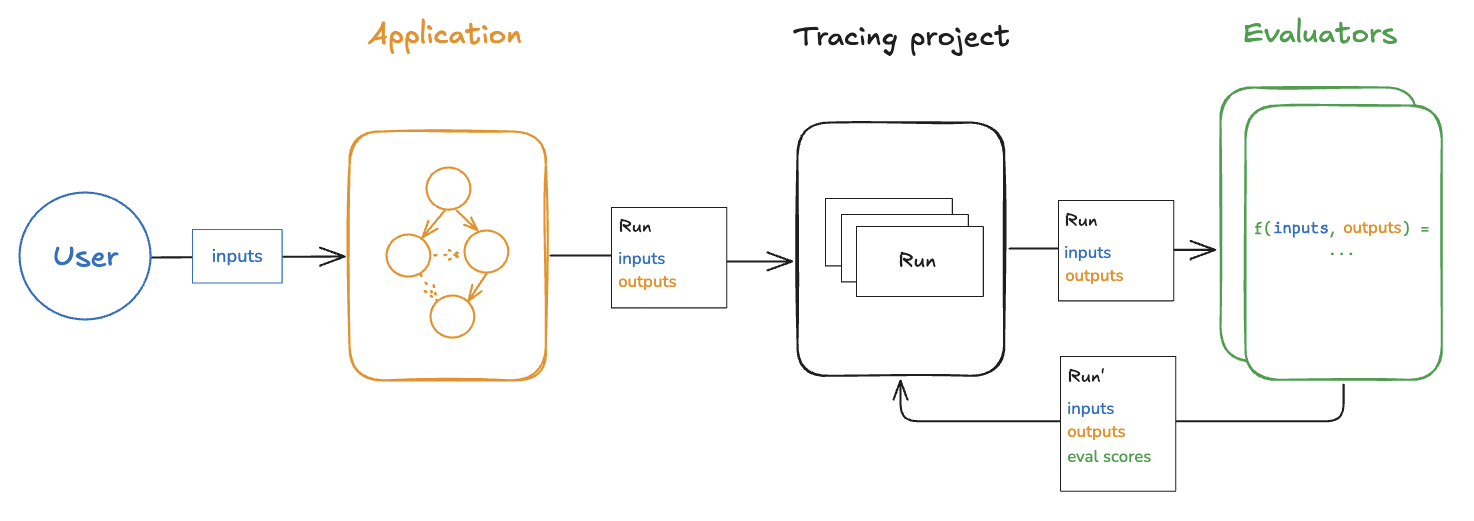
Testing
Evaluations vs testing
Testing and evaluation are very similar and overlapping concepts that often get confused. An evaluation measures performance according to a metric(s). Evaluation metrics can be fuzzy or subjective, and are more useful in relative terms than absolute ones. That is, they’re often used to compare two systems against each other rather than to assert something about an individual system. Testing asserts correctness. A system can only be deployed if it passes all tests. Evaluation metrics can be turned into tests. For example, you can write regression tests to assert that any new version of a system must outperform some baseline version of the system on the relevant evaluation metrics. It can also be more resource efficient to run tests and evaluations together if your system is expensive to run and you have overlapping datasets for your tests and evaluations. You can also choose to write evaluations using standard software testing tools likepytest or vitest/jest out of convenience.
Using pytest and Vitest/Jest
The LangSmith SDKs come with integrations for pytest and Vitest/Jest. These make it easy to:
- Track test results in LangSmith
- Write evaluations as tests