LangSmith pytest 插件允许 Python 开发人员将其数据集和评估定义为 pytest 测试用例。与标准评估流程相比,这在以下情况下很有用:
- 每个示例需要不同的评估逻辑
- 您希望断言二进制期望,并在 LangSmith 中跟踪这些断言并在本地(例如在 CI 管道中)引发断言错误
- 您希望获得类似 pytest 的终端输出
- 您已经使用 pytest 测试应用程序,并希望添加 LangSmith 跟踪
pytest 集成处于测试阶段,在即将发布的版本中可能会发生变化。
langsmith>=0.3.4。
对于丰富的终端输出和测试缓存等额外功能,请安装:
pip install -U "langsmith[pytest]"
定义和运行测试
pytest 集成允许您将数据集和评估器定义为测试用例。
要在 LangSmith 中跟踪测试,请添加 @pytest.mark.langsmith 装饰器。每个装饰的测试用例都将同步到数据集示例。当您运行测试套件时,数据集将被更新,并创建一个新实验,每个测试用例对应一个结果。
###################### my_app/main.py ######################
import openai
from langsmith import traceable, wrappers

oai_client = wrappers.wrap_openai(openai.OpenAI())

@traceable
def generate_sql(user_query: str) -> str:
    result = oai_client.chat.completions.create(
        model="gpt-4o-mini",
        messages=[
            {"role": "system", "content": "Convert the user query to a SQL query."},
            {"role": "user", "content": user_query},
        ],
    )
    return result.choices[0].message.content

###################### tests/test_my_app.py ######################
import pytest
from langsmith import testing as t

def is_valid_sql(query: str) -> bool:
    """Return True if the query is valid SQL."""
    return True  # Dummy implementation

@pytest.mark.langsmith  # <-- Mark as a LangSmith test case
def test_sql_generation_select_all() -> None:
    user_query = "Get all users from the customers table"
    t.log_inputs({"user_query": user_query})  # <-- Log example inputs, optional
    expected = "SELECT * FROM customers;"
    t.log_reference_outputs({"sql": expected})  # <-- Log example reference outputs, optional

    sql = generate_sql(user_query)
    t.log_outputs({"sql": sql})  # <-- Log run outputs, optional

    t.log_feedback(key="valid_sql", score=is_valid_sql(sql))  # <-- Log feedback, optional
    assert sql == expected  # <-- Test pass/fail status automatically logged to LangSmith under 'pass' feedback key
pass 布尔反馈键。它还会跟踪您记录的任何输入、输出和参考(预期)输出。
像往常一样使用 pytest 运行测试:
在大多数情况下,我们建议设置测试套件名称:
LANGSMITH_TEST_SUITE='SQL app tests' pytest tests/
- 为每个测试文件创建一个数据集。如果此测试文件的数据集已存在,它将被更新
- 在每个创建/更新的数据集中创建一个实验
- 为每个测试用例创建一个实验行,包含您记录的输入、输出、参考输出和反馈
- 在每个测试用例的
pass 反馈键下收集通过/失败率
以下是测试套件数据集的样子:
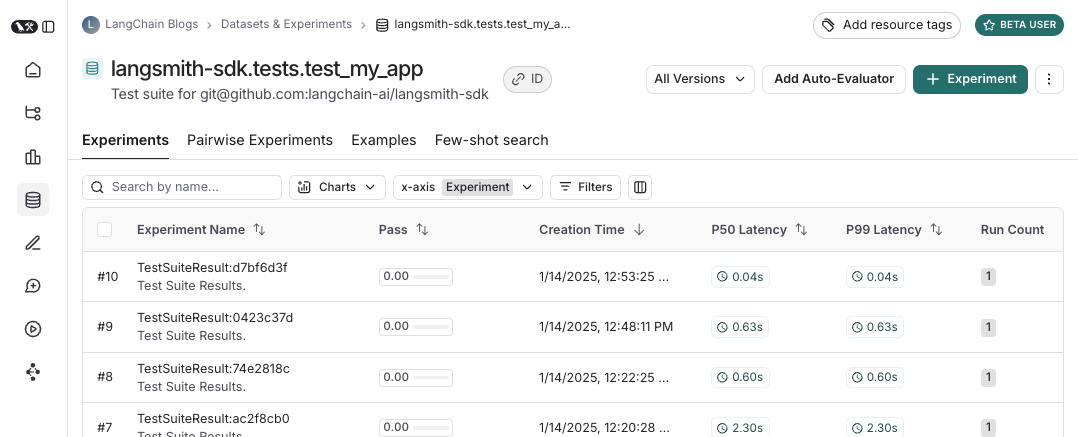 以及针对该测试套件的实验的样子:
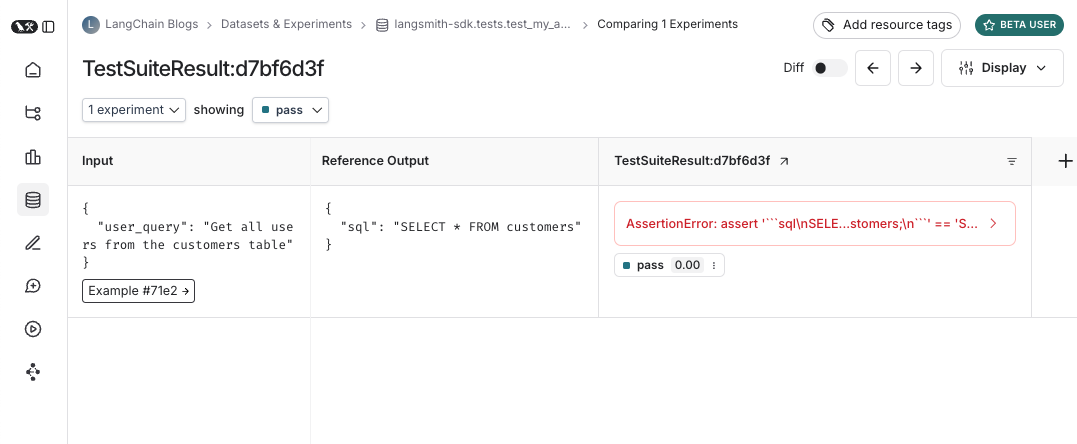
记录输入、输出和参考输出
每次运行测试时,我们都会将其同步到数据集示例并作为运行进行跟踪。有几种不同的方法可以跟踪示例输入、参考输出和运行输出。最简单的方法是使用 log_inputs、log_outputs 和 log_reference_outputs 方法。您可以在测试中的任何时候运行这些方法来更新该测试的示例和运行:
import pytest
from langsmith import testing as t

@pytest.mark.langsmith
def test_foo() -> None:
    t.log_inputs({"a": 1, "b": 2})
    t.log_reference_outputs({"foo": "bar"})
    t.log_outputs({"foo": "baz"})
    assert True
{"a": 1, "b": 2},参考输出为 {"foo": "bar"},并跟踪一个输出为 {"foo": "baz"} 的运行。
注意:如果您运行 log_inputs、log_outputs 或 log_reference_outputs 两次,之前的值将被覆盖。
另一种定义示例输入和参考输出的方法是通过 pytest fixtures/参数化。默认情况下,测试函数的任何参数都将作为输入记录到相应的示例中。如果某些参数旨在表示参考输出,您可以使用 @pytest.mark.langsmith(output_keys=["name_of_ref_output_arg"]) 指定它们应作为参考输出记录:
import pytest

@pytest.fixture
def c() -> int:
    return 5

@pytest.fixture
def d() -> int:
    return 6

@pytest.mark.langsmith(output_keys=["d"])
def test_cd(c: int, d: int) -> None:
    result = 2 * c
    t.log_outputs({"d": result})  # Log run outputs
    assert result == d
{"c": 5},参考输出为 {"d": 6},运行输出为 {"d": 10}。
记录反馈
默认情况下,LangSmith 在每个测试用例的 pass 反馈键下收集通过/失败率。您可以使用 log_feedback 添加其他反馈。
import openai
import pytest
from langsmith import wrappers
from langsmith import testing as t

oai_client = wrappers.wrap_openai(openai.OpenAI())

@pytest.mark.langsmith
def test_offtopic_input() -> None:
    user_query = "whats up"
    t.log_inputs({"user_query": user_query})

    sql = generate_sql(user_query)
    t.log_outputs({"sql": sql})

    expected = "Sorry that is not a valid query."
    t.log_reference_outputs({"sql": expected})

    # Use this context manager to trace any steps used for generating evaluation
    # feedback separately from the main application logic
    with t.trace_feedback():
        instructions = (
            "Return 1 if the ACTUAL and EXPECTED answers are semantically equivalent, "
            "otherwise return 0. Return only 0 or 1 and nothing else."
        )

        grade = oai_client.chat.completions.create(
            model="gpt-4o-mini",
            messages=[
                {"role": "system", "content": instructions},
                {"role": "user", "content": f"ACTUAL: {sql}\nEXPECTED: {expected}"},
            ],
        )
        score = float(grade.choices[0].message.content)
        t.log_feedback(key="correct", score=score)

    assert score
trace_feedback() 上下文管理器的使用。这使得 LLM-as-judge 调用与测试用例的其余部分分开跟踪。它不会出现在主测试用例运行中,而是会出现在 correct 反馈键的跟踪中。
注意:确保与反馈跟踪关联的 log_feedback 调用发生在 trace_feedback 上下文中。这样我们就能够将反馈与跟踪关联起来,当在 UI 中看到反馈时,您可以单击它来查看生成它的跟踪。
跟踪中间调用
LangSmith 将自动跟踪测试用例执行过程中发生的任何可跟踪的中间调用。
将测试分组到测试套件
默认情况下,给定文件中的所有测试将分组为单个”测试套件”,并具有相应的数据集。您可以通过向 @pytest.mark.langsmith 传递 test_suite_name 参数来配置测试属于哪个测试套件,以进行逐个分组,或者您可以设置 LANGSMITH_TEST_SUITE 环境变量,将执行中的所有测试分组到单个测试套件中:
LANGSMITH_TEST_SUITE="SQL app tests" pytest tests/
LANGSMITH_TEST_SUITE 以获得所有结果的统一视图。
命名实验
您可以使用 LANGSMITH_EXPERIMENT 环境变量命名实验:
LANGSMITH_TEST_SUITE="SQL app tests" LANGSMITH_EXPERIMENT="baseline" pytest tests/
langsmith[pytest] 安装并设置环境变量:LANGSMITH_TEST_CACHE=/my/cache/path:
pip install -U "langsmith[pytest]"
LANGSMITH_TEST_CACHE=tests/cassettes pytest tests/my_llm_tests
tests/cassettes,并在后续运行中从那里加载。如果您将其签入到存储库,您的 CI 也将能够使用缓存。
在 langsmith>=0.4.10 中,您可以选择性地为对单个 URL 或主机名的请求启用缓存,如下所示:
@pytest.mark.langsmith(cached_hosts=["api.openai.com", "https://api.anthropic.com"])
def my_test():
    ...
pytest 功能
@pytest.mark.langsmith 设计为不干扰您的工作,并与熟悉的 pytest 功能良好配合。
使用 pytest.mark.parametrize 进行参数化
您可以像以前一样使用 parametrize 装饰器。这将为测试的每个参数化实例创建一个新的测试用例。
@pytest.mark.langsmith(output_keys=["expected_sql"])
@pytest.mark.parametrize(
    "user_query, expected_sql",
    [
        ("Get all users from the customers table", "SELECT * FROM customers"),
        ("Get all users from the orders table", "SELECT * FROM orders"),
    ],
)
def test_sql_generation_parametrized(user_query, expected_sql):
    sql = generate_sql(user_query)
    assert sql == expected_sql
evaluate() 代替。这可以并行化评估,并使控制单个实验和相应的数据集变得更容易。
使用 pytest-xdist 并行化
您可以像往常一样使用 pytest-xdist 来并行化测试执行:
pip install -U pytest-xdist
pytest -n auto tests
使用 pytest-asyncio 进行异步测试
@pytest.mark.langsmith 适用于同步或异步测试,因此您可以像以前一样运行异步测试。
使用 pytest-watch 的监视模式
使用监视模式快速迭代您的测试。我们强烈建议仅在启用测试缓存(见下文)的情况下使用此功能,以避免不必要的 LLM 调用:
pip install pytest-watch
LANGSMITH_TEST_CACHE=tests/cassettes ptw tests/my_llm_tests
丰富的输出
如果您想查看测试运行的 LangSmith 结果的丰富显示,可以指定 --langsmith-output:
pytest --langsmith-output tests
langsmith<=0.3.3 中曾经是 --output=langsmith,但已更新以避免与其他 pytest 插件冲突。
您将获得每个测试套件的漂亮表格,当结果上传到 LangSmith 时会实时更新:
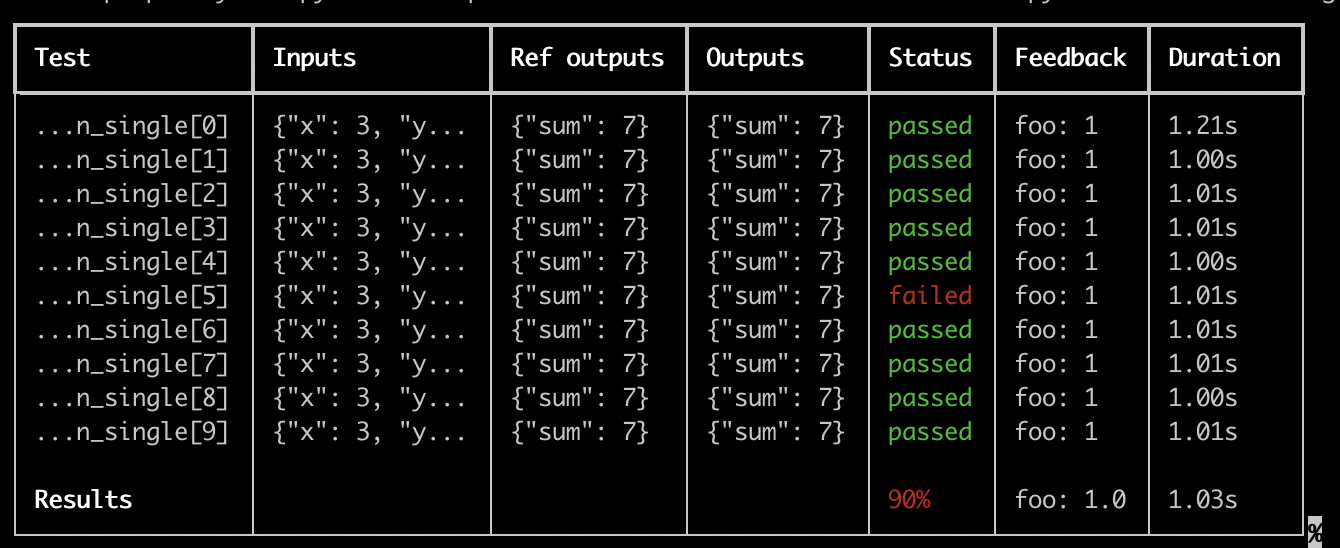 使用此功能的一些重要注意事项:
- 确保您已安装
pip install -U "langsmith[pytest]"
- 丰富的输出目前不适用于
pytest-xdist
注意:自定义输出会删除所有标准 pytest 输出。如果您试图调试一些意外行为,通常最好显示常规 pytest 输出以获得完整的错误跟踪。
试运行模式
如果您想运行测试而不将结果同步到 LangSmith,可以在环境中设置 LANGSMITH_TEST_TRACKING=false。
LANGSMITH_TEST_TRACKING=false pytest tests/
from langsmith import expect

@pytest.mark.langsmith
def test_sql_generation_select_all():
    user_query = "Get all users from the customers table"
    sql = generate_sql(user_query)
    expect(sql).to_contain("customers")
assert 期望得到满足,可能会触发测试失败。
expect 还提供”模糊匹配”方法。例如:
@pytest.mark.langsmith(output_keys=["expectation"])
@pytest.mark.parametrize(
    "query, expectation",
    [
       ("what's the capital of France?", "Paris"),
    ],
)
def test_embedding_similarity(query, expectation):
    prediction = my_chatbot(query)
    expect.embedding_distance(
        # This step logs the distance as feedback for this run
        prediction=prediction, expectation=expectation
        # Adding a matcher (in this case, 'to_be_*"), logs 'expectation' feedback
    ).to_be_less_than(0.5) # Optional predicate to assert against

    expect.edit_distance(
        # This computes the normalized Damerau-Levenshtein distance between the two strings
        prediction=prediction, expectation=expectation
        # If no predicate is provided below, 'assert' isn't called, but the score is still logged
    )
- 预测和期望之间的
embedding_distance
- 二进制
expectation 分数(如果余弦距离小于 0.5 则为 1,否则为 0)
- 预测和期望之间的
edit_distance
- 总体测试通过/失败分数(二进制)
expect 实用程序基于 Jest 的 expect API 建模,具有一些现成的功能,使评估您的 LLM 变得更容易。
@test / @unit 装饰器
标记测试用例的遗留方法是使用 @test 或 @unit 装饰器:
from langsmith import test

@test
def test_foo() -> None:
    pass

