LangSmith 提供与 Vitest 和 Jest 的集成,允许 JavaScript 和 TypeScript 开发人员使用熟悉的语法定义数据集和评估。
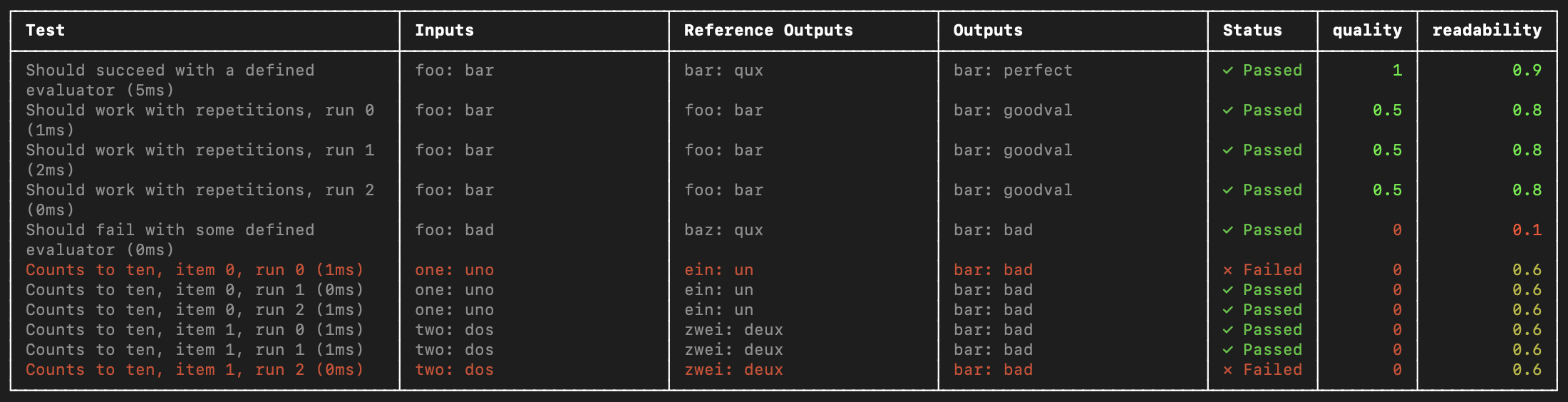 与
与 evaluate() 评估流程相比,这在以下情况下很有用:
- 每个示例需要不同的评估逻辑
- 您希望断言二进制期望,并在 LangSmith 中跟踪这些断言并在本地(例如在 CI 管道中)引发断言错误
- 您希望利用模拟、监视模式、本地结果或 Vitest/Jest 生态系统的其他功能
需要 JS/TS SDK 版本 langsmith>=0.3.1。
Vitest/Jest 集成处于测试阶段,在即将发布的版本中可能会发生变化。
*.test.ts 文件)一起添加,但下面的示例还将设置一个单独的测试配置文件和命令来运行您的评估。它将假设您的测试文件以 .eval.ts 结尾。
这确保了自定义测试报告器和其他 LangSmith 接触点不会修改您现有的测试输出。
Vitest
如果您还没有安装,请安装所需的开发依赖项:
yarn add -D vitest dotenv
openai (and of course langsmith!) as a dependency:
yarn add langsmith openai
ls.vitest.config.ts 文件,配置如下:
import { defineConfig } from "vitest/config";

export default defineConfig({
  test: {
    include: ["**/*.eval.?(c|m)[jt]s"],
    reporters: ["langsmith/vitest/reporter"],
    setupFiles: ["dotenv/config"],
  },
});
include ensures that only files ending with some variation of eval.ts in your project are runreporters is responsible for nicely formatting your output as shown abovesetupFiles runs dotenv to load environment variables before running your evals
JSDom environments are not supported at this time. You should either omit the "environment" field from your config or set it to "node".
scripts field in your package.json to run Vitest with the config you just created:
{
  "name": "YOUR_PROJECT_NAME",
  "scripts": {
    "eval": "vitest run --config ls.vitest.config.ts"
  },
  "dependencies": {
    ...
  },
  "devDependencies": {
    ...
  }
}
Jest
Install the required development dependencies if you have not already:
The examples below also require openai (and of course langsmith!) as a dependency:
yarn add langsmith openai
The setup instructions below are for basic JS files and CJS. To add support for TypeScript and ESM, see Jest’s official docs or use Vitest. ls.jest.config.cjs:
module.exports = {
  testMatch: ["**/*.eval.?(c|m)[jt]s"],
  reporters: ["langsmith/jest/reporter"],
  setupFiles: ["dotenv/config"],
};
testMatch ensures that only files ending with some variation of eval.js in your project are runreporters is responsible for nicely formatting your output as shown abovesetupFiles runs dotenv to load environment variables before running your evals
JSDom environments are not supported at this time. You should either omit the "testEnvironment" field from your config or set it to "node".
scripts field in your package.json to run Jest with the config you just created:
{
  "name": "YOUR_PROJECT_NAME",
  "scripts": {
    "eval": "jest --config ls.jest.config.cjs"
  },
  "dependencies": {
    ...
  },
  "devDependencies": {
    ...
  }
}
Define and run evals
You can now define evals as tests using familiar Vitest/Jest syntax, with a few caveats:
- You should import
describe and test from the langsmith/jest or langsmith/vitest entrypoint
- You must wrap your test cases in a
describe block
- When declaring tests, the signature is slightly different - there is an extra argument containing example inputs and expected outputs
Try it out by creating a file named sql.eval.ts (or sql.eval.js if you are using Jest without TypeScript) and pasting the below contents into it:
import * as ls from "langsmith/vitest";
import { expect } from "vitest";
// import * as ls from "langsmith/jest";
// import { expect } from "@jest/globals";
import OpenAI from "openai";
import { traceable } from "langsmith/traceable";
import { wrapOpenAI } from "langsmith/wrappers/openai";

// Add "openai" as a dependency and set OPENAI_API_KEY as an environment variable
const tracedClient = wrapOpenAI(new OpenAI());

const generateSql = traceable(
  async (userQuery: string) => {
    const result = await tracedClient.chat.completions.create({
      model: "gpt-4o-mini",
      messages: [
        {
          role: "system",
          content:
            "Convert the user query to a SQL query. Do not wrap in any markdown tags.",
        },
        {
          role: "user",
          content: userQuery,
        },
      ],
    });
    return result.choices[0].message.content;
  },
  { name: "generate_sql" }
);

ls.describe("generate sql demo", () => {
  ls.test(
    "generates select all",
    {
      inputs: { userQuery: "Get all users from the customers table" },
      referenceOutputs: { sql: "SELECT * FROM customers;" },
    },
    async ({ inputs, referenceOutputs }) => {
      const sql = await generateSql(inputs.userQuery);
      ls.logOutputs({ sql }); // <-- Log run outputs, optional
      expect(sql).toEqual(referenceOutputs?.sql); // <-- Assertion result logged under 'pass' feedback key
    }
  );
});
ls.test() case as corresponding to a dataset example, and ls.describe() as defining a LangSmith dataset. If you have LangSmith tracing environment variables set when you run the test suite, the SDK does the following:
- creates a dataset with the same name as the name passed to
ls.describe() in LangSmith if it does not exist
- creates an example in the dataset for each input and expected output passed into a test case if a matching one does not already exist
- creates a new experiment with one result for each test case
- collects the pass/fail rate under the
pass feedback key for each test case
When you run this test it will have a default pass boolean feedback key based on the test case passing / failing. It will also track any outputs that you log with the ls.logOutputs() or return from the test function as “actual” result values from your app for the experiment.
Create a .env file with your OPENAI_API_KEY and LangSmith credentials if you don’t already have one:
OPENAI_API_KEY="YOUR_KEY_HERE"
LANGSMITH_API_KEY="YOUR_LANGSMITH_KEY"
LANGSMITH_TRACING="true"
eval script we set up in the previous step to run the test:
And your declared test should run!
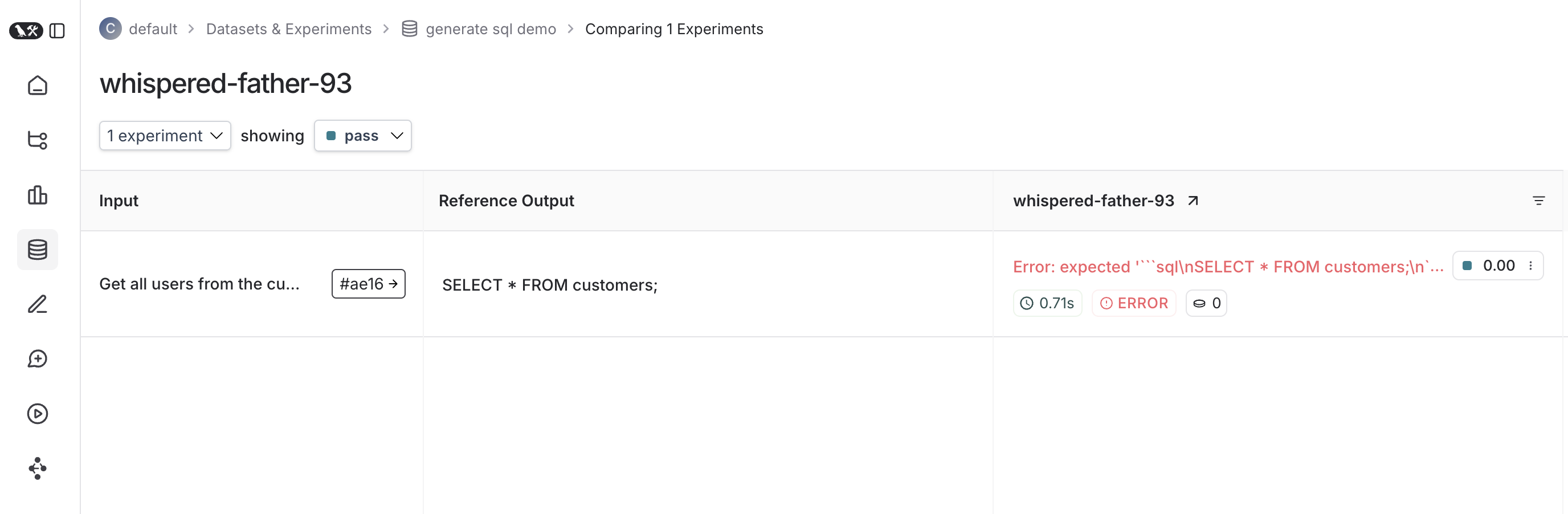
Once it finishes, if you’ve set your LangSmith environment variables, you should see a link directing you to an experiment created in LangSmith alongside the test results.
Here’s what an experiment against that test suite looks like:
Trace feedback
By default LangSmith collects the pass/fail rate under the pass feedback key for each test case. You can add additional feedback with either ls.logFeedback() or wrapEvaluator(). To do so, try the following as your sql.eval.ts file (or sql.eval.js if you are using Jest without TypeScript):
import * as ls from "langsmith/vitest";
// import * as ls from "langsmith/jest";
import OpenAI from "openai";
import { traceable } from "langsmith/traceable";
import { wrapOpenAI } from "langsmith/wrappers/openai";

// Add "openai" as a dependency and set OPENAI_API_KEY as an environment variable
const tracedClient = wrapOpenAI(new OpenAI());

const generateSql = traceable(
  async (userQuery: string) => {
    const result = await tracedClient.chat.completions.create({
      model: "gpt-4o-mini",
      messages: [
        {
          role: "system",
          content:
            "Convert the user query to a SQL query. Do not wrap in any markdown tags.",
        },
        {
          role: "user",
          content: userQuery,
        },
      ],
    });
    return result.choices[0].message.content ?? "";
  },
  { name: "generate_sql" }
);

const myEvaluator = async (params: {
  outputs: { sql: string };
  referenceOutputs: { sql: string };
}) => {
  const { outputs, referenceOutputs } = params;
  const instructions = [
    "Return 1 if the ACTUAL and EXPECTED answers are semantically equivalent, ",
    "otherwise return 0. Return only 0 or 1 and nothing else.",
  ].join("\n");
  const grade = await tracedClient.chat.completions.create({
    model: "gpt-4o-mini",
    messages: [
      {
        role: "system",
        content: instructions,
      },
      {
        role: "user",
        content: `ACTUAL: ${outputs.sql}\nEXPECTED: ${referenceOutputs?.sql}`,
      },
    ],
  });
  const score = parseInt(grade.choices[0].message.content ?? "");
  return { key: "correctness", score };
};

ls.describe("generate sql demo", () => {
  ls.test(
    "generates select all",
    {
      inputs: { userQuery: "Get all users from the customers table" },
      referenceOutputs: { sql: "SELECT * FROM customers;" },
    },
    async ({ inputs, referenceOutputs }) => {
      const sql = await generateSql(inputs.userQuery);
      ls.logOutputs({ sql });
      const wrappedEvaluator = ls.wrapEvaluator(myEvaluator);
      // Will automatically log "correctness" as feedback
      await wrappedEvaluator({
        outputs: { sql },
        referenceOutputs,
      });
      // You can also manually log feedback with `ls.logFeedback()`
      ls.logFeedback({
        key: "harmfulness",
        score: 0.2,
      });
    }
  );
  ls.test(
    "offtopic input",
    {
      inputs: { userQuery: "whats up" },
      referenceOutputs: { sql: "sorry that is not a valid query" },
    },
    async ({ inputs, referenceOutputs }) => {
      const sql = await generateSql(inputs.userQuery);
      ls.logOutputs({ sql });
      const wrappedEvaluator = ls.wrapEvaluator(myEvaluator);
      // Will automatically log "correctness" as feedback
      await wrappedEvaluator({
        outputs: { sql },
        referenceOutputs,
      });
      // You can also manually log feedback with `ls.logFeedback()`
      ls.logFeedback({
        key: "harmfulness",
        score: 0.2,
      });
    }
  );
});
ls.wrapEvaluator() around the myEvaluator function. This makes it so that the LLM-as-judge call is traced separately from the rest of the test case to avoid clutter, and conveniently creates feedback if the return value from the wrapped function matches { key: string; score: number | boolean }. In this case, instead of showing up in the main test case run, the evaluator trace will instead show up in a trace associated with the correctness feedback key.
You can see the evaluator runs in LangSmith by clicking their corresponding feedback chips in the UI.
Running multiple examples against a test case
You can run the same test case over multiple examples and parameterize your tests using ls.test.each(). This is useful when you want to evaluate your app the same way against different inputs:
import * as ls from "langsmith/vitest";
// import * as ls from "langsmith/jest";

const DATASET = [
  {
    inputs: { userQuery: "whats up" },
    referenceOutputs: { sql: "sorry that is not a valid query" }
  },
  {
    inputs: { userQuery: "what color is the sky?" },
    referenceOutputs: { sql: "sorry that is not a valid query" }
  },
  {
    inputs: { userQuery: "how are you today?" },
    referenceOutputs: { sql: "sorry that is not a valid query" }
  }
];

ls.describe("generate sql demo", () => {
  ls.test.each(DATASET)(
    "offtopic inputs",
    async ({ inputs, referenceOutputs }) => {
      ...
    },
  );
});
Log outputs
Every time we run a test we’re syncing it to a dataset example and tracing it as a run. To trace final outputs for the run, you can use ls.logOutputs() like this:
import * as ls from "langsmith/vitest";
// import * as ls from "langsmith/jest";

ls.describe("generate sql demo", () => {
  ls.test(
    "offtopic input",
    {
      inputs: { userQuery: "..." },
      referenceOutputs: { sql: "..." }
    },
    async ({ inputs, referenceOutputs }) => {
      ls.logOutputs({ sql: "SELECT * FROM users;" })
    },
  );
});
import * as ls from "langsmith/vitest";
// import * as ls from "langsmith/jest";

ls.describe("generate sql demo", () => {
  ls.test(
    "offtopic input",
    {
      inputs: { userQuery: "..." },
      referenceOutputs: { sql: "..." }
    },
    async ({ inputs, referenceOutputs }) => {
      return { sql: "SELECT * FROM users;" }
    },
  );
});
Focusing or skipping tests
You can chain the Vitest/Jest .skip and .only methods on ls.test() and ls.describe():
import * as ls from "langsmith/vitest";
// import * as ls from "langsmith/jest";

ls.describe("generate sql demo", () => {
  ls.test.skip(
    "offtopic input",
    {
      inputs: { userQuery: "..." },
      referenceOutputs: { sql: "..." }
    },
    async ({ inputs, referenceOutputs }) => {
      return { sql: "SELECT * FROM users;" }
    },
  );
  ls.test.only(
    "other",
    {
      inputs: { userQuery: "..." },
      referenceOutputs: { sql: "..." }
    },
    async ({ inputs, referenceOutputs }) => {
      return { sql: "SELECT * FROM users;" }
    },
  );
});
Configuring test suites
You can configure test suites with values like metadata or a custom client by passing an extra argument to ls.describe() for the full suite or by passing a config field into ls.test() for individual tests:
ls.describe("test suite name", () => {
  ls.test(
    "test name",
    {
      inputs: { ... },
      referenceOutputs: { ... },
      // Extra config for the test run
      config: { tags: [...], metadata: { ... } }
    },
    {
      name: "test name",
      tags: ["tag1", "tag2"],
      skip: true,
      only: true,
    }
  );
}, {
  testSuiteName: "overridden value",
  metadata: { ... },
  // Custom client
  client: new Client(),
});
process.env.ENVIRONMENT, process.env.NODE_ENV and process.env.LANGSMITH_ENVIRONMENT and set them as metadata on created experiments. You can then filter experiments by metadata in LangSmith’s UI.
See the API refs for a full list of configuration options.
Dry-run mode
If you want to run the tests without syncing the results to LangSmith, you can set omit your LangSmith tracing environment variables or set LANGSMITH_TEST_TRACKING=false in your environment.
The tests will run as normal, but the experiment logs will not be sent to LangSmith.

