

- **版本控制:**在熟悉的系统中将提示与应用程序代码一起版本化。
- **CI/CD 集成:**当关键提示更改时触发自动化的暂存或生产部署。
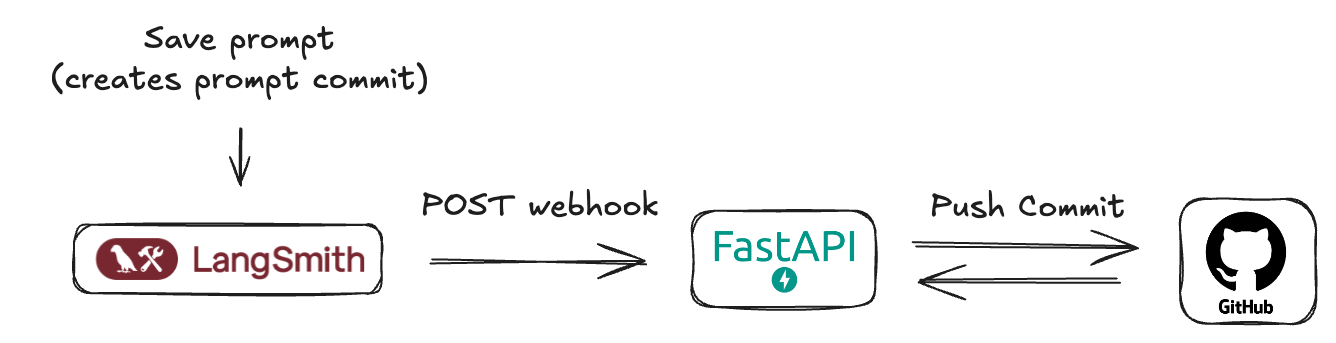
前提条件
在开始之前,请确保已设置以下内容:- **GitHub 账户:**标准 GitHub 账户。
- **GitHub 仓库:**创建一个新的(或选择现有的)仓库,您的 LangSmith 提示清单将存储在其中。这可以是与应用程序代码相同的仓库,也可以是专用于提示的仓库。
-
GitHub 个人访问令牌(PAT):
- LangSmith webhook 不直接与 GitHub 交互 — 它们调用您创建的中介服务器。
- 此服务器需要 GitHub PAT 来进行身份验证并向您的仓库提交。
- 必须包含
repo范围(public_repo足以用于公共仓库)。 - 转到 GitHub > Settings > Developer settings > Personal access tokens > Tokens (classic)。
- 单击 Generate new token (classic)。
- 命名它(例如,“LangSmith Prompt Sync”),设置到期时间,并选择所需的范围。
- 单击 Generate token 并立即复制它 — 它不会再次显示。
- 安全地存储令牌并将其作为环境变量提供给您的服务器。
理解 LangSmith “提示提交”和 webhook
在 LangSmith 中,当您保存对提示的更改时,您实际上是在创建新版本或”提示提交”。这些提交可以触发 webhook。 webhook 将发送包含新提示清单的 JSON 有效负载。Sample Webhook Payload
Sample Webhook Payload
It’s important to understand that LangSmith webhooks for prompt commits are generally triggered at the workspace level. This means if any prompt within your LangSmith workspace is modified and a “prompt commit” is saved, the webhook will fire and send the updated manifest of the prompt. The payloads are identifiable by prompt id. Your receiving server should be designed with this in mind.
Implementing a FastAPI server for webhook reception
To effectively process webhook notifications from LangSmith when prompts are updated, an intermediary server application is necessary. This server will act as the receiver for HTTP POST requests sent by LangSmith. For demonstration purposes in this guide, we will outline the creation of a simple FastAPI application to fulfill this role. This publicly accessible server will be responsible for:- Receiving Webhook Requests: Listening for incoming HTTP POST requests.
- Parsing Payloads: Extracting and interpreting the JSON-formatted prompt manifest from the request body.
- Committing to GitHub: Programmatically creating a new commit in your specified GitHub repository, containing the updated prompt manifest. This ensures your prompts remain version-controlled and synchronized with changes made in LangSmith.
Minimal FastAPI Server Code ()
Minimal FastAPI Server Code ()
main.pyThis server will listen for incoming webhooks from LangSmith and commit the received prompt manifest to your GitHub repository.- Configuration (
.env): It expects a.envfile with yourGITHUB_TOKEN,GITHUB_REPO_OWNER, andGITHUB_REPO_NAME. You can also customizeGITHUB_FILE_PATH(default:LangSmith_prompt_manifest.json) andGITHUB_BRANCH(default:main). - GitHub Interaction: The
commit_manifest_to_githubfunction handles the logic of fetching the current file’s SHA (to update it) and then committing the new manifest content. - Webhook Endpoint (
/webhook/commit): This is the URL path your LangSmith webhook will target. - Error Handling: Basic error handling for GitHub API interactions is included.
https://prompt-commit-webhook.onrender.com).Configuring the webhook in LangSmith
Once your FastAPI server is deployed and you have its public URL, you can configure the webhook in LangSmith:- Navigate to your LangSmith workspace.
-
Go to the Prompts section. Here you’ll see a list of your prompts.
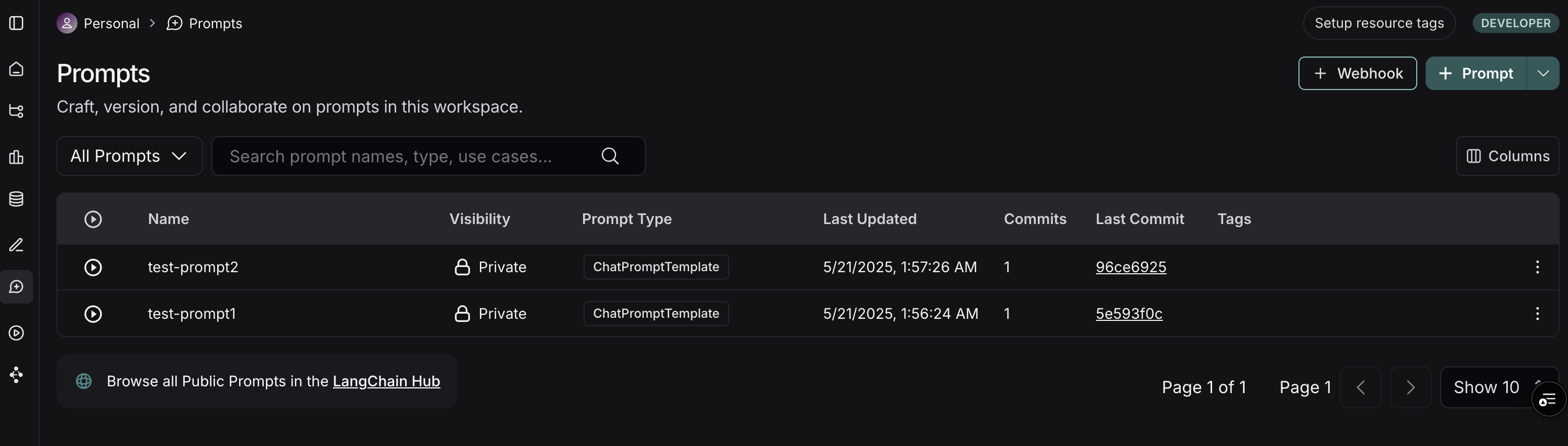
- On the top right of the Prompts page, click the + Webhook button.
-
You’ll be presented with a form to configure your webhook:
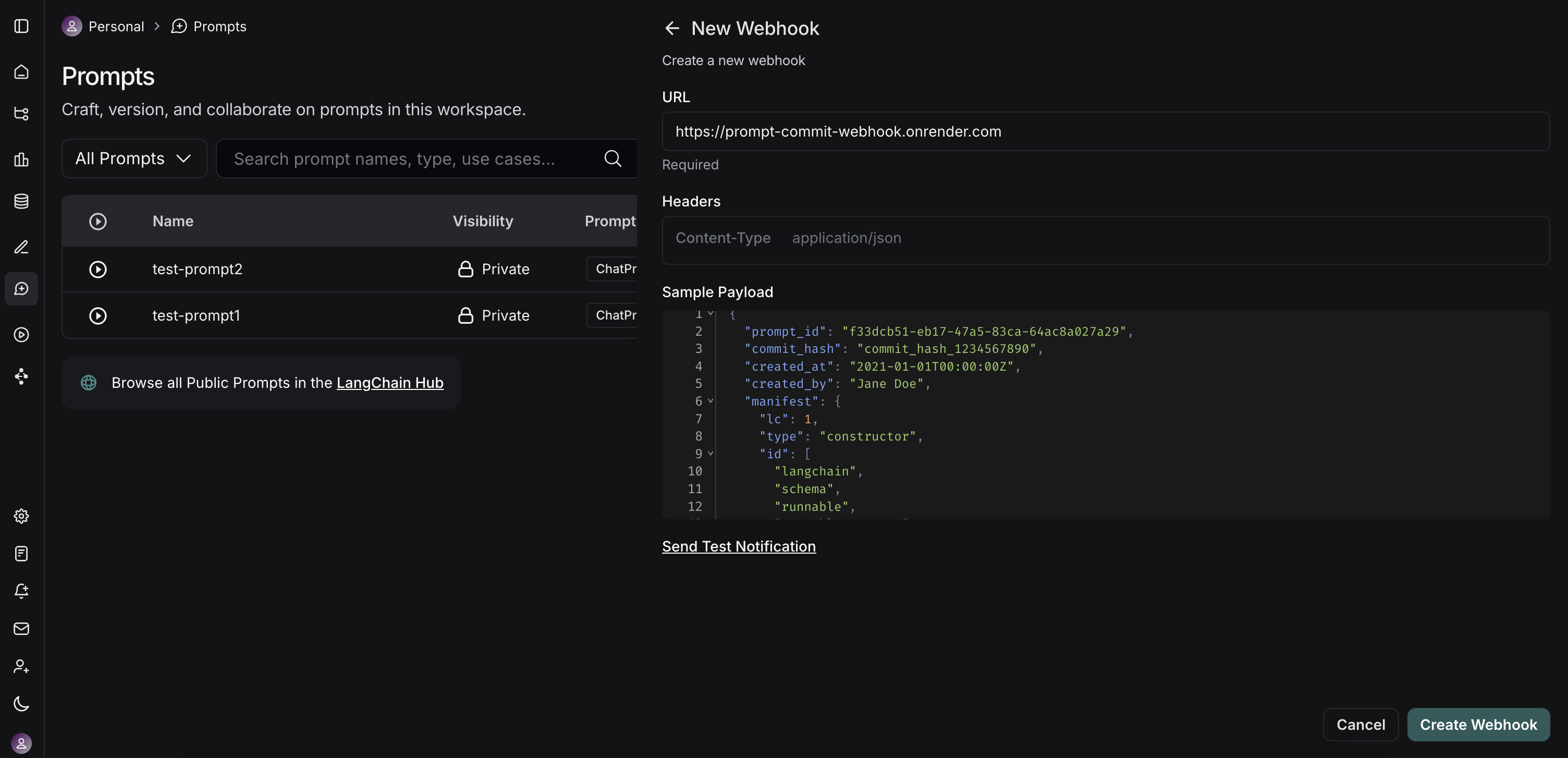
- Webhook URL: Enter the full public URL of your deployed FastAPI server’s endpoint. For our example server, this would be
https://prompt-commit-webhook.onrender.com/webhook/commit. - Headers (Optional):
- You can add custom headers that LangSmith will send with each webhook request.
- Webhook URL: Enter the full public URL of your deployed FastAPI server’s endpoint. For our example server, this would be
- Test the Webhook: LangSmith provides a “Send Test Notification” button. Use this to send a sample payload to your server. Check your server logs (e.g., on Render) to ensure it receives the request and processes it successfully (or to debug any issues).
- Save the webhook configuration.
The workflow in action
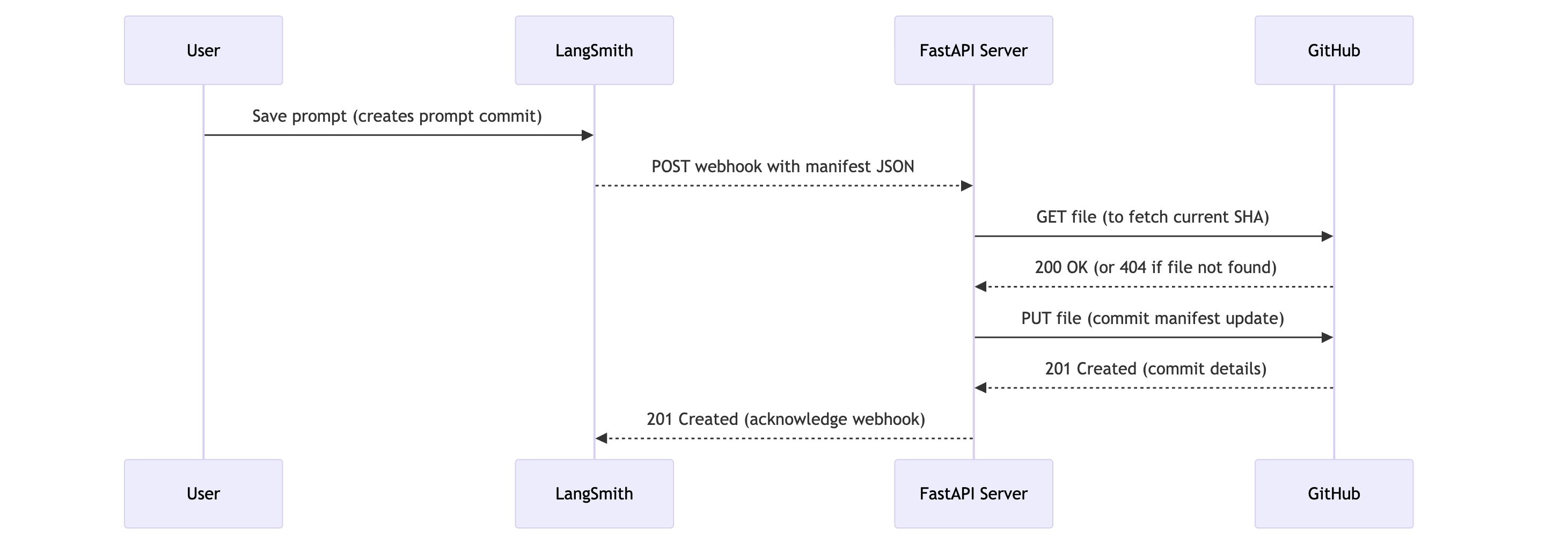 Now, with everything set up, here’s what happens:
- Prompt Modification: A user (developer or non-technical team member) modifies a prompt in the LangSmith UI and saves it, creating a new “prompt commit.”
- Webhook Trigger: LangSmith detects this new prompt commit and triggers the configured webhook.
-
HTTP Request: LangSmith sends an HTTP POST request to the public URL of your FastAPI server (e.g.,
https://prompt-commit-webhook.onrender.com/webhook/commit). The body of this request contains the JSON prompt manifest for the entire workspace. - Server Receives Payload: Your FastAPI server’s endpoint receives the request.
-
GitHub Commit: The server parses the JSON manifest from the request body. It then uses the configured GitHub Personal Access Token, repository owner, repository name, file path, and branch to:
- Check if the manifest file already exists in the repository on the specified branch to get its SHA (this is necessary for updating an existing file).
- Create a new commit with the latest prompt manifest, either creating the file or updating it if it already exists. The commit message will indicate that it’s an update from LangSmith.
-
Confirmation: You should see the new commit appear in your GitHub repository.

Beyond a simple commit
Our example FastAPI server performs a direct commit of the entire prompt manifest. However, this is just the starting point. You can extend the server’s functionality to perform more sophisticated actions:- Granular Commits: Parse the manifest and commit changes to individual prompt files if you prefer a more granular structure in your repository.
- Trigger CI/CD: Instead of (or in addition to) committing, have the server trigger a CI/CD pipeline (e.g., Jenkins, GitHub Actions, GitLab CI) to deploy a staging environment, run tests, or build new application versions.
- Update Databases/Caches: If your application loads prompts from a database or cache, update these stores directly.
- Notifications: Send notifications to Slack, email, or other communication channels about prompt changes.
- Selective Processing: Based on metadata within the LangSmith payload (if available, e.g., which specific prompt changed or by whom), you could apply different logic.