

- 构建多智能体系统
- 在多个图中重用一组节点
- 分布式开发:当您希望不同的团队独立处理图的不同部分时,您可以将每个部分定义为子图,只要尊重子图接口(输入和输出模式),就可以在不了解子图任何细节的情况下构建父图
设置
pip install -U langgraph
从节点调用图
实现子图的一种简单方法是从另一个图的节点内部调用图。在这种情况下,子图可以具有与父图完全不同的模式(没有共享键)。例如,您可能希望为多智能体系统中的每个智能体保留私有消息历史。 如果您的应用程序就是这种情况,您需要定义一个调用子图的节点函数。此函数需要在调用子图之前将输入(父)状态转换为子图状态,并在从节点返回状态更新之前将结果转换回父状态。from typing_extensions import TypedDict
from langgraph.graph.state import StateGraph, START
class SubgraphState(TypedDict):
bar: str
# Subgraph
def subgraph_node_1(state: SubgraphState):
return {"bar": "hi! " + state["bar"]}
subgraph_builder = StateGraph(SubgraphState)
subgraph_builder.add_node(subgraph_node_1)
subgraph_builder.add_edge(START, "subgraph_node_1")
subgraph = subgraph_builder.compile()
# Parent graph
class State(TypedDict):
foo: str
def call_subgraph(state: State):
# Transform the state to the subgraph state
subgraph_output = subgraph.invoke({"bar": state["foo"]})
# Transform response back to the parent state
return {"foo": subgraph_output["bar"]}
builder = StateGraph(State)
builder.add_node("node_1", call_subgraph)
builder.add_edge(START, "node_1")
graph = builder.compile()
Full example: different state schemas
Full example: different state schemas
from typing_extensions import TypedDict
from langgraph.graph.state import StateGraph, START

# Define subgraph
class SubgraphState(TypedDict):
    # note that none of these keys are shared with the parent graph state
    bar: str
    baz: str

def subgraph_node_1(state: SubgraphState):
    return {"baz": "baz"}

def subgraph_node_2(state: SubgraphState):
    return {"bar": state["bar"] + state["baz"]}

subgraph_builder = StateGraph(SubgraphState)
subgraph_builder.add_node(subgraph_node_1)
subgraph_builder.add_node(subgraph_node_2)
subgraph_builder.add_edge(START, "subgraph_node_1")
subgraph_builder.add_edge("subgraph_node_1", "subgraph_node_2")
subgraph = subgraph_builder.compile()

# Define parent graph
class ParentState(TypedDict):
    foo: str

def node_1(state: ParentState):
    return {"foo": "hi! " + state["foo"]}

def node_2(state: ParentState):
    # Transform the state to the subgraph state
    response = subgraph.invoke({"bar": state["foo"]})
    # Transform response back to the parent state
    return {"foo": response["bar"]}


builder = StateGraph(ParentState)
builder.add_node("node_1", node_1)
builder.add_node("node_2", node_2)
builder.add_edge(START, "node_1")
builder.add_edge("node_1", "node_2")
graph = builder.compile()

for chunk in graph.stream({"foo": "foo"}, subgraphs=True):
    print(chunk)
((), {'node_1': {'foo': 'hi! foo'}})
(('node_2:9c36dd0f-151a-cb42-cbad-fa2f851f9ab7',), {'grandchild_1': {'my_grandchild_key': 'hi Bob, how are you'}})
(('node_2:9c36dd0f-151a-cb42-cbad-fa2f851f9ab7',), {'grandchild_2': {'bar': 'hi! foobaz'}})
((), {'node_2': {'foo': 'hi! foobaz'}})
Full example: different state schemas (two levels of subgraphs)
Full example: different state schemas (two levels of subgraphs)
This is an example with two levels of subgraphs: parent -> child -> grandchild.
# Grandchild graph
from typing_extensions import TypedDict
from langgraph.graph.state import StateGraph, START, END

class GrandChildState(TypedDict):
    my_grandchild_key: str

def grandchild_1(state: GrandChildState) -> GrandChildState:
    # NOTE: child or parent keys will not be accessible here
    return {"my_grandchild_key": state["my_grandchild_key"] + ", how are you"}


grandchild = StateGraph(GrandChildState)
grandchild.add_node("grandchild_1", grandchild_1)

grandchild.add_edge(START, "grandchild_1")
grandchild.add_edge("grandchild_1", END)

grandchild_graph = grandchild.compile()

# Child graph
class ChildState(TypedDict):
    my_child_key: str

def call_grandchild_graph(state: ChildState) -> ChildState:
    # NOTE: parent or grandchild keys won't be accessible here
    grandchild_graph_input = {"my_grandchild_key": state["my_child_key"]}
    grandchild_graph_output = grandchild_graph.invoke(grandchild_graph_input)
    return {"my_child_key": grandchild_graph_output["my_grandchild_key"] + " today?"}

child = StateGraph(ChildState)
# We're passing a function here instead of just compiled graph (`grandchild_graph`)
child.add_node("child_1", call_grandchild_graph)
child.add_edge(START, "child_1")
child.add_edge("child_1", END)
child_graph = child.compile()

# Parent graph
class ParentState(TypedDict):
    my_key: str

def parent_1(state: ParentState) -> ParentState:
    # NOTE: child or grandchild keys won't be accessible here
    return {"my_key": "hi " + state["my_key"]}

def parent_2(state: ParentState) -> ParentState:
    return {"my_key": state["my_key"] + " bye!"}

def call_child_graph(state: ParentState) -> ParentState:
    child_graph_input = {"my_child_key": state["my_key"]}
    child_graph_output = child_graph.invoke(child_graph_input)
    return {"my_key": child_graph_output["my_child_key"]}

parent = StateGraph(ParentState)
parent.add_node("parent_1", parent_1)
# We're passing a function here instead of just a compiled graph (`child_graph`)
parent.add_node("child", call_child_graph)
parent.add_node("parent_2", parent_2)

parent.add_edge(START, "parent_1")
parent.add_edge("parent_1", "child")
parent.add_edge("child", "parent_2")
parent.add_edge("parent_2", END)

parent_graph = parent.compile()

for chunk in parent_graph.stream({"my_key": "Bob"}, subgraphs=True):
    print(chunk)
((), {'parent_1': {'my_key': 'hi Bob'}})
(('child:2e26e9ce-602f-862c-aa66-1ea5a4655e3b', 'child_1:781bb3b1-3971-84ce-810b-acf819a03f9c'), {'grandchild_1': {'my_grandchild_key': 'hi Bob, how are you'}})
(('child:2e26e9ce-602f-862c-aa66-1ea5a4655e3b',), {'child_1': {'my_child_key': 'hi Bob, how are you today?'}})
((), {'child': {'my_key': 'hi Bob, how are you today?'}})
((), {'parent_2': {'my_key': 'hi Bob, how are you today? bye!'}})
将图添加为节点
当父图和子图可以通过模式中的共享状态键(通道)进行通信时,您可以将图添加为另一个图中的节点。例如,在多智能体系统中,智能体通常通过共享的 messages 键进行通信。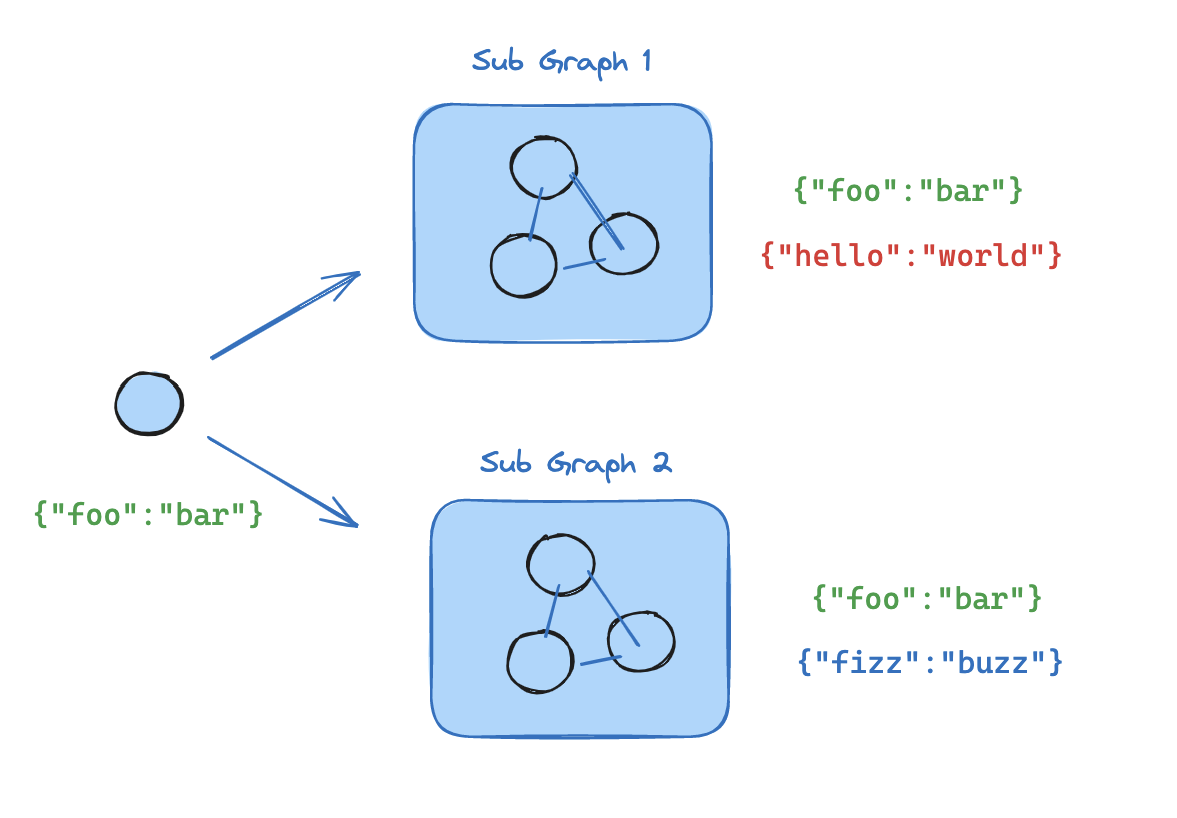 如果您的子图与父图共享状态键,您可以按照以下步骤将其添加到您的图中:
- 定义子图工作流(下面示例中的
subgraph_builder)并编译它 - 在定义父图工作流时,将编译的子图传递给
add_node方法
from typing_extensions import TypedDict
from langgraph.graph.state import StateGraph, START

class State(TypedDict):
    foo: str

# Subgraph

def subgraph_node_1(state: State):
    return {"foo": "hi! " + state["foo"]}

subgraph_builder = StateGraph(State)
subgraph_builder.add_node(subgraph_node_1)
subgraph_builder.add_edge(START, "subgraph_node_1")
subgraph = subgraph_builder.compile()

# Parent graph

builder = StateGraph(State)
builder.add_node("node_1", subgraph)
builder.add_edge(START, "node_1")
graph = builder.compile()
Full example: shared state schemas
Full example: shared state schemas
from typing_extensions import TypedDict
from langgraph.graph.state import StateGraph, START

# Define subgraph
class SubgraphState(TypedDict):
    foo: str  # shared with parent graph state
    bar: str  # private to SubgraphState

def subgraph_node_1(state: SubgraphState):
    return {"bar": "bar"}

def subgraph_node_2(state: SubgraphState):
    # 请注意,此节点使用的是仅在子图中可用的状态键('bar')
    # 并在共享状态键('foo')上发送更新
    return {"foo": state["foo"] + state["bar"]}

subgraph_builder = StateGraph(SubgraphState)
subgraph_builder.add_node(subgraph_node_1)
subgraph_builder.add_node(subgraph_node_2)
subgraph_builder.add_edge(START, "subgraph_node_1")
subgraph_builder.add_edge("subgraph_node_1", "subgraph_node_2")
subgraph = subgraph_builder.compile()

# Define parent graph
class ParentState(TypedDict):
    foo: str

def node_1(state: ParentState):
    return {"foo": "hi! " + state["foo"]}

builder = StateGraph(ParentState)
builder.add_node("node_1", node_1)
builder.add_node("node_2", subgraph)
builder.add_edge(START, "node_1")
builder.add_edge("node_1", "node_2")
graph = builder.compile()

for chunk in graph.stream({"foo": "foo"}):
    print(chunk)
{'node_1': {'foo': 'hi! foo'}}
{'node_2': {'foo': 'hi! foobar'}}
添加持久化
您只需要在编译父图时提供检查点器。LangGraph 会自动将检查点器传播到子图。from langgraph.graph import START, StateGraph
from langgraph.checkpoint.memory import MemorySaver
from typing_extensions import TypedDict
class State(TypedDict):
foo: str
# Subgraph
def subgraph_node_1(state: State):
return {"foo": state["foo"] + "bar"}
subgraph_builder = StateGraph(State)
subgraph_builder.add_node(subgraph_node_1)
subgraph_builder.add_edge(START, "subgraph_node_1")
subgraph = subgraph_builder.compile()
# Parent graph
builder = StateGraph(State)
builder.add_node("node_1", subgraph)
builder.add_edge(START, "node_1")
checkpointer = MemorySaver()
graph = builder.compile(checkpointer=checkpointer)
subgraph_builder = StateGraph(...)
subgraph = subgraph_builder.compile(checkpointer=True)
查看子图状态
当您启用持久化时,您可以通过适当的方法检查图状态(检查点)。要查看子图状态,您可以使用 subgraphs 选项。 您可以通过graph.get_state(config) 检查图状态。要查看子图状态,可以使用 graph.get_state(config, subgraphs=True)。
仅在中断时可用
子图状态只能在子图被中断时查看。一旦您恢复图,您将无法访问子图状态。
View interrupted subgraph state
View interrupted subgraph state
from langgraph.graph import START, StateGraph
from langgraph.checkpoint.memory import MemorySaver
from langgraph.types import interrupt, Command
from typing_extensions import TypedDict

class State(TypedDict):
    foo: str

# Subgraph

def subgraph_node_1(state: State):
    value = interrupt("Provide value:")
    return {"foo": state["foo"] + value}

subgraph_builder = StateGraph(State)
subgraph_builder.add_node(subgraph_node_1)
subgraph_builder.add_edge(START, "subgraph_node_1")

subgraph = subgraph_builder.compile()

# Parent graph

builder = StateGraph(State)
builder.add_node("node_1", subgraph)
builder.add_edge(START, "node_1")

checkpointer = MemorySaver()
graph = builder.compile(checkpointer=checkpointer)

config = {"configurable": {"thread_id": "1"}}

graph.invoke({"foo": ""}, config)
parent_state = graph.get_state(config)

# 这仅在子图被中断时可用。
# 一旦您恢复图,您将无法访问子图状态。
subgraph_state = graph.get_state(config, subgraphs=True).tasks[0].state

# resume the subgraph
graph.invoke(Command(resume="bar"), config)
- This will be available only when the subgraph is interrupted. Once you resume the graph, you won’t be able to access the subgraph state.
流式传输子图输出
要在流式输出中包含子图的输出,您可以在父图的 stream 方法中设置 subgraphs 选项。这将从父图和任何子图流式传输输出。for chunk in graph.stream(
{"foo": "foo"},
subgraphs=True,
stream_mode="updates",
):
print(chunk)
Stream from subgraphs
Stream from subgraphs
from typing_extensions import TypedDict
from langgraph.graph.state import StateGraph, START

# Define subgraph
class SubgraphState(TypedDict):
    foo: str
    bar: str

def subgraph_node_1(state: SubgraphState):
    return {"bar": "bar"}

def subgraph_node_2(state: SubgraphState):
    # 请注意,此节点使用的是仅在子图中可用的状态键('bar')
    # 并在共享状态键('foo')上发送更新
    return {"foo": state["foo"] + state["bar"]}

subgraph_builder = StateGraph(SubgraphState)
subgraph_builder.add_node(subgraph_node_1)
subgraph_builder.add_node(subgraph_node_2)
subgraph_builder.add_edge(START, "subgraph_node_1")
subgraph_builder.add_edge("subgraph_node_1", "subgraph_node_2")
subgraph = subgraph_builder.compile()

# Define parent graph
class ParentState(TypedDict):
    foo: str

def node_1(state: ParentState):
    return {"foo": "hi! " + state["foo"]}

builder = StateGraph(ParentState)
builder.add_node("node_1", node_1)
builder.add_node("node_2", subgraph)
builder.add_edge(START, "node_1")
builder.add_edge("node_1", "node_2")
graph = builder.compile()

for chunk in graph.stream(
    {"foo": "foo"},
    stream_mode="updates",
    subgraphs=True,
):
    print(chunk)
((), {'node_1': {'foo': 'hi! foo'}})
(('node_2:e58e5673-a661-ebb0-70d4-e298a7fc28b7',), {'subgraph_node_1': {'bar': 'bar'}})
(('node_2:e58e5673-a661-ebb0-70d4-e298a7fc28b7',), {'subgraph_node_2': {'foo': 'hi! foobar'}})
((), {'node_2': {'foo': 'hi! foobar'}})
Connect these docs programmatically to Claude, VSCode, and more via MCP for real-time answers.