概述

LLM 启用的最强大应用程序之一是复杂的问答(Q&A)聊天机器人。这些应用程序可以回答有关特定来源信息的问题。这些应用程序使用一种称为检索增强生成(Retrieval Augmented Generation)或 RAG 的技术。 本教程将展示如何在非结构化文本数据源上构建简单的问答应用程序。我们将演示:
  1. 使用简单工具执行搜索的 RAG 智能体。这是一个良好的通用实现。
  2. 每个查询仅使用一次 LLM 调用的两步 RAG 。这是用于简单查询的快速有效方法。

概念

我们将涵盖以下概念:
  • 索引:用于从源摄取数据并对其进行索引的管道。这通常在单独的过程中发生。
  • 检索和生成:实际的 RAG 过程,在运行时获取用户查询并从索引中检索相关数据,然后将其传递给模型。
一旦我们索引了我们的数据,我们将使用智能体作为我们的编排框架来实现检索和生成步骤。
本教程的索引部分将主要遵循语义搜索教程如果您的数据已经可供搜索(即,您有一个执行搜索的函数),或者您对该教程的内容感到满意,请随时跳到检索和生成部分

预览

在本指南中,我们将构建一个回答有关网站内容的问题的应用程序。我们将使用的具体网站是 Lilian Weng 的 LLM 驱动的自主智能体 博客文章,这使我们能够提出有关该文章内容的问题。 我们可以创建一个简单的索引管道和 RAG 链,用约 40 行代码完成此操作。请参阅下面的完整代码片段:
import bs4
from langchain.agents import AgentState, create_agent
from langchain_community.document_loaders import WebBaseLoader
from langchain.messages import MessageLikeRepresentation
from langchain_text_splitters import RecursiveCharacterTextSplitter

# Load and chunk contents of the blog
loader = WebBaseLoader(
    web_paths=("https://lilianweng.github.io/posts/2023-06-23-agent/",),
    bs_kwargs=dict(
        parse_only=bs4.SoupStrainer(
            class_=("post-content", "post-title", "post-header")
        )
    ),
)
docs = loader.load()

text_splitter = RecursiveCharacterTextSplitter(chunk_size=1000, chunk_overlap=200)
all_splits = text_splitter.split_documents(docs)

# Index chunks
_ = vector_store.add_documents(documents=all_splits)

# Construct a tool for retrieving context
@tool(response_format="content_and_artifact")
def retrieve_context(query: str):
    """Retrieve information to help answer a query."""
    retrieved_docs = vector_store.similarity_search(query, k=2)
    serialized = "\n\n".join(
        (f"Source: {doc.metadata}\nContent: {doc.page_content}")
        for doc in retrieved_docs
    )
    return serialized, retrieved_docs

tools = [retrieve_context]
# If desired, specify custom instructions
prompt = (
    "You have access to a tool that retrieves context from a blog post. "
    "Use the tool to help answer user queries."
)
agent = create_agent(model, tools, system_prompt=prompt)
query = "What is task decomposition?"
for step in agent.stream(
    {"messages": [{"role": "user", "content": query}]},
    stream_mode="values",
):
    step["messages"][-1].pretty_print()
================================ Human Message =================================

What is task decomposition?
================================== Ai Message ==================================
Tool Calls:
  retrieve_context (call_xTkJr8njRY0geNz43ZvGkX0R)
 Call ID: call_xTkJr8njRY0geNz43ZvGkX0R
  Args:
    query: task decomposition
================================= Tool Message =================================
Name: retrieve_context

Source: {'source': 'https://lilianweng.github.io/posts/2023-06-23-agent/'}
Content: Task decomposition can be done by...

Source: {'source': 'https://lilianweng.github.io/posts/2023-06-23-agent/'}
Content: Component One: Planning...
================================== Ai Message ==================================

Task decomposition refers to...
Check out the LangSmith trace.

Setup

Installation

This tutorial requires these langchain dependencies:
pip install langchain langchain-text-splitters langchain-community bs4
有关更多详细信息,请参阅我们的安装指南

LangSmith

您使用 LangChain 构建的许多应用程序将包含多个步骤和多次 LLM 调用。随着这些应用程序变得越来越复杂,能够检查链或智能体内部究竟发生了什么变得至关重要。执行此操作的最佳方法是使用 LangSmith 在上面的链接注册后,请确保设置您的环境变量以开始记录跟踪:
export LANGSMITH_TRACING="true"
export LANGSMITH_API_KEY="..."
或者,在 Python 中设置它们:
import getpass
import os

os.environ["LANGSMITH_TRACING"] = "true"
os.environ["LANGSMITH_API_KEY"] = getpass.getpass()

组件

我们需要从 LangChain 的集成套件中选择三个组件。 选择一个聊天模型:
  • OpenAI
  • Anthropic
  • Azure
  • Google Gemini
  • AWS Bedrock
👉 Read the OpenAI chat model integration docs
pip install -U "langchain[openai]"
import os
from langchain.chat_models import init_chat_model

os.environ["OPENAI_API_KEY"] = "sk-..."

model = init_chat_model("gpt-4.1")
选择一个嵌入模型:
  • OpenAI
  • Azure
  • Google Gemini
  • Google Vertex
  • AWS
  • HuggingFace
  • Ollama
  • Cohere
  • MistralAI
  • Nomic
  • NVIDIA
  • Voyage AI
  • IBM watsonx
  • Fake
pip install -U "langchain-openai"
import getpass
import os

if not os.environ.get("OPENAI_API_KEY"):
os.environ["OPENAI_API_KEY"] = getpass.getpass("Enter API key for OpenAI: ")

from langchain_openai import OpenAIEmbeddings

embeddings = OpenAIEmbeddings(model="text-embedding-3-large")
选择一个向量存储:
  • In-memory
  • AstraDB
  • Chroma
  • FAISS
  • Milvus
  • MongoDB
  • PGVector
  • PGVectorStore
  • Pinecone
  • Qdrant
pip install -U "langchain-core"
from langchain_core.vectorstores import InMemoryVectorStore

vector_store = InMemoryVectorStore(embeddings)

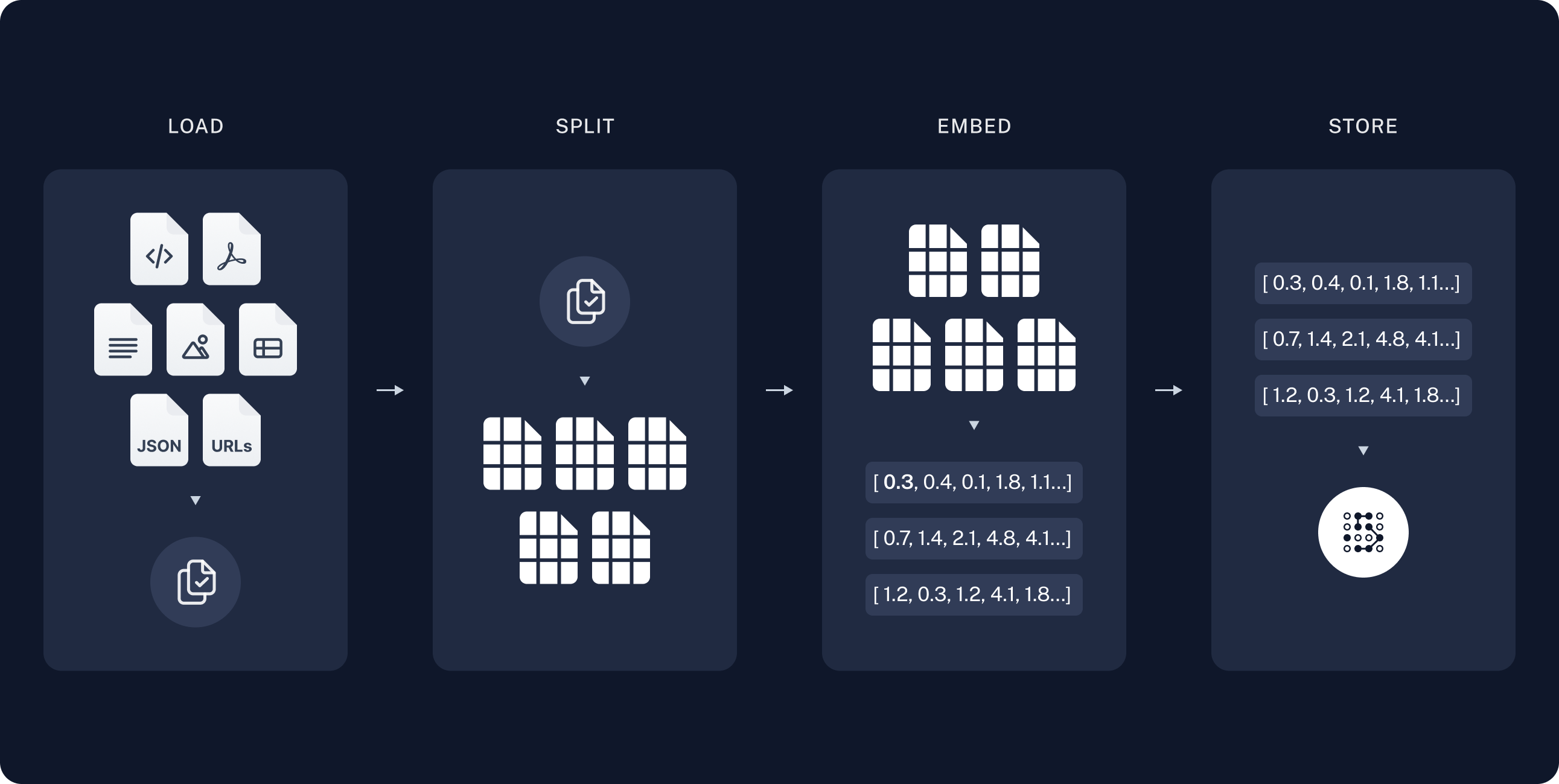
1. Indexing

本节是语义搜索教程中内容的缩写版本。如果您的数据已经索引并可供搜索(即,您有一个执行搜索的函数),或者您熟悉文档加载器嵌入向量存储,请随时跳到下一节关于检索和生成的内容。
索引通常按以下方式工作:
  1. 加载:首先我们需要加载数据。这是通过文档加载器完成的。
  2. 分割文本分割器将大型 Documents 分解为较小的块。这对于索引数据和将其传递给模型都很有用,因为大块更难搜索,并且无法适应模型的有限上下文窗口。
  3. 存储:我们需要某个地方来存储和索引我们的分割,以便以后可以搜索它们。这通常使用向量存储嵌入模型来完成。
index_diagram

加载文档

我们首先需要加载博客文章内容。我们可以为此使用文档加载器,这些对象从源加载数据并返回 Document 对象列表。 在这种情况下,我们将使用 WebBaseLoader,它使用 urllib 从 Web URL 加载 HTML,并使用 BeautifulSoup 将其解析为文本。我们可以通过 bs_kwargs 将参数传递给 BeautifulSoup 解析器来自定义 HTML -> 文本解析(请参阅 BeautifulSoup 文档)。在这种情况下,只有类为 “post-content”、“post-title” 或 “post-header” 的 HTML 标签是相关的,因此我们将删除所有其他标签。
import bs4
from langchain_community.document_loaders import WebBaseLoader

# Only keep post title, headers, and content from the full HTML.
bs4_strainer = bs4.SoupStrainer(class_=("post-title", "post-header", "post-content"))
loader = WebBaseLoader(
    web_paths=("https://lilianweng.github.io/posts/2023-06-23-agent/",),
    bs_kwargs={"parse_only": bs4_strainer},
)
docs = loader.load()

assert len(docs) == 1
print(f"Total characters: {len(docs[0].page_content)}")
Total characters: 43131
print(docs[0].page_content[:500])
      LLM Powered Autonomous Agents

Date: June 23, 2023  |  Estimated Reading Time: 31 min  |  Author: Lilian Weng


Building agents with LLM (large language model) as its core controller is a cool concept. Several proof-of-concepts demos, such as AutoGPT, GPT-Engineer and BabyAGI, serve as inspiring examples. The potentiality of LLM extends beyond generating well-written copies, stories, essays and programs; it can be framed as a powerful general problem solver.
Agent System Overview#
In
深入了解 DocumentLoader:从源加载数据作为 Documents 列表的对象。
  • 集成:160+ 个集成可供选择。
  • BaseLoader:基础接口的 API 参考。

分割文档

我们加载的文档超过 42k 个字符,这对于许多模型的上下文窗口来说太长了。即使对于那些可以将完整文章放入其上下文窗口的模型,模型也很难在非常长的输入中找到信息。 为了处理这个问题,我们将 Document 分割成块以进行嵌入和向量存储。这应该有助于我们在运行时仅检索博客文章最相关的部分。 语义搜索教程中一样,我们使用 RecursiveCharacterTextSplitter,它将使用常见分隔符(如换行符)递归分割文档,直到每个块达到适当的大小。这是通用文本用例推荐的文本分割器。
from langchain_text_splitters import RecursiveCharacterTextSplitter

text_splitter = RecursiveCharacterTextSplitter(
    chunk_size=1000,  # chunk size (characters)
    chunk_overlap=200,  # chunk overlap (characters)
    add_start_index=True,  # track index in original document
)
all_splits = text_splitter.split_documents(docs)

print(f"Split blog post into {len(all_splits)} sub-documents.")
Split blog post into 66 sub-documents.
Go deeper TextSplitter: Object that splits a list of Document objects into smaller chunks for storage and retrieval.

存储文档

现在我们需要索引我们的 66 个文本块,以便在运行时可以搜索它们。遵循语义搜索教程,我们的方法是将每个文档分割的内容嵌入并将这些嵌入插入到向量存储中。给定输入查询,我们可以使用向量搜索来检索相关文档。 我们可以使用在教程开始时选择的向量存储和嵌入模型,在单个命令中嵌入和存储所有文档分割。
document_ids = vector_store.add_documents(documents=all_splits)

print(document_ids[:3])
['07c18af6-ad58-479a-bfb1-d508033f9c64', '9000bf8e-1993-446f-8d4d-f4e507ba4b8f', 'ba3b5d14-bed9-4f5f-88be-44c88aedc2e6']
深入了解 Embeddings:文本嵌入模型的包装器,用于将文本转换为嵌入。
  • 集成:30+ 个集成可供选择。
  • 接口:基础接口的 API 参考。
VectorStore:向量数据库的包装器,用于存储和查询嵌入。
  • 集成:40+ 个集成可供选择。
  • 接口:基础接口的 API 参考。
这完成了管道的索引部分。此时,我们有一个包含博客文章分块内容的可查询向量存储。给定用户问题,理想情况下我们应该能够返回回答问题的博客文章片段。

2. 检索和生成

RAG 应用程序通常按以下方式工作:
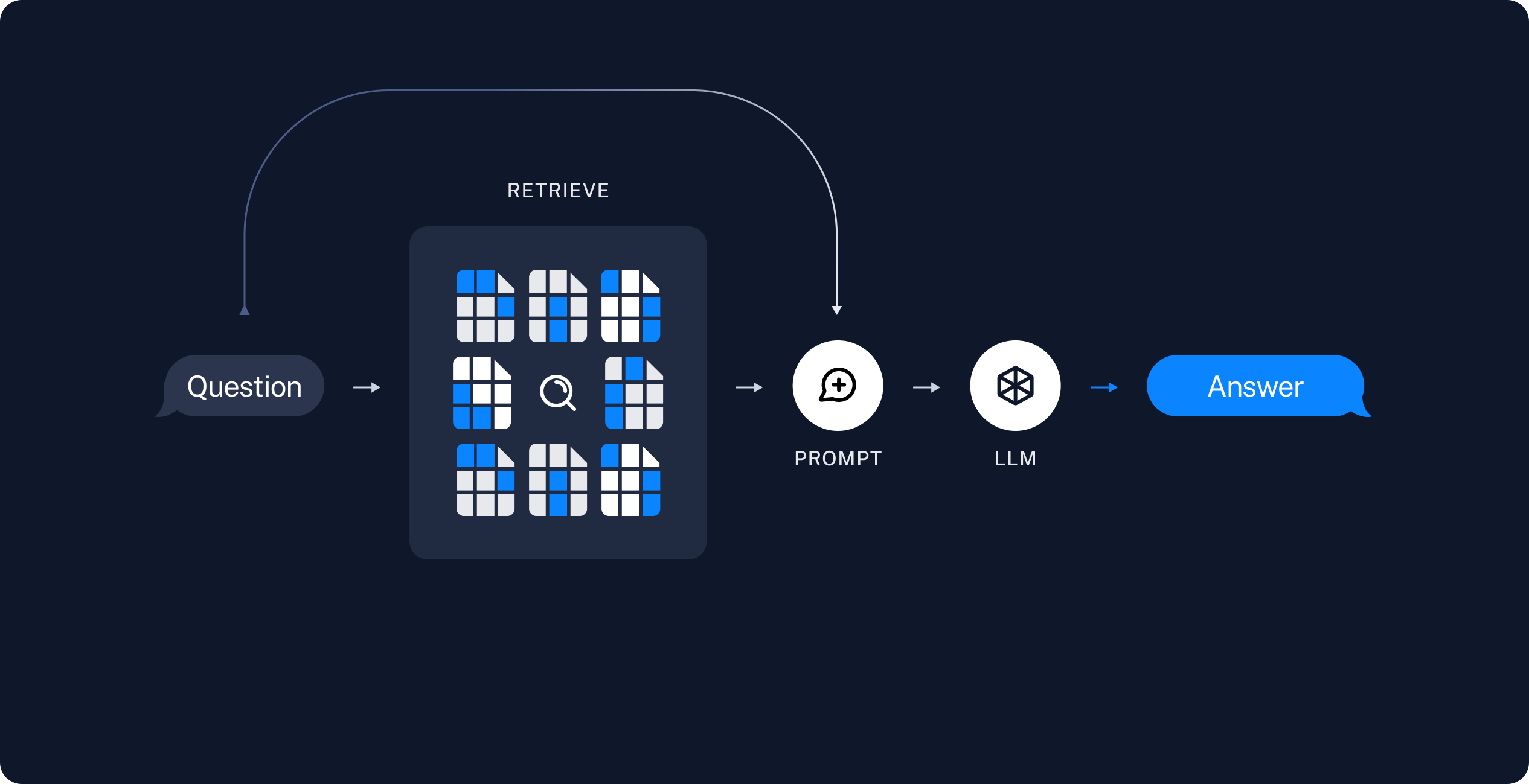
  1. 检索:给定用户输入,使用检索器从存储中检索相关分割。
  2. 生成模型使用包含问题和检索数据的提示生成答案
retrieval_diagram 现在让我们编写实际的应用程序逻辑。我们想创建一个简单的应用程序,它接受用户问题,搜索与该问题相关的文档,将检索到的文档和初始问题传递给模型,并返回答案。 我们将演示:
  1. 使用简单工具执行搜索的 RAG 智能体。这是一个良好的通用实现。
  2. 每个查询仅使用一次 LLM 调用的两步 RAG 。这是用于简单查询的快速有效方法。

RAG 智能体

RAG 应用程序的一种形式是带有检索信息工具的简单智能体。我们可以通过实现一个包装向量存储的工具来组装一个最小的 RAG 智能体:
from langchain.tools import tool

@tool(response_format="content_and_artifact")
def retrieve_context(query: str):
    """Retrieve information to help answer a query."""
    retrieved_docs = vector_store.similarity_search(query, k=2)
    serialized = "\n\n".join(
        (f"Source: {doc.metadata}\nContent: {doc.page_content}")
        for doc in retrieved_docs
    )
    return serialized, retrieved_docs
这里我们使用 工具装饰器 来配置工具,将原始文档作为工件附加到每个 ToolMessage。这将让我们在应用程序中访问文档元数据,与发送给模型的字符串化表示分开。
检索工具不限于单个字符串 query 参数,如上面的示例所示。您可以通过添加参数来强制 LLM 指定其他搜索参数 - 例如,类别:
from typing import Literal

def retrieve_context(query: str, section: Literal["beginning", "middle", "end"]):
有了我们的工具,我们可以构建智能体:
from langchain.agents import create_agent


tools = [retrieve_context]
# 如果需要,指定自定义指令
prompt = (
    "您可以访问一个从博客文章中检索上下文的工具。"
    "使用该工具帮助回答用户查询。"
)
agent = create_agent(model, tools, system_prompt=prompt)
让我们测试一下。我们构建一个通常需要迭代检索步骤序列来回答的问题:
query = (
    "What is the standard method for Task Decomposition?\n\n"
    "Once you get the answer, look up common extensions of that method."
)

for event in agent.stream(
    {"messages": [{"role": "user", "content": query}]},
    stream_mode="values",
):
    event["messages"][-1].pretty_print()
================================ Human Message =================================

What is the standard method for Task Decomposition?

Once you get the answer, look up common extensions of that method.
================================== Ai Message ==================================
Tool Calls:
  retrieve_context (call_d6AVxICMPQYwAKj9lgH4E337)
 Call ID: call_d6AVxICMPQYwAKj9lgH4E337
  Args:
    query: standard method for Task Decomposition
================================= Tool Message =================================
Name: retrieve_context

Source: {'source': 'https://lilianweng.github.io/posts/2023-06-23-agent/'}
Content: Task decomposition can be done...

Source: {'source': 'https://lilianweng.github.io/posts/2023-06-23-agent/'}
Content: Component One: Planning...
================================== Ai Message ==================================
Tool Calls:
  retrieve_context (call_0dbMOw7266jvETbXWn4JqWpR)
 Call ID: call_0dbMOw7266jvETbXWn4JqWpR
  Args:
    query: common extensions of the standard method for Task Decomposition
================================= Tool Message =================================
Name: retrieve_context

Source: {'source': 'https://lilianweng.github.io/posts/2023-06-23-agent/'}
Content: Task decomposition can be done...

Source: {'source': 'https://lilianweng.github.io/posts/2023-06-23-agent/'}
Content: Component One: Planning...
================================== Ai Message ==================================

The standard method for Task Decomposition often used is the Chain of Thought (CoT)...
Note that the agent:
  1. Generates a query to search for a standard method for task decomposition;
  2. Receiving the answer, generates a second query to search for common extensions of it;
  3. Having received all necessary context, answers the question.
We can see the full sequence of steps, along with latency and other metadata, in the LangSmith trace.
You can add a deeper level of control and customization using the LangGraph framework directly— for example, you can add steps to grade document relevance and rewrite search queries. Check out LangGraph’s Agentic RAG tutorial for more advanced formulations.

RAG 链

在上面的智能体 RAG 公式中,我们允许 LLM 在生成工具调用以帮助回答用户查询时使用其判断力。这是一个良好的通用解决方案,但有一些权衡:
✅ 优势⚠️ 缺点
仅在需要时搜索 – LLM 可以处理问候、后续问题和简单查询,而不会触发不必要的搜索。两次推理调用 – 执行搜索时,需要一次调用来生成查询,另一次调用来产生最终响应。
上下文搜索查询 – 通过将搜索视为带有 query 输入的工具,LLM 会制作自己的查询,这些查询包含对话上下文。控制减少 – LLM 可能在真正需要时跳过搜索,或在不需要时进行额外搜索。
允许多次搜索 – LLM 可以执行多次搜索以支持单个用户查询。
另一种常见方法是两步链,其中我们总是运行搜索(可能使用原始用户查询)并将结果作为单个 LLM 查询的上下文。这导致每个查询只有一次推理调用,以降低延迟为代价换取灵活性。 在这种方法中,我们不再在循环中调用模型,而是进行单次传递。 我们可以通过从智能体中删除工具并将检索步骤合并到自定义提示中来实现此链:
from langchain.agents.middleware import dynamic_prompt, ModelRequest

@dynamic_prompt
def prompt_with_context(request: ModelRequest) -> str:
    """将上下文注入状态消息。"""
    last_query = request.state["messages"][-1].text
    retrieved_docs = vector_store.similarity_search(last_query)

    docs_content = "\n\n".join(doc.page_content for doc in retrieved_docs)

    system_message = (
        "您是一个有用的助手。在您的响应中使用以下上下文:"
        f"\n\n{docs_content}"
    )

    return system_message


agent = create_agent(model, tools=[], middleware=[prompt_with_context])
让我们试试这个:
query = "What is task decomposition?"
for step in agent.stream(
    {"messages": [{"role": "user", "content": query}]},
    stream_mode="values",
):
    step["messages"][-1].pretty_print()
================================ Human Message =================================

What is task decomposition?
================================== Ai Message ==================================

Task decomposition is...
In the LangSmith trace we can see the retrieved context incorporated into the model prompt. This is a fast and effective method for simple queries in constrained settings, when we typically do want to run user queries through semantic search to pull additional context.
The above RAG chain incorporates retrieved context into a single system message for that run.As in the agentic RAG formulation, we sometimes want to include raw source documents in the application state to have access to document metadata. We can do this for the two-step chain case by:
  1. Adding a key to the state to store the retrieved documents
  2. Adding a new node via a pre-model hook to populate that key (as well as inject the context).
from typing import Any
from langchain_core.documents import Document
from langchain.agents.middleware import AgentMiddleware, AgentState


class State(AgentState):
    context: list[Document]


class RetrieveDocumentsMiddleware(AgentMiddleware[State]):
    state_schema = State

    def before_model(self, state: AgentState) -> dict[str, Any] | None:
        last_message = state["messages"][-1]
        retrieved_docs = vector_store.similarity_search(last_message.text)

        docs_content = "\n\n".join(doc.page_content for doc in retrieved_docs)

        augmented_message_content = (
            f"{last_message.text}\n\n"
            "Use the following context to answer the query:\n"
            f"{docs_content}"
        )
        return {
            "messages": [last_message.model_copy(update={"content": augmented_message_content})],
            "context": retrieved_docs,
        }


agent = create_agent(
    llm,
    tools=[],
    middleware=[RetrieveDocumentsMiddleware()],
)

后续步骤

现在我们已经通过 create_agent 实现了一个简单的 RAG 应用程序,我们可以轻松地合并新功能并深入:
Connect these docs programmatically to Claude, VSCode, and more via MCP for real-time answers.