
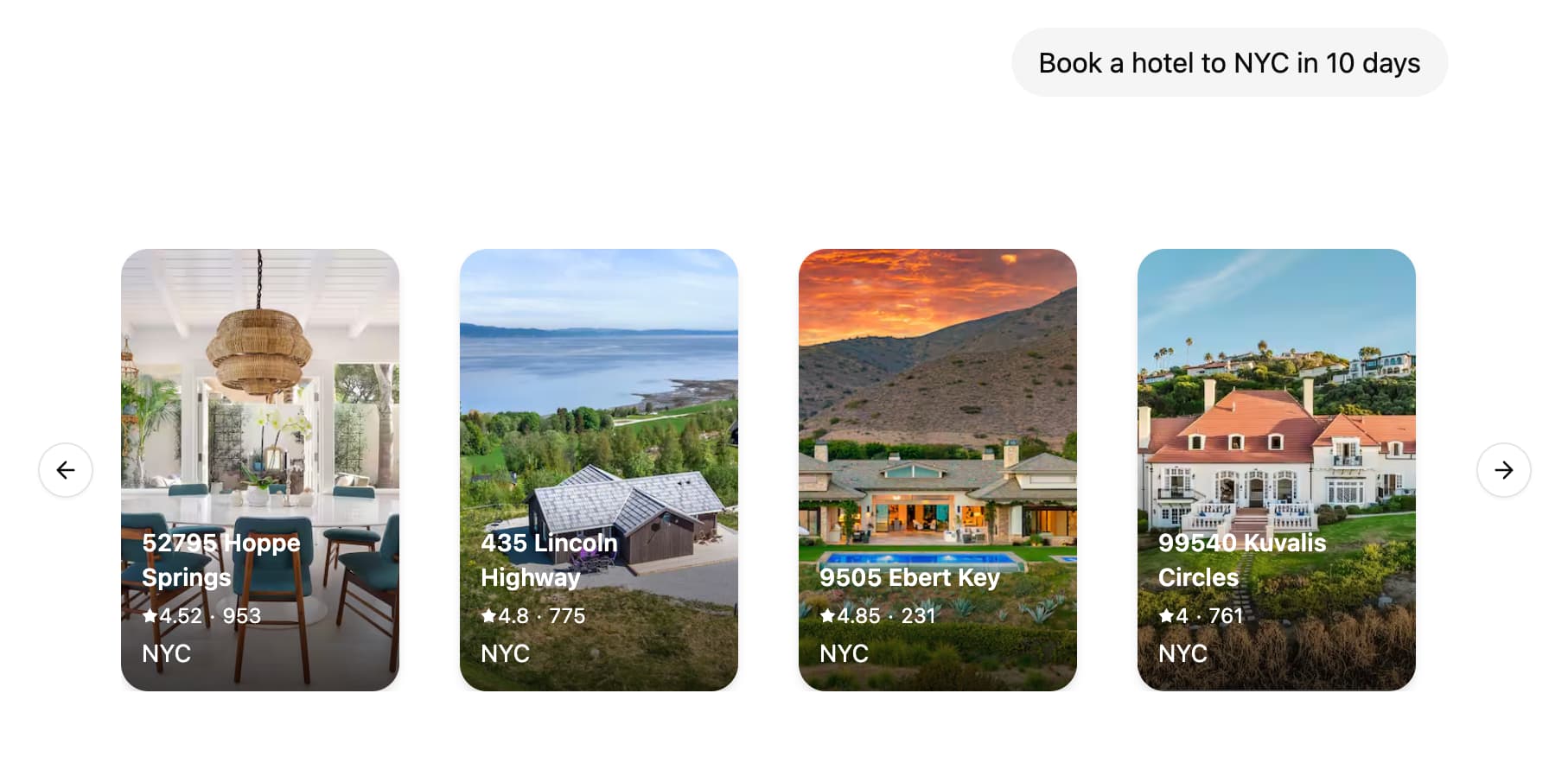
生成式用户界面(Generative UI)允许智能体超越文本并生成丰富的用户界面。这使得能够创建更具交互性和上下文感知的应用程序,其中 UI 根据对话流程和 AI 响应进行调整。 Agent Chat showing a prompt about booking/lodging and a generated set of hotel listing cards (images, titles, prices, locations) rendered inline as UI components. LangSmith 支持将您的 React 组件与图代码放在一起。这使您能够专注于为图构建特定的 UI 组件,同时轻松插入现有的聊天界面,例如 Agent Chat,并仅在实际需要时加载代码。

教程

1. 定义和配置 UI 组件

首先,创建您的第一个 UI 组件。对于每个组件,您需要提供一个唯一的标识符,该标识符将用于在图代码中引用该组件。
src/agent/ui.tsx
const WeatherComponent = (props: { city: string }) => {
  return <div>Weather for {props.city}</div>;
};

export default {
  weather: WeatherComponent,
};
接下来,在您的 langgraph.json 配置中定义 UI 组件:
{
  "node_version": "20",
  "graphs": {
    "agent": "./src/agent/index.ts:graph"
  },
  "ui": {
    "agent": "./src/agent/ui.tsx"
  }
}
ui 部分指向图将使用的 UI 组件。默认情况下,我们建议使用与图名称相同的键,但您可以按照自己的喜好拆分组件,有关更多详细信息,请参阅自定义 UI 组件的命名空间 LangSmith 将自动捆绑您的 UI 组件代码和样式,并将它们作为外部资产提供,可以由 LoadExternalComponent 组件加载。一些依赖项(例如 reactreact-dom)将自动从捆绑包中排除。 CSS 和 Tailwind 4.x 也是开箱即用的支持,因此您可以在 UI 组件中自由使用 Tailwind 类以及 shadcn/ui
  • src/agent/ui.tsx
  • src/agent/styles.css
import "./styles.css";

const WeatherComponent = (props: { city: string }) => {
  return <div className="bg-red-500">Weather for {props.city}</div>;
};

export default {
  weather: WeatherComponent,
};

2. 在图中发送 UI 组件

  • Python
  • JS
src/agent.py
import uuid
from typing import Annotated, Sequence, TypedDict

from langchain.messages import AIMessage, BaseMessage
from langchain_openai import ChatOpenAI
from langgraph.graph import StateGraph
from langgraph.graph.message import add_messages
from langgraph.graph.ui import AnyUIMessage, ui_message_reducer, push_ui_message


class AgentState(TypedDict):  # noqa: D101
    messages: Annotated[Sequence[BaseMessage], add_messages]
    ui: Annotated[Sequence[AnyUIMessage], ui_message_reducer]


async def weather(state: AgentState):
    class WeatherOutput(TypedDict):
        city: str

    weather: WeatherOutput = (
        await ChatOpenAI(model="gpt-4o-mini")
        .with_structured_output(WeatherOutput)
        .with_config({"tags": ["nostream"]})
        .ainvoke(state["messages"])
    )

    message = AIMessage(
        id=str(uuid.uuid4()),
        content=f"Here's the weather for {weather['city']}",
    )

    # Emit UI elements associated with the message
    push_ui_message("weather", weather, message=message)
    return {"messages": [message]}


workflow = StateGraph(AgentState)
workflow.add_node(weather)
workflow.add_edge("__start__", "weather")
graph = workflow.compile()

3. Handle UI elements in your React application

On the client side, you can use useStream() and LoadExternalComponent to display the UI elements.
src/app/page.tsx
"use client";

import { useStream } from "@langchain/langgraph-sdk/react";
import { LoadExternalComponent } from "@langchain/langgraph-sdk/react-ui";

export default function Page() {
  const { thread, values } = useStream({
    apiUrl: "http://localhost:2024",
    assistantId: "agent",
  });

  return (
    <div>
      {thread.messages.map((message) => (
        <div key={message.id}>
          {message.content}
          {values.ui
            ?.filter((ui) => ui.metadata?.message_id === message.id)
            .map((ui) => (
              <LoadExternalComponent key={ui.id} stream={thread} message={ui} />
            ))}
        </div>
      ))}
    </div>
  );
}
Behind the scenes, LoadExternalComponent will fetch the JS and CSS for the UI components from LangSmith and render them in a shadow DOM, thus ensuring style isolation from the rest of your application.

How-to guides

Provide custom components on the client side

If you already have the components loaded in your client application, you can provide a map of such components to be rendered directly without fetching the UI code from LangSmith.
const clientComponents = {
  weather: WeatherComponent,
};

<LoadExternalComponent
  stream={thread}
  message={ui}
  components={clientComponents}
/>;

Show loading UI when components are loading

You can provide a fallback UI to be rendered when the components are loading.
<LoadExternalComponent
  stream={thread}
  message={ui}
  fallback={<div>Loading...</div>}
/>

Customise the namespace of UI components.

By default LoadExternalComponent will use the assistantId from useStream() hook to fetch the code for UI components. You can customise this by providing a namespace prop to the LoadExternalComponent component.
  • src/app/page.tsx
  • langgraph.json
<LoadExternalComponent
  stream={thread}
  message={ui}
  namespace="custom-namespace"
/>

Access and interact with the thread state from the UI component

You can access the thread state inside the UI component by using the useStreamContext hook.
import { useStreamContext } from "@langchain/langgraph-sdk/react-ui";

const WeatherComponent = (props: { city: string }) => {
  const { thread, submit } = useStreamContext();
  return (
    <>
      <div>Weather for {props.city}</div>

      <button
        onClick={() => {
          const newMessage = {
            type: "human",
            content: `What's the weather in ${props.city}?`,
          };

          submit({ messages: [newMessage] });
        }}
      >
        Retry
      </button>
    </>
  );
};

Pass additional context to the client components

You can pass additional context to the client components by providing a meta prop to the LoadExternalComponent component.
<LoadExternalComponent stream={thread} message={ui} meta={{ userId: "123" }} />
Then, you can access the meta prop in the UI component by using the useStreamContext hook.
import { useStreamContext } from "@langchain/langgraph-sdk/react-ui";

const WeatherComponent = (props: { city: string }) => {
  const { meta } = useStreamContext<
    { city: string },
    { MetaType: { userId?: string } }
  >();

  return (
    <div>
      Weather for {props.city} (user: {meta?.userId})
    </div>
  );
};

Streaming UI messages from the server

You can stream UI messages before the node execution is finished by using the onCustomEvent callback of the useStream() hook. This is especially useful when updating the UI component as the LLM is generating the response.
import { uiMessageReducer } from "@langchain/langgraph-sdk/react-ui";

const { thread, submit } = useStream({
  apiUrl: "http://localhost:2024",
  assistantId: "agent",
  onCustomEvent: (event, options) => {
    options.mutate((prev) => {
      const ui = uiMessageReducer(prev.ui ?? [], event);
      return { ...prev, ui };
    });
  },
});
Then you can push updates to the UI component by calling ui.push() / push_ui_message() with the same ID as the UI message you wish to update.
  • Python
  • JS
  • ui.tsx
from typing import Annotated, Sequence, TypedDict

from langchain_anthropic import ChatAnthropic
from langchain.messages import AIMessage, AIMessageChunk, BaseMessage
from langgraph.graph import StateGraph
from langgraph.graph.message import add_messages
from langgraph.graph.ui import AnyUIMessage, push_ui_message, ui_message_reducer


class AgentState(TypedDict):  # noqa: D101
    messages: Annotated[Sequence[BaseMessage], add_messages]
    ui: Annotated[Sequence[AnyUIMessage], ui_message_reducer]


class CreateTextDocument(TypedDict):
    """Prepare a document heading for the user."""

    title: str


async def writer_node(state: AgentState):
    model = ChatAnthropic(model="claude-sonnet-4-5-20250929")
    message: AIMessage = await model.bind_tools(
        tools=[CreateTextDocument],
        tool_choice={"type": "tool", "name": "CreateTextDocument"},
    ).ainvoke(state["messages"])

    tool_call = next(
        (x["args"] for x in message.tool_calls if x["name"] == "CreateTextDocument"),
        None,
    )

    if tool_call:
        ui_message = push_ui_message("writer", tool_call, message=message)
        ui_message_id = ui_message["id"]

        # We're already streaming the LLM response to the client through UI messages
        # so we don't need to stream it again to the `messages` stream mode.
        content_stream = model.with_config({"tags": ["nostream"]}).astream(
            f"Create a document with the title: {tool_call['title']}"
        )

        content: AIMessageChunk | None = None
        async for chunk in content_stream:
            content = content + chunk if content else chunk

            push_ui_message(
                "writer",
                {"content": content.text()},
                id=ui_message_id,
                message=message,
                # Use `merge=rue` to merge props with the existing UI message
                merge=True,
            )

    return {"messages": [message]}

Remove UI messages from state

Similar to how messages can be removed from the state by appending a RemoveMessage you can remove an UI message from the state by calling remove_ui_message / ui.delete with the ID of the UI message.
  • Python
  • JS
from langgraph.graph.ui import push_ui_message, delete_ui_message

# push message
message = push_ui_message("weather", {"city": "London"})

# remove said message
delete_ui_message(message["id"])

Learn more


Connect these docs programmatically to Claude, VSCode, and more via MCP for real-time answers.