

概述
CI/CD 管道提供:- 自动化测试:单元、集成和端到端测试。
- 离线评估:使用 AgentEvals、OpenEvals 和 LangSmith 进行性能评估。
- 预览和生产部署:使用控制平面 API 进行自动化暂存和质量门控生产发布。
- 监控:持续评估和警报。
管道架构
CI/CD 管道由多个关键组件组成,它们协同工作以确保代码质量和可靠的部署:触发源
有多种方式可以触发此管道,无论是在开发期间还是应用程序已经上线的情况下。管道可以通过以下方式触发:- 代码更改:推送到 main/development 分支,您可以在其中修改 LangGraph 架构、尝试不同的模型、更新智能体逻辑或进行任何代码改进。
- PromptHub 更新:存储在 LangSmith PromptHub 中的提示模板的更改 — 每当有新的提示提交时,系统都会触发 webhook 运行管道。
- 在线评估警报:来自实时部署的性能下降通知
- LangSmith 跟踪 webhook:基于跟踪分析和性能指标的自动触发器。
- 手动触发:手动启动管道以进行测试或紧急部署。
测试层
与传统软件相比,测试 AI 智能体应用程序还需要评估响应质量,因此测试工作流程的每个部分都很重要。管道实现了多个测试层:- 单元测试:单个节点和实用函数测试。
- 集成测试:组件交互测试。
- 端到端测试:完整图执行测试。
- 离线评估:使用真实场景进行性能评估,包括端到端评估、单步评估、智能体轨迹分析和多轮模拟。
- LangGraph 开发服务器测试:使用 langgraph-cli 工具在 GitHub Action 内启动本地服务器以运行 LangGraph 智能体。这会轮询
/ok服务器 API 端点直到它可用并持续 30 秒,之后它会抛出错误。
GitHub Actions 工作流程
CI/CD 管道使用 GitHub Actions 与控制平面 API和 LangSmith API来自动化部署。一个辅助脚本管理 API 交互和部署:https://github.com/langchain-ai/cicd-pipeline-example/blob/main/.github/scripts/langgraph_api.py。 工作流程包括:- 新智能体部署:当打开新的 PR 并且测试通过时,使用控制平面 API在 LangSmith Deployments 中创建新的预览部署。这允许您在升级到生产之前在暂存环境中测试智能体。
-
智能体部署修订:当找到具有相同 ID 的现有部署时,或者当 PR 合并到 main 时,会发生修订。在合并到 main 的情况下,预览部署将被删除,并创建生产部署。这确保对智能体的任何更新都得到正确部署并集成到生产基础架构中。

-
测试和评估工作流程:除了更传统的测试阶段(单元测试、集成测试、端到端测试等)之外,管道还包括离线评估和 Agent 开发服务器测试,因为您想测试智能体的质量。这些评估使用真实场景和数据对智能体的性能进行全面评估。
 See the LangGraph testing documentation for specific testing approaches and the evaluation approaches guide for a comprehensive overview of offline evaluations.
Final Response Evaluation
Evaluates the final output of your agent against expected results. This is the most common type of evaluation that checks if the agent’s final response meets quality standards and answers the user’s question correctly.Single Step Evaluation
Tests individual steps or nodes within your LangGraph workflow. This allows you to validate specific components of your agent’s logic in isolation, ensuring each step functions correctly before testing the full pipeline.Agent Trajectory Evaluation
Analyzes the complete path your agent takes through the graph, including all intermediate steps and decision points. This helps identify bottlenecks, unnecessary steps, or suboptimal routing in your agent’s workflow. It also evaluates whether your agent invoked the right tools in the right order or at the right time.Multi-Turn Evaluation
Tests conversational flows where the agent maintains context across multiple interactions. This is crucial for agents that handle follow-up questions, clarifications, or extended dialogues with users.
Prerequisites
Before setting up the CI/CD pipeline, ensure you have:- An AI agent application (in this case built using LangGraph)
- A LangSmith account
- A LangSmith API key needed to deploy agents and retrieve experiment results
- Project-specific environment variables configured in your repository secrets (e.g., LLM model API keys, vector store credentials, database connections)
While this example uses GitHub, the CI/CD pipeline works with other Git hosting platforms including GitLab, Bitbucket, and others.
Deployment options
LangSmith supports multiple deployment methods, depending on how your LangSmith instance is hosted:- Cloud LangSmith: Direct GitHub integration or Docker image deployment.
- Self-Hosted/Hybrid: Container registry-based deployments.
langgraph.json and dependency file in your project (requirements.txt or pyproject.toml). Use the langgraph dev CLI tool to check for errors—fix any errors; otherwise, the deployment will succeed when deployed to LangSmith Deployments.
Prerequisites for manual deployment
Before deploying your agent, ensure you have:- LangGraph graph: Your agent implementation (e.g.,
./agents/simple_text2sql.py:agent). - Dependencies: Either
requirements.txtorpyproject.tomlwith all required packages. - Configuration:
langgraph.jsonfile specifying:- Path to your agent graph
- Dependencies location
- Environment variables
- Python version
langgraph.json:
Local development and testing
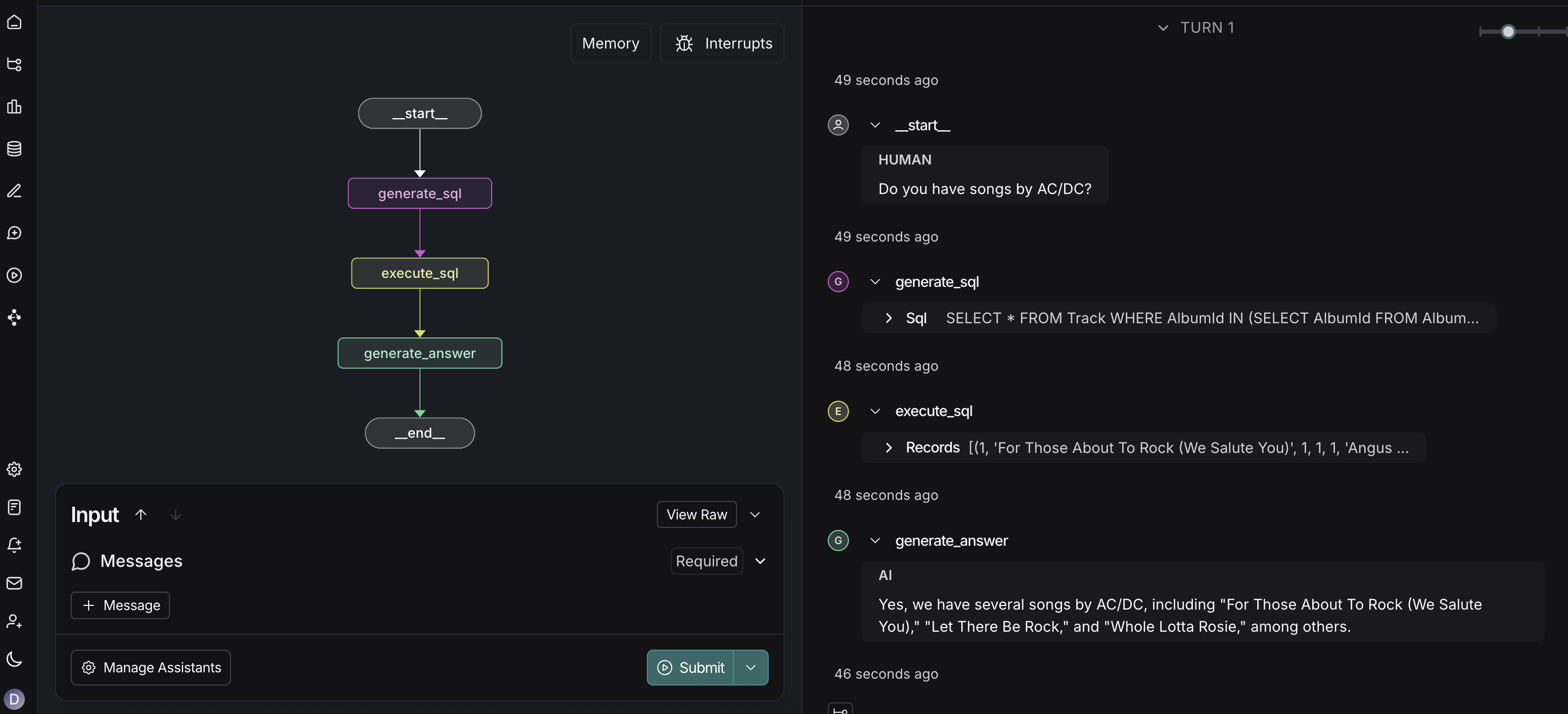 First, test your agent locally using Studio:
- Spin up a local server with Studio.
- Allow you to visualize and interact with your graph.
- Validate that your agent works correctly before deployment.
If your agent runs locally without any errors, it means that deployment to LangSmith will likely succeed. This local testing helps catch configuration issues, dependency problems, and agent logic errors before attempting deployment.
Method 1: LangSmith Deployment UI
Deploy your agent using the LangSmith deployment interface:- Go to your LangSmith dashboard.
- Navigate to the Deployments section.
- Click the + New Deployment button in the top right.
- Select your GitHub repository containing your LangGraph agent from the dropdown menu.
- Cloud LangSmith: Direct GitHub integration with dropdown menu
- Self-Hosted/Hybrid LangSmith: Specify your image URI in the Image Path field (e.g.,
docker.io/username/my-agent:latest)
Benefits:
- Simple UI-based deployment
- Direct integration with your GitHub repository (cloud)
- No manual Docker image management required (cloud)
Method 2: Control Plane API
Deploy using the Control Plane API with different approaches for each deployment type: For Cloud LangSmith:- Use the Control Plane API to create deployments by pointing to your GitHub repository
- No Docker image building required for cloud deployments
- Cloud LangSmith: Use the Control Plane API to create deployments from your GitHub repository
- Self-Hosted/Hybrid LangSmith: Use the Control Plane API to create deployments from your container registry
Connect to Your Deployed Agent
- LangGraph SDK: Use the LangGraph SDK for programmatic integration.
- RemoteGraph: Connect using RemoteGraph for remote graph connections (to use your graph in other graphs).
- REST API: Use HTTP-based interactions with your deployed agent.
- Studio: Access the visual interface for testing and debugging.
Environment configuration
Database & cache configuration
By default, LangSmith Deployments create PostgreSQL and Redis instances for you. To use external services, set the following environment variables in your new deployment or revision:Troubleshooting
Wrong API endpoints
If you’re experiencing connection issues, verify you’re using the correct endpoint format for your LangSmith instance. There are two different APIs with different endpoints:LangSmith API (Traces, Ingestion, etc.)
For LangSmith API operations (traces, evaluations, datasets):| Region | Endpoint |
|---|---|
| US | https://api.smith.langchain.com |
| EU | https://eu.api.smith.langchain.com |
http(s)://<langsmith-url>/api where <langsmith-url> is your self-hosted instance URL.
If you’re setting the endpoint in the
LANGSMITH_ENDPOINT environment variable, you need to add /v1 at the end (e.g., https://api.smith.langchain.com/v1 or http(s)://<langsmith-url>/api/v1 if self-hosted).LangSmith Deployments API (Deployments)
For LangSmith Deployments operations (deployments, revisions):| Region | Endpoint |
|---|---|
| US | https://api.host.langchain.com |
| EU | https://eu.api.host.langchain.com |
http(s)://<langsmith-url>/api-host where <langsmith-url> is your self-hosted instance URL.