

createAgent
在 LangChain 中构建智能体的新标准方式,用更清晰、更强大的 API 取代 LangGraph 的
createReactAgent。标准内容块
新的
contentBlocks 属性,提供跨所有提供商统一访问现代 LLM 功能。简化的包
langchain 包已精简为专注于智能体的基本构建块,旧功能已移至 @langchain/classic。createAgent
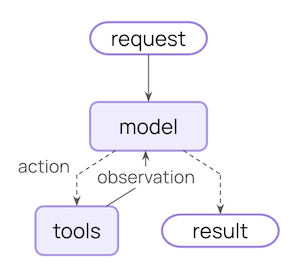
createAgent 是在 LangChain 1.0 中构建智能体的标准方式。它提供了比从 LangGraph 导出的预构建 createReactAgent 更简单的接口,同时通过使用中间件提供更大的自定义潜力。
createAgent 建立在基本智能体循环之上 — 调用模型,让它选择要执行的工具,然后在不再调用工具时完成:
中间件
中间件是createAgent 的定义特性。它使 createAgent 高度可定制,提高了您可以构建的上限。
优秀的智能体需要上下文工程:在正确的时间将正确的信息提供给模型。中间件通过可组合的抽象帮助您控制动态提示、对话总结、选择性工具访问、状态管理和护栏。
预构建中间件
LangChain 为常见模式提供了一些预构建中间件,包括:summarizationMiddleware:当对话历史太长时进行压缩humanInTheLoopMiddleware:为敏感工具调用要求批准piiRedactionMiddleware:在发送给模型之前编辑敏感信息
Custom middleware
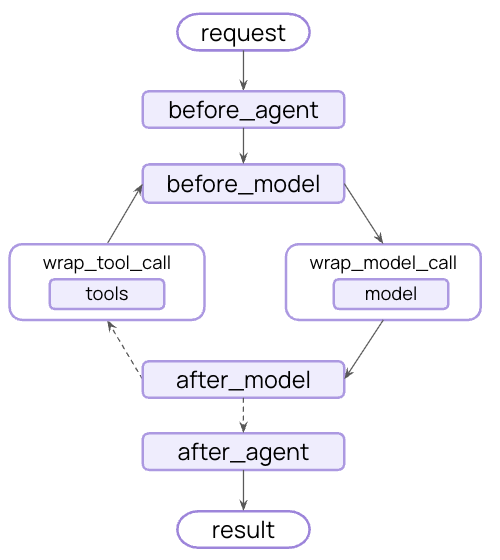
You can also build custom middleware to fit your specific needs. Build custom middleware by implementing any of these hooks using thecreateMiddleware function:
| Hook | When it runs | Use cases |
|---|---|---|
beforeAgent | Before calling the agent | Load memory, validate input |
beforeModel | Before each LLM call | Update prompts, trim messages |
wrapModelCall | Around each LLM call | Intercept and modify requests/responses |
wrapToolCall | Around each tool call | Intercept and modify tool execution |
afterModel | After each LLM response | Validate output, apply guardrails |
afterAgent | After agent completes | Save results, cleanup |
Built on LangGraph
BecausecreateAgent is built on LangGraph, you automatically get built in support for long running and reliable agents via:
Persistence
Conversations automatically persist across sessions with built-in checkpointing
Streaming
Stream tokens, tool calls, and reasoning traces in real-time
Human-in-the-loop
Pause agent execution for human approval before sensitive actions
Time travel
Rewind conversations to any point and explore alternate paths and prompts
Structured output
createAgent has improved structured output generation:
- Main loop integration: Structured output is now generated in the main loop instead of requiring an additional LLM call
- Structured output strategy: Models can choose between calling tools or using provider-side structured output generation
- Cost reduction: Eliminates extra expense from additional LLM calls
handleErrors parameter to ToolStrategy:
- Parsing errors: Model generates data that doesn’t match desired structure
- Multiple tool calls: Model generates 2+ tool calls for structured output schemas
Standard content blocks
1.0 releases are available for most packages. Only the following currently support new content blocks:
langchain@langchain/core@langchain/anthropic@langchain/openai
Benefits
- Provider agnostic: Access reasoning traces, citations, built-in tools (web search, code interpreters, etc.), and other features using the same API regardless of provider
- Type safe: Full type hints for all content block types
- Backward compatible: Standard content can be loaded lazily, so there are no associated breaking changes
Simplified package
LangChain v1 streamlines thelangchain package namespace to focus on essential building blocks for agents. The package exposes only the most useful and relevant functionality:
Most of these are re-exported from @langchain/core for convenience, which gives you a focused API surface for building agents.
@langchain/classic
Legacy functionality has moved to @langchain/classic to keep the core package lean and focused.
What’s in @langchain/classic
- Legacy chains and chain implementations
- Retrievers
- The indexing API
@langchain/communityexports- Other deprecated functionality
@langchain/classic:
Reporting issues
Please report any issues discovered with 1.0 on GitHub using the'v1' label.
Additional resources
LangChain 1.0
Read the announcement
Middleware Guide
Deep dive into middleware
Agents Documentation
Full agent documentation
Message Content
New content blocks API
Migration guide
How to migrate to LangChain v1
GitHub
Report issues or contribute
See also
- Versioning - Understanding version numbers
- Release policy - Detailed release policies