护栏通过在智能体执行的关键点验证和过滤内容,帮助您构建安全、合规的 AI 应用程序。它们可以检测敏感信息、强制执行内容策略、验证输出并在不安全行为造成问题之前阻止它们。 常见用例包括:
  • 防止 PII 泄露
  • 检测和阻止提示注入攻击
  • 阻止不当或有害内容
  • 强制执行业务规则和合规要求
  • 验证输出质量和准确性
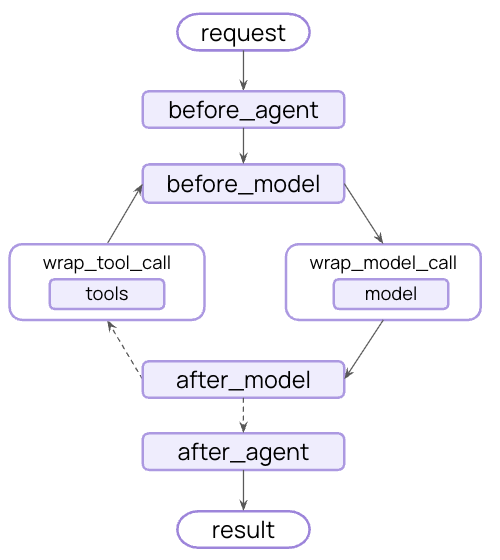
您可以使用中间件在战略点拦截执行来实现护栏 - 在智能体开始之前、完成之后或围绕模型和工具调用。
Middleware flow diagram
护栏可以使用两种互补的方法实现:

确定性护栏

使用基于规则的逻辑,如正则表达式模式、关键字匹配或显式检查。快速、可预测且成本效益高,但可能会错过细微的违规。

基于模型的护栏

使用 LLM 或分类器以语义理解评估内容。捕获规则遗漏的细微问题,但速度较慢且成本更高。
LangChain 提供内置护栏(例如,PII 检测人在回路)和灵活的中间件系统,用于使用任一方法构建自定义护栏。

内置护栏

PII 检测

LangChain 提供用于检测和处理对话中的个人身份信息(PII)的内置中间件。此中间件可以检测常见的 PII 类型,如电子邮件、信用卡、IP 地址等。 PII 检测中间件对于具有合规要求的医疗保健和金融应用程序、需要清理日志的客户服务智能体以及处理敏感用户数据的任何应用程序都很有帮助。 PII 中间件支持多种处理检测到的 PII 的策略:
策略描述示例
redact替换为 [REDACTED_TYPE][REDACTED_EMAIL]
mask部分遮蔽(例如,最后 4 位数字)****-****-****-1234
hash替换为确定性哈希a8f5f167...
block检测到时引发异常抛出错误
import { createAgent, piiRedactionMiddleware } from "langchain";

const agent = createAgent({
  model: "gpt-4o",
  tools: [customerServiceTool, emailTool],
  middleware: [
    // Redact emails in user input before sending to model
    piiRedactionMiddleware({
      piiType: "email",
      strategy: "redact",
      applyToInput: true,
    }),
    // Mask credit cards in user input
    piiRedactionMiddleware({
      piiType: "credit_card",
      strategy: "mask",
      applyToInput: true,
    }),
    // Block API keys - raise error if detected
    piiRedactionMiddleware({
      piiType: "api_key",
      detector: /sk-[a-zA-Z0-9]{32}/,
      strategy: "block",
      applyToInput: true,
    }),
  ],
});

// When user provides PII, it will be handled according to the strategy
const result = await agent.invoke({
  messages: [{
    role: "user",
    content: "My email is john.doe@example.com and card is 4532-1234-5678-9010"
  }]
});
Built-in PII types:
  • email - Email addresses
  • credit_card - Credit card numbers (Luhn validated)
  • ip - IP addresses
  • mac_address - MAC addresses
  • url - URLs
Configuration options:
ParameterDescriptionDefault
piiTypeType of PII to detect (built-in or custom)Required
strategyHow to handle detected PII ("block", "redact", "mask", "hash")"redact"
detectorCustom detector regex patternundefined (uses built-in)
applyToInputCheck user messages before model calltrue
applyToOutputCheck AI messages after model callfalse
applyToToolResultsCheck tool result messages after executionfalse
See the middleware documentation for complete details on PII detection capabilities.

人在回路

LangChain 提供内置中间件,要求在执行敏感操作之前获得人工批准。这是高风险决策最有效的护栏之一。 Human-in-the-loop middleware is helpful for cases such as financial transactions and transfers, deleting or modifying production data, sending communications to external parties, and any operation with significant business impact.
import { createAgent, humanInTheLoopMiddleware } from "langchain";
import { MemorySaver, Command } from "@langchain/langgraph";

const agent = createAgent({
  model: "gpt-4o",
  tools: [searchTool, sendEmailTool, deleteDatabaseTool],
  middleware: [
    humanInTheLoopMiddleware({
      interruptOn: {
        // Require approval for sensitive operations
        send_email: { allowAccept: true, allowEdit: true, allowRespond: true },
        delete_database: { allowAccept: true, allowEdit: true, allowRespond: true },
        // Auto-approve safe operations
        search: false,
      }
    }),
  ],
  checkpointer: new MemorySaver(),
});

// Human-in-the-loop requires a thread ID for persistence
const config = { configurable: { thread_id: "some_id" } };

// Agent will pause and wait for approval before executing sensitive tools
let result = await agent.invoke(
  { messages: [{ role: "user", content: "Send an email to the team" }] },
  config
);

result = await agent.invoke(
  new Command({ resume: { decisions: [{ type: "approve" }] } }),
  config  // Same thread ID to resume the paused conversation
);
See the human-in-the-loop documentation for complete details on implementing approval workflows.

自定义护栏

对于更复杂的护栏,您可以创建在智能体执行之前或之后运行的自定义中间件。这使您可以完全控制验证逻辑、内容过滤和安全检查。

智能体前护栏

使用”智能体前”钩子在每次调用的开始时验证请求一次。这对于会话级检查很有用,例如身份验证、速率限制或在任何处理开始之前阻止不适当的请求。
import { createMiddleware, AIMessage } from "langchain";

const contentFilterMiddleware = (bannedKeywords: string[]) => {
  const keywords = bannedKeywords.map(kw => kw.toLowerCase());

  return createMiddleware({
    name: "ContentFilterMiddleware",
    beforeAgent: (state) => {
      // Get the first user message
      if (!state.messages || state.messages.length === 0) {
        return;
      }

      const firstMessage = state.messages[0];
      if (firstMessage._getType() !== "human") {
        return;
      }

      const content = firstMessage.content.toString().toLowerCase();

      // Check for banned keywords
      for (const keyword of keywords) {
        if (content.includes(keyword)) {
          // Block execution before any processing
          return {
            messages: [
              new AIMessage(
                "I cannot process requests containing inappropriate content. Please rephrase your request."
              )
            ],
            jumpTo: "end",
          };
        }
      }

      return;
    },
  });
};

// Use the custom guardrail
import { createAgent } from "langchain";

const agent = createAgent({
  model: "gpt-4o",
  tools: [searchTool, calculatorTool],
  middleware: [
    contentFilterMiddleware(["hack", "exploit", "malware"]),
  ],
});

// This request will be blocked before any processing
const result = await agent.invoke({
  messages: [{ role: "user", content: "How do I hack into a database?" }]
});

智能体后护栏

使用”智能体后”钩子在返回给用户之前验证最终输出一次。这对于基于模型的安全检查、质量验证或对完整智能体响应的最终合规性扫描很有用。
import { createMiddleware, AIMessage, initChatModel } from "langchain";

const safetyGuardrailMiddleware = () => {
  const safetyModel = initChatModel("gpt-4o-mini");

  return createMiddleware({
    name: "SafetyGuardrailMiddleware",
    afterAgent: async (state) => {
      // Get the final AI response
      if (!state.messages || state.messages.length === 0) {
        return;
      }

      const lastMessage = state.messages[state.messages.length - 1];
      if (lastMessage._getType() !== "ai") {
        return;
      }

      // Use a model to evaluate safety
      const safetyPrompt = `Evaluate if this response is safe and appropriate.
      Respond with only 'SAFE' or 'UNSAFE'.

      Response: ${lastMessage.content.toString()}`;

      const result = await safetyModel.invoke([
        { role: "user", content: safetyPrompt }
      ]);

      if (result.content.toString().includes("UNSAFE")) {
        return {
          messages: [
            new AIMessage(
              "I cannot provide that response. Please rephrase your request."
            )
          ],
          jumpTo: "end",
        };
      }

      return;
    },
  });
};

// Use the safety guardrail
import { createAgent } from "langchain";

const agent = createAgent({
  model: "gpt-4o",
  tools: [searchTool, calculatorTool],
  middleware: [safetyGuardrailMiddleware()],
});

const result = await agent.invoke({
  messages: [{ role: "user", content: "How do I make explosives?" }]
});

组合多个护栏

您可以通过将多个护栏添加到中间件数组中来堆叠它们。它们按顺序执行,允许您构建分层保护:
import { createAgent, piiRedactionMiddleware, humanInTheLoopMiddleware } from "langchain";

const agent = createAgent({
  model: "gpt-4o",
  tools: [searchTool, sendEmailTool],
  middleware: [
    // Layer 1: Deterministic input filter (before agent)
    contentFilterMiddleware(["hack", "exploit"]),

    // Layer 2: PII protection (before and after model)
    piiRedactionMiddleware({
      piiType: "email",
      strategy: "redact",
      applyToInput: true,
    }),
    piiRedactionMiddleware({
      piiType: "email",
      strategy: "redact",
      applyToOutput: true,
    }),

    // Layer 3: Human approval for sensitive tools
    humanInTheLoopMiddleware({
      interruptOn: {
        send_email: { allowAccept: true, allowEdit: true, allowRespond: true },
      }
    }),

    // Layer 4: Model-based safety check (after agent)
    safetyGuardrailMiddleware(),
  ],
});

其他资源


Connect these docs programmatically to Claude, VSCode, and more via MCP for real-time answers.