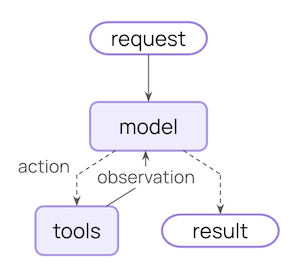
中间件提供了一种更紧密控制智能体内部发生的事情的方法。 核心智能体循环涉及调用模型,让它选择要执行的工具,然后在不再调用工具时完成:
Core agent loop diagram
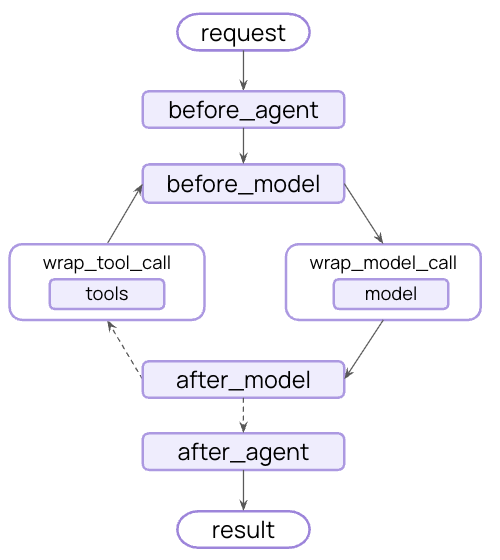
中间件在这些步骤的前后公开钩子:
中间件流程图

中间件可以做什么?

监控

通过日志记录、分析和调试跟踪智能体行为

修改

转换提示、工具选择和输出格式

控制

添加重试、回退和提前终止逻辑

强制执行

应用速率限制、护栏和 PII 检测
通过将中间件传递给 @[create_agent] 来添加中间件:
import {
  createAgent,
  summarizationMiddleware,
  humanInTheLoopMiddleware,
} from "langchain";

const agent = createAgent({
  model: "gpt-4o",
  tools: [...],
  middleware: [summarizationMiddleware, humanInTheLoopMiddleware],
});

内置中间件

LangChain 为常见用例提供预构建的中间件:

摘要

在接近令牌限制时自动总结对话历史。
完美适用于:
  • 超出上下文窗口的长时间运行的对话
  • 具有广泛历史记录的多轮对话
  • 保留完整对话上下文很重要的应用程序
import { createAgent, summarizationMiddleware } from "langchain";

const agent = createAgent({
  model: "gpt-4o",
  tools: [weatherTool, calculatorTool],
  middleware: [
    summarizationMiddleware({
      model: "gpt-4o-mini",
      maxTokensBeforeSummary: 4000, // Trigger summarization at 4000 tokens
      messagesToKeep: 20, // Keep last 20 messages after summary
      summaryPrompt: "Custom prompt for summarization...", // Optional
    }),
  ],
});
model
string
required
Model for generating summaries
maxTokensBeforeSummary
number
Token threshold for triggering summarization
messagesToKeep
number
default:"20"
Recent messages to preserve
tokenCounter
function
Custom token counting function. Defaults to character-based counting.
summaryPrompt
string
Custom prompt template. Uses built-in template if not specified.
summaryPrefix
string
default:"## Previous conversation summary:"
Prefix for summary messages

人在回路

在执行之前暂停智能体执行,以便人工批准、编辑或拒绝工具调用。
完美适用于:
  • 需要人工批准的高风险操作(数据库写入、金融交易)
  • 必须有人工监督的合规工作流程
  • 使用人工反馈来指导智能体的长时间运行对话
import { createAgent, humanInTheLoopMiddleware } from "langchain";

const agent = createAgent({
  model: "gpt-4o",
  tools: [readEmailTool, sendEmailTool],
  middleware: [
    humanInTheLoopMiddleware({
      interruptOn: {
        // Require approval, editing, or rejection for sending emails
        send_email: {
          allowAccept: true,
          allowEdit: true,
          allowRespond: true,
        },
        // Auto-approve reading emails
        read_email: false,
      }
    })
  ]
});
interruptOn
object
required
Mapping of tool names to approval configs
Tool approval config options:
allowAccept
boolean
default:"false"
Whether approval is allowed
allowEdit
boolean
default:"false"
Whether editing is allowed
allowRespond
boolean
default:"false"
Whether responding/rejection is allowed
重要: 人在回路中间件需要检查点器来在中断之间维护状态。有关完整示例和集成模式,请参阅人在回路文档

Anthropic 提示缓存

通过缓存 Anthropic 模型的重复提示前缀来降低成本。
完美适用于:
  • 具有长且重复的系统提示的应用程序
  • 在调用之间重用相同上下文的智能体
  • 减少高流量部署的 API 成本
了解有关 Anthropic 提示缓存策略和限制的更多信息。
import { createAgent, HumanMessage, anthropicPromptCachingMiddleware } from "langchain";

const LONG_PROMPT = `
Please be a helpful assistant.

<Lots more context ...>
`;

const agent = createAgent({
  model: "claude-sonnet-4-5-20250929",
  prompt: LONG_PROMPT,
  middleware: [anthropicPromptCachingMiddleware({ ttl: "5m" })],
});

// cache store
await agent.invoke({
  messages: [new HumanMessage("Hi, my name is Bob")]
});

// cache hit, system prompt is cached
const result = await agent.invoke({
  messages: [new HumanMessage("What's my name?")]
});
ttl
string
default:"5m"
Time to live for cached content. Valid values: "5m" or "1h"

模型调用限制

限制模型调用次数以防止无限循环或过度成本。
完美适用于:
  • 防止失控的智能体进行过多的 API 调用
  • 在生产部署上强制执行成本控制
  • 在特定调用预算内测试智能体行为
import { createAgent, modelCallLimitMiddleware } from "langchain";

const agent = createAgent({
  model: "gpt-4o",
  tools: [...],
  middleware: [
    modelCallLimitMiddleware({
      threadLimit: 10, // Max 10 calls per thread (across runs)
      runLimit: 5, // Max 5 calls per run (single invocation)
      exitBehavior: "end", // Or "error" to throw exception
    }),
  ],
});
threadLimit
number
Maximum model calls across all runs in a thread. Defaults to no limit.
runLimit
number
Maximum model calls per single invocation. Defaults to no limit.
exitBehavior
string
default:"end"
Behavior when limit is reached. Options: "end" (graceful termination) or "error" (throw exception)

工具调用限制

通过限制工具调用次数来控制智能体执行,可以全局限制所有工具或针对特定工具。
完美适用于:
  • 防止对昂贵的外部 API 进行过多调用
  • 限制网络搜索或数据库查询
  • 对特定工具使用强制执行速率限制
  • 防止失控的智能体循环
要全局限制所有工具或针对特定工具限制工具调用,请设置 toolName。对于每个限制,指定以下一项或两项:
  • 线程限制 (threadLimit) - 对话中所有运行的最大调用次数。在调用之间持续存在。需要检查点器。
  • 运行限制 (runLimit) - 每次调用的最大调用次数。每轮重置。
Exit behaviors:
BehaviorEffectBest For
"continue" (default)Blocks exceeded calls with error messages, agent continuesMost use cases - agent handles limits gracefully
"error"Raises exception immediatelyComplex workflows where you want to handle the limit error manually
"end"Stops with ToolMessage + AI messageSingle-tool scenarios (errors if other tools pending)
import { createAgent, toolCallLimitMiddleware } from "langchain";

// Global limit: max 20 calls per thread, 10 per run
const globalLimiter = toolCallLimitMiddleware({
  threadLimit: 20,
  runLimit: 10,
});

// Tool-specific limit with default "continue" behavior
const searchLimiter = toolCallLimitMiddleware({
  toolName: "search",
  threadLimit: 5,
  runLimit: 3,
});

// Thread limit only (no per-run limit)
const databaseLimiter = toolCallLimitMiddleware({
  toolName: "query_database",
  threadLimit: 10,
});

// Strict enforcement with "error" behavior
const webScraperLimiter = toolCallLimitMiddleware({
  toolName: "scrape_webpage",
  runLimit: 2,
  exitBehavior: "error",
});

// Immediate termination with "end" behavior
const criticalToolLimiter = toolCallLimitMiddleware({
  toolName: "delete_records",
  runLimit: 1,
  exitBehavior: "end",
});

// Use multiple limiters together
const agent = createAgent({
  model: "gpt-4o",
  tools: [searchTool, databaseTool, scraperTool],
  middleware: [globalLimiter, searchLimiter, databaseLimiter, webScraperLimiter],
});
toolName
string
Name of specific tool to limit. If not provided, limits apply to all tools globally.
threadLimit
number
Maximum tool calls across all runs in a thread (conversation). Persists across multiple invocations with the same thread ID. Requires a checkpointer to maintain state. undefined means no thread limit.
runLimit
number
Maximum tool calls per single invocation (one user message → response cycle). Resets with each new user message. undefined means no run limit.Note: At least one of threadLimit or runLimit must be specified.
exitBehavior
string
default:"continue"
Behavior when limit is reached:
  • "continue" (default) - Block exceeded tool calls with error messages, let other tools and the model continue. The model decides when to end based on the error messages.
  • "error" - Throw a ToolCallLimitExceededError exception, stopping execution immediately
  • "end" - Stop execution immediately with a ToolMessage and AI message for the exceeded tool call. Only works when limiting a single tool; throws error if other tools have pending calls.

模型回退

当主模型失败时自动回退到替代模型。
完美适用于:
  • 构建能够处理模型中断的弹性智能体
  • 通过回退到更便宜的模型来优化成本
  • 跨 OpenAI、Anthropic 等的提供商冗余
import { createAgent, modelFallbackMiddleware } from "langchain";

const agent = createAgent({
  model: "gpt-4o", // Primary model
  tools: [...],
  middleware: [
    modelFallbackMiddleware(
      "gpt-4o-mini", // Try first on error
      "claude-3-5-sonnet-20241022" // Then this
    ),
  ],
});
中间件接受可变数量的字符串参数,按顺序表示回退模型:
...models
string[]
required
当主模型失败时按顺序尝试的一个或多个回退模型字符串
modelFallbackMiddleware(
  "first-fallback-model",
  "second-fallback-model",
  // ... more models
)

PII 检测

检测和处理对话中的个人身份信息。
完美适用于:
  • 具有合规要求的医疗保健和金融应用程序
  • 需要清理日志的客户服务智能体
  • 处理敏感用户数据的任何应用程序
import { createAgent, piiRedactionMiddleware } from "langchain";

const agent = createAgent({
  model: "gpt-4o",
  tools: [...],
  middleware: [
    // Redact emails in user input
    piiRedactionMiddleware({
      piiType: "email",
      strategy: "redact",
      applyToInput: true,
    }),
    // Mask credit cards (show last 4 digits)
    piiRedactionMiddleware({
      piiType: "credit_card",
      strategy: "mask",
      applyToInput: true,
    }),
    // Custom PII type with regex
    piiRedactionMiddleware({
      piiType: "api_key",
      detector: /sk-[a-zA-Z0-9]{32}/,
      strategy: "block", // Throw error if detected
    }),
  ],
});
piiType
string
required
Type of PII to detect. Can be a built-in type (email, credit_card, ip, mac_address, url) or a custom type name.
strategy
string
default:"redact"
How to handle detected PII. Options:
  • "block" - Throw error when detected
  • "redact" - Replace with [REDACTED_TYPE]
  • "mask" - Partially mask (e.g., ****-****-****-1234)
  • "hash" - Replace with deterministic hash
detector
RegExp
Custom detector regex pattern. If not provided, uses built-in detector for the PII type.
applyToInput
boolean
default:"true"
Check user messages before model call
applyToOutput
boolean
default:"false"
Check AI messages after model call
applyToToolResults
boolean
default:"false"
Check tool result messages after execution

规划

为复杂的多步骤任务添加待办事项列表管理功能。
此中间件自动为智能体提供 write_todos 工具和系统提示,以指导有效的任务规划。
import { createAgent, HumanMessage, todoListMiddleware } from "langchain";

const agent = createAgent({
  model: "gpt-4o",
  tools: [
    /* ... */
  ],
  middleware: [todoListMiddleware()] as const,
});

const result = await agent.invoke({
  messages: [new HumanMessage("Help me refactor my codebase")],
});
console.log(result.todos); // Array of todo items with status tracking
没有可用的配置选项(使用默认值)。

LLM 工具选择器

在调用主模型之前使用 LLM 智能选择相关工具。
完美适用于:
  • 具有许多工具(10+)的智能体,其中大多数工具与每个查询无关
  • 通过过滤不相关的工具来减少 token 使用
  • 提高模型的专注度和准确性
import { createAgent, llmToolSelectorMiddleware } from "langchain";

const agent = createAgent({
  model: "gpt-4o",
  tools: [tool1, tool2, tool3, tool4, tool5, ...], // Many tools
  middleware: [
    llmToolSelectorMiddleware({
      model: "gpt-4o-mini", // Use cheaper model for selection
      maxTools: 3, // Limit to 3 most relevant tools
      alwaysInclude: ["search"], // Always include certain tools
    }),
  ],
});
model
string
Model for tool selection. Defaults to the agent’s main model.
maxTools
number
Maximum number of tools to select. Defaults to no limit.
alwaysInclude
string[]
Array of tool names to always include in the selection

上下文编辑

通过修剪、总结或清除工具使用来管理对话上下文。
完美适用于:
  • 需要定期清理上下文的长对话
  • 从上下文中删除失败的工具尝试
  • 自定义上下文管理策略
import { createAgent, contextEditingMiddleware, ClearToolUsesEdit } from "langchain";

const agent = createAgent({
  model: "gpt-4o",
  tools: [...],
  middleware: [
    contextEditingMiddleware({
      edits: [
        new ClearToolUsesEdit({ maxTokens: 1000 }), // Clear old tool uses
      ],
    }),
  ],
});
edits
ContextEdit[]
default:"[new ClearToolUsesEdit()]"
Array of ContextEdit strategies to apply
@[ClearToolUsesEdit] options:
maxTokens
number
default:"1000"
Token count that triggers the edit

Custom middleware

Build custom middleware by implementing hooks that run at specific points in the agent execution flow.

Class-based middleware

Two hook styles

Node-style hooks

Run sequentially at specific execution points. Use for logging, validation, and state updates.

Wrap-style hooks

Intercept execution with full control over handler calls. Use for retries, caching, and transformation.

Node-style hooks

Run at specific points in the execution flow:
  • beforeAgent - Before agent starts (once per invocation)
  • beforeModel - Before each model call
  • afterModel - After each model response
  • afterAgent - After agent completes (up to once per invocation)
Example: Logging middleware
import { createMiddleware } from "langchain";

const loggingMiddleware = createMiddleware({
  name: "LoggingMiddleware",
  beforeModel: (state) => {
    console.log(`About to call model with ${state.messages.length} messages`);
    return;
  },
  afterModel: (state) => {
    const lastMessage = state.messages[state.messages.length - 1];
    console.log(`Model returned: ${lastMessage.content}`);
    return;
  },
});
Example: Conversation length limit
import { createMiddleware, AIMessage } from "langchain";

const createMessageLimitMiddleware = (maxMessages: number = 50) => {
  return createMiddleware({
    name: "MessageLimitMiddleware",
    beforeModel: (state) => {
      if (state.messages.length === maxMessages) {
        return {
          messages: [new AIMessage("Conversation limit reached.")],
          jumpTo: "end",
        };
      }
      return;
    },
  });
};

Wrap-style hooks

Intercept execution and control when the handler is called:
  • wrapModelCall - Around each model call
  • wrapToolCall - Around each tool call
You decide if the handler is called zero times (short-circuit), once (normal flow), or multiple times (retry logic). Example: Model retry middleware
import { createMiddleware } from "langchain";

const createRetryMiddleware = (maxRetries: number = 3) => {
  return createMiddleware({
    name: "RetryMiddleware",
    wrapModelCall: (request, handler) => {
      for (let attempt = 0; attempt < maxRetries; attempt++) {
        try {
          return handler(request);
        } catch (e) {
          if (attempt === maxRetries - 1) {
            throw e;
          }
          console.log(`Retry ${attempt + 1}/${maxRetries} after error: ${e}`);
        }
      }
      throw new Error("Unreachable");
    },
  });
};
Example: Dynamic model selection
import { createMiddleware, initChatModel } from "langchain";

const dynamicModelMiddleware = createMiddleware({
  name: "DynamicModelMiddleware",
  wrapModelCall: (request, handler) => {
    // Use different model based on conversation length
    const modifiedRequest = { ...request };
    if (request.messages.length > 10) {
      modifiedRequest.model = initChatModel("gpt-4o");
    } else {
      modifiedRequest.model = initChatModel("gpt-4o-mini");
    }
    return handler(modifiedRequest);
  },
});
Example: Tool call monitoring
import { createMiddleware } from "langchain";

const toolMonitoringMiddleware = createMiddleware({
  name: "ToolMonitoringMiddleware",
  wrapToolCall: (request, handler) => {
    console.log(`Executing tool: ${request.toolCall.name}`);
    console.log(`Arguments: ${JSON.stringify(request.toolCall.args)}`);

    try {
      const result = handler(request);
      console.log("Tool completed successfully");
      return result;
    } catch (e) {
      console.log(`Tool failed: ${e}`);
      throw e;
    }
  },
});

Custom state schema

Middleware can extend the agent’s state with custom properties. Define a custom state type and set it as the state_schema:
import { createMiddleware, createAgent, HumanMessage } from "langchain";
import * as z from "zod";

// Middleware with custom state requirements
const callCounterMiddleware = createMiddleware({
  name: "CallCounterMiddleware",
  stateSchema: z.object({
    modelCallCount: z.number().default(0),
    userId: z.string().optional(),
  }),
  beforeModel: (state) => {
    // Access custom state properties
    if (state.modelCallCount > 10) {
      return { jumpTo: "end" };
    }
    return;
  },
  afterModel: (state) => {
    // Update custom state
    return { modelCallCount: state.modelCallCount + 1 };
  },
});
const agent = createAgent({
  model: "gpt-4o",
  tools: [...],
  middleware: [callCounterMiddleware] as const,
});

// TypeScript enforces required state properties
const result = await agent.invoke({
  messages: [new HumanMessage("Hello")],
  modelCallCount: 0, // Optional due to default value
  userId: "user-123", // Optional
});

Context extension

Context properties are configuration values passed through the runnable config. Unlike state, context is read-only and typically used for configuration that doesn’t change during execution. Middleware can define context requirements that must be satisfied through the agent’s configuration:
import * as z from "zod";
import { createMiddleware, HumanMessage } from "langchain";

const rateLimitMiddleware = createMiddleware({
  name: "RateLimitMiddleware",
  contextSchema: z.object({
    maxRequestsPerMinute: z.number(),
    apiKey: z.string(),
  }),
  beforeModel: async (state, runtime) => {
    // Access context through runtime
    const { maxRequestsPerMinute, apiKey } = runtime.context;

    // Implement rate limiting logic
    const allowed = await checkRateLimit(apiKey, maxRequestsPerMinute);
    if (!allowed) {
      return { jumpTo: "END" };
    }

    return state;
  },
});

// Context is provided through config
await agent.invoke(
  { messages: [new HumanMessage("Process data")] },
  {
    context: {
      maxRequestsPerMinute: 60,
      apiKey: "api-key-123",
    },
  }
);

Execution order

When using multiple middleware, understanding execution order is important:
const agent = createAgent({
  model: "gpt-4o",
  middleware: [middleware1, middleware2, middleware3],
  tools: [...],
});
Before hooks run in order:
  1. middleware1.before_agent()
  2. middleware2.before_agent()
  3. middleware3.before_agent()
Agent loop starts
  1. middleware1.before_model()
  2. middleware2.before_model()
  3. middleware3.before_model()
Wrap hooks nest like function calls:
  1. middleware1.wrap_model_call()middleware2.wrap_model_call()middleware3.wrap_model_call() → model
After hooks run in reverse order:
  1. middleware3.after_model()
  2. middleware2.after_model()
  3. middleware1.after_model()
Agent loop ends
  1. middleware3.after_agent()
  2. middleware2.after_agent()
  3. middleware1.after_agent()
Key rules:
  • before_* hooks: First to last
  • after_* hooks: Last to first (reverse)
  • wrap_* hooks: Nested (first middleware wraps all others)

Agent jumps

To exit early from middleware, return a dictionary with jump_to:
import { createMiddleware, AIMessage } from "langchain";

const earlyExitMiddleware = createMiddleware({
  name: "EarlyExitMiddleware",
  beforeModel: (state) => {
    // Check some condition
    if (shouldExit(state)) {
      return {
        messages: [new AIMessage("Exiting early due to condition.")],
        jumpTo: "end",
      };
    }
    return;
  },
});
Available jump targets:
  • "end": Jump to the end of the agent execution
  • "tools": Jump to the tools node
  • "model": Jump to the model node (or the first before_model hook)
Important: When jumping from before_model or after_model, jumping to "model" will cause all before_model middleware to run again. To enable jumping, decorate your hook with @hook_config(can_jump_to=[...]):
import { createMiddleware } from "langchain";

const conditionalMiddleware = createMiddleware({
  name: "ConditionalMiddleware",
  afterModel: (state) => {
    if (someCondition(state)) {
      return { jumpTo: "end" };
    }
    return;
  },
});

Best practices

  1. Keep middleware focused - each should do one thing well
  2. Handle errors gracefully - don’t let middleware errors crash the agent
  3. Use appropriate hook types:
    • Node-style for sequential logic (logging, validation)
    • Wrap-style for control flow (retry, fallback, caching)
  4. Clearly document any custom state properties
  5. Unit test middleware independently before integrating
  6. Consider execution order - place critical middleware first in the list
  7. Use built-in middleware when possible, don’t reinvent the wheel :)

Examples

Dynamically selecting tools

Select relevant tools at runtime to improve performance and accuracy.
Benefits:
  • Shorter prompts - Reduce complexity by exposing only relevant tools
  • Better accuracy - Models choose correctly from fewer options
  • Permission control - Dynamically filter tools based on user access
import { createAgent, createMiddleware } from "langchain";

const toolSelectorMiddleware = createMiddleware({
  name: "ToolSelector",
  wrapModelCall: (request, handler) => {
    // Select a small, relevant subset of tools based on state/context
    const relevantTools = selectRelevantTools(request.state, request.runtime);
    const modifiedRequest = { ...request, tools: relevantTools };
    return handler(modifiedRequest);
  },
});

const agent = createAgent({
  model: "gpt-4o",
  tools: allTools, // All available tools need to be registered upfront
  // Middleware can be used to select a smaller subset that's relevant for the given run.
  middleware: [toolSelectorMiddleware],
});

Additional resources


Connect these docs programmatically to Claude, VSCode, and more via MCP for real-time answers.